ExpressVPN
    • ノーログポリシー
    • Servers in 113 Countries
    • Use on Multiple Devices
    • High-Speed VPN
    • Access Online Services Securely
    • ゲームに最適なVPN
    • 全ての機能を見る
    • ExpressVPNについて
    Sign Up For Expressvpn

    One subscription gives you access to a fast-growing suite of privacy and security tools that work seamlessly together to improve your digital life.

    View all products
    • Lightway VPNプロトコル
    • Internet Kill Switch
    • スプリットトンネル
    • Private, Encrypted DNS
    • Avoid ISP Throttling
    • Threat Manager
    • 広告ブロッカー
    • ペアレンタルコントロール
    • 固定IP
  • VPNのダウンロード
    • Windows new
    • MacOS new
    • Linux new
    • iPhone / iPad
    • Android
    • Apple TV
    • Fire Stick
    • Android TV
    • ルーター版VPN
    • Aircoveルーター
    • Chrome
    • Firefox
    • Edge
  • Pricing
    • VPNとは?
    • VPN for Beginners
    • How To Use a VPN
    • VPN Encryption Explained
    • ブログ
    • Glossary
    • IP Address Checker
    • DNS漏洩テスト
    • WebRTC漏洩テスト
    • パスワード生成
    • サポートセンター
    • よくある質問 (FAQ)
    • ライブチャット
    • VPN設定方法
    • Redemption Code
  • Icon10VPN for Teams
  • プロダクト
    Icon11

    ExpressVPN for Teams Get fast, secure VPN protection for growing teams. Easy to deploy, simple to manage, built to scale.

    Img2
    • ExpressVPN

      ExpressVPN Industry-leading, ultra-fast VPN with secure servers in 113 countries.

    • ExpressMailGuard

      ExpressMailGuard Private email relay service to protect your inbox and identity.

    • ExpressKeys

      ExpressKeys Secure password management, multi-factor authentication, and more.

    • ExpressAI

      ExpressAI The first consumer AI powered by confidential computing for privacy-led intelligence.

    • Identity Defender

      Identity Defender Powerful suite of ID protection, monitoring, and data removal tools

    Other products from the family behind ExpressVPN

    • holiday.com eSIM

      holiday.com eSIM Unlimited data with a single eSIM across 150+ destinations.

    • Intego

      Intego Award-winning macOS antivirus, firewall, system tools, and more.

  • マイアカウント
プランを見る
ExpressVPN
    • ノーログポリシー
    • Servers in 113 Countries
    • Use on Multiple Devices
    • High-Speed VPN
    • Access Online Services Securely
    • ゲームに最適なVPN
    • 全ての機能を見る
    • ExpressVPNについて
    Sign Up For Expressvpn

    One subscription gives you access to a fast-growing suite of privacy and security tools that work seamlessly together to improve your digital life.

    View all products
    • Lightway VPNプロトコル
    • Internet Kill Switch
    • スプリットトンネル
    • Private, Encrypted DNS
    • Avoid ISP Throttling
    • Threat Manager
    • 広告ブロッカー
    • ペアレンタルコントロール
    • 固定IP
  • VPNのダウンロード
    • Windows new
    • MacOS new
    • Linux new
    • iPhone / iPad
    • Android
    • Apple TV
    • Fire Stick
    • Android TV
    • ルーター版VPN
    • Aircoveルーター
    • Chrome
    • Firefox
    • Edge
  • Pricing
    • VPNとは?
    • VPN for Beginners
    • How To Use a VPN
    • VPN Encryption Explained
    • ブログ
    • Glossary
    • IP Address Checker
    • DNS漏洩テスト
    • WebRTC漏洩テスト
    • パスワード生成
    • サポートセンター
    • よくある質問 (FAQ)
    • ライブチャット
    • VPN設定方法
    • Redemption Code
  • VPN for Teams
  • プロダクト
    • ExpressVPN

      ExpressVPN Industry-leading, ultra-fast VPN with secure servers in 113 countries.

    • ExpressMailGuard

      ExpressMailGuard Private email relay service to protect your inbox and identity.

    • ExpressKeys

      ExpressKeys Secure password management, multi-factor authentication, and more.

    • ExpressAI

      ExpressAI The first consumer AI powered by confidential computing for privacy-led intelligence.

    • Identity Defender

      Identity Defender Powerful suite of ID protection, monitoring, and data removal tools

    Other products from the family behind ExpressVPN

    • holiday.com eSIM

      holiday.com eSIM Unlimited data with a single eSIM across 150+ destinations.

    • Intego

      Intego Award-winning macOS antivirus, firewall, system tools, and more.

    Icon11

    ExpressVPN for Teams Get fast, secure VPN protection for growing teams. Easy to deploy, simple to manage, built to scale.

    Img2
  • マイアカウント
プランを見る
Home Home » ExpressVPNが動作中のルーターでデバイスグループを管理する方法

ナレッジハブ

ExpressVPNが動作中のルーターでデバイスグループを管理する方法

最終更新: 2026/09/23

Share in FacebookShare in TwitterShare in WhatsappShare in TelegramShare by email

このガイドでは、Aircove、Aircove Go、およびルーター向けExpressVPNアプリv3.2.0以降を実行している対応ルーターで、デバイスグループを使用・管理する方法を説明します。

デバイスグループを使用すると、デバイスをグループ分けし、それぞれを異なるVPNロケーションに接続できます。

注: Aircoveルーターは現在販売を終了しており、新たに購入することはできません。Aircoveには、公開済みのスケジュールに基づいて引き続きセキュリティアップデートが提供され、既存ユーザーへのカスタマーサポートも継続されます。Aircoveのサポート、セキュリティ、アップデート、およびExpressVPNとGL.iNetが提供する最新の家庭用ルーターについて詳しくは、Aircove FAQをご覧ください。

目次

デバイスグループを使用するタイミング
新しいデバイスグループの追加
デフォルトグループの変更
デバイスグループにデバイスを追加(またはデバイスから削除)
デバイスグループ名の変更
デバイス名とIPアドレスの変更
デバイスグループの削除


デバイスグループを使用するタイミング

デバイスグループ機能を使うと、デバイスを異なるグループに分け、各グループをそれぞれ独自のVPNロケーションに接続させることができます。また、最大で5つのグループを作成できるため、複数のユーザーまたはデバイスが、互いの活動を損なうことなく、異なる目的でVPNを使用できます。以下は、デバイスグループ機能を使用するタイミング例です。

  • 自宅のノートパソコンで、他のデバイスの通信速度を低下させることなく、海外の番組をストリーミングしたい
  • 家族は国内の検索結果を見たがるけれど、自分はゲームする際に別の国のVPNロケーションを使いたい
  • パートナーは海外の銀行口座にアクセスしたいが、自分はスマートロケーションにタブレットを接続して、より高速な通信を可能にしたい

注意:デバイスグループはすべて、同じVPNプロトコルを使用します。プロトコルを変更する場合は、こちらのガイドを参照してください。

サポートが必要ですか? すぐにサポートを受けるには、ExpressVPNサポートチームまでお問い合わせください。

トップへ戻る


新しいデバイスグループの追加

デフォルトでは、デバイスグループは1つしかありません。新しいデバイスグループを追加する方法を紹介します。

  1. ExpressVPNが動作中のルーターにサインイン
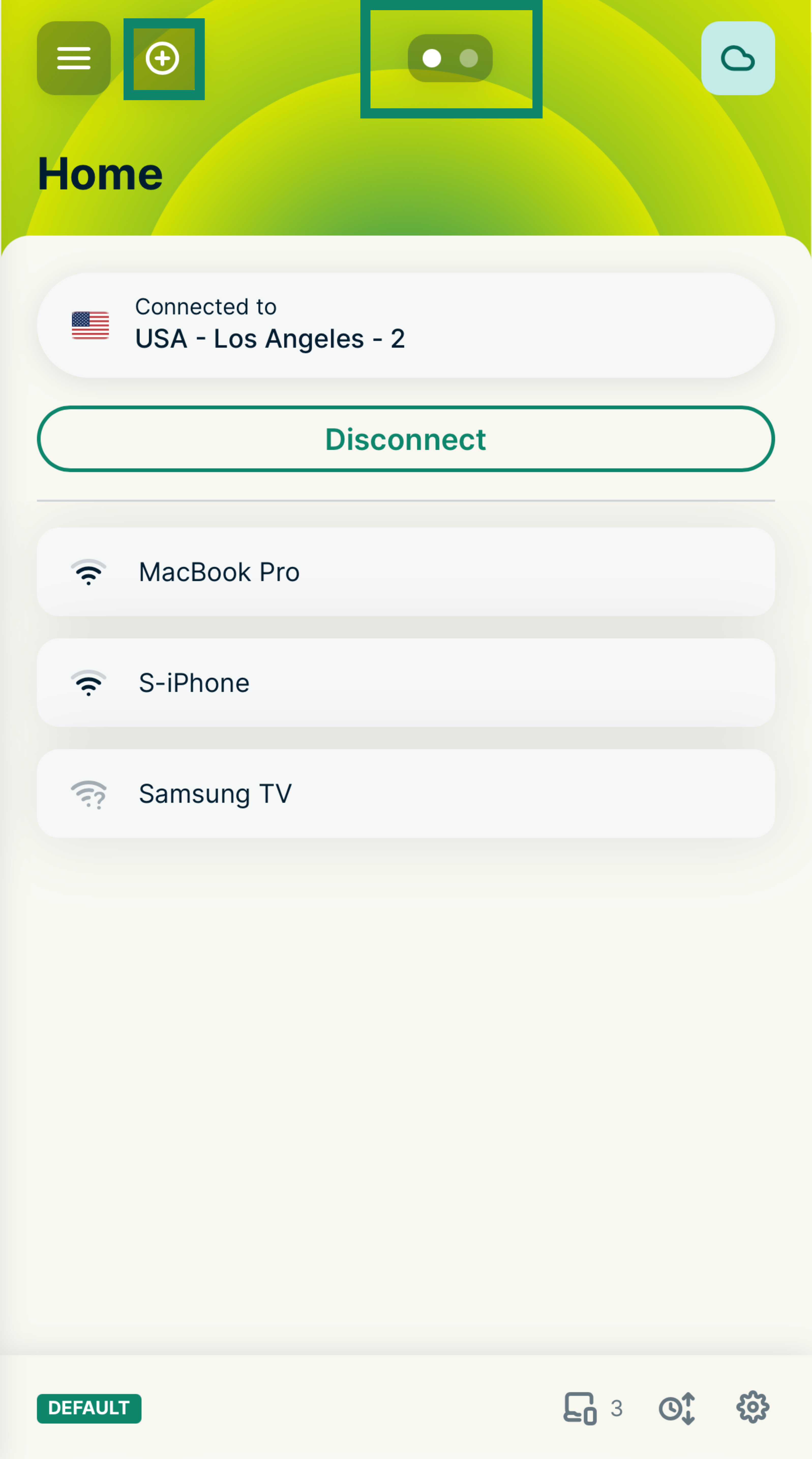
  2. ダッシュボード上部のAdd icon.プラスアイコンを選択するか、スワイプしてCreate a new group(新しいグループを作成)画面に移動します。
    The ExpressVPN router dashboard showing the Home group, with green boxes highlighting the plus icon for adding a group and the group navigation dots at the top of the screen.
  3. ADD GROUP(グループを追加)を選択するか、SUGGESTED GROUPS(おすすめのグループ)からいずれか(Streaming(ストリーミング)、Privacy(プライバシー)、Child Safe(チャイルドセーフ)など)を選択します。
    The Create a new group screen on the ExpressVPN router dashboard, with a green box highlighting the Add Group button.
  4. カスタムグループを作成する場合は、グループ名を入力します。
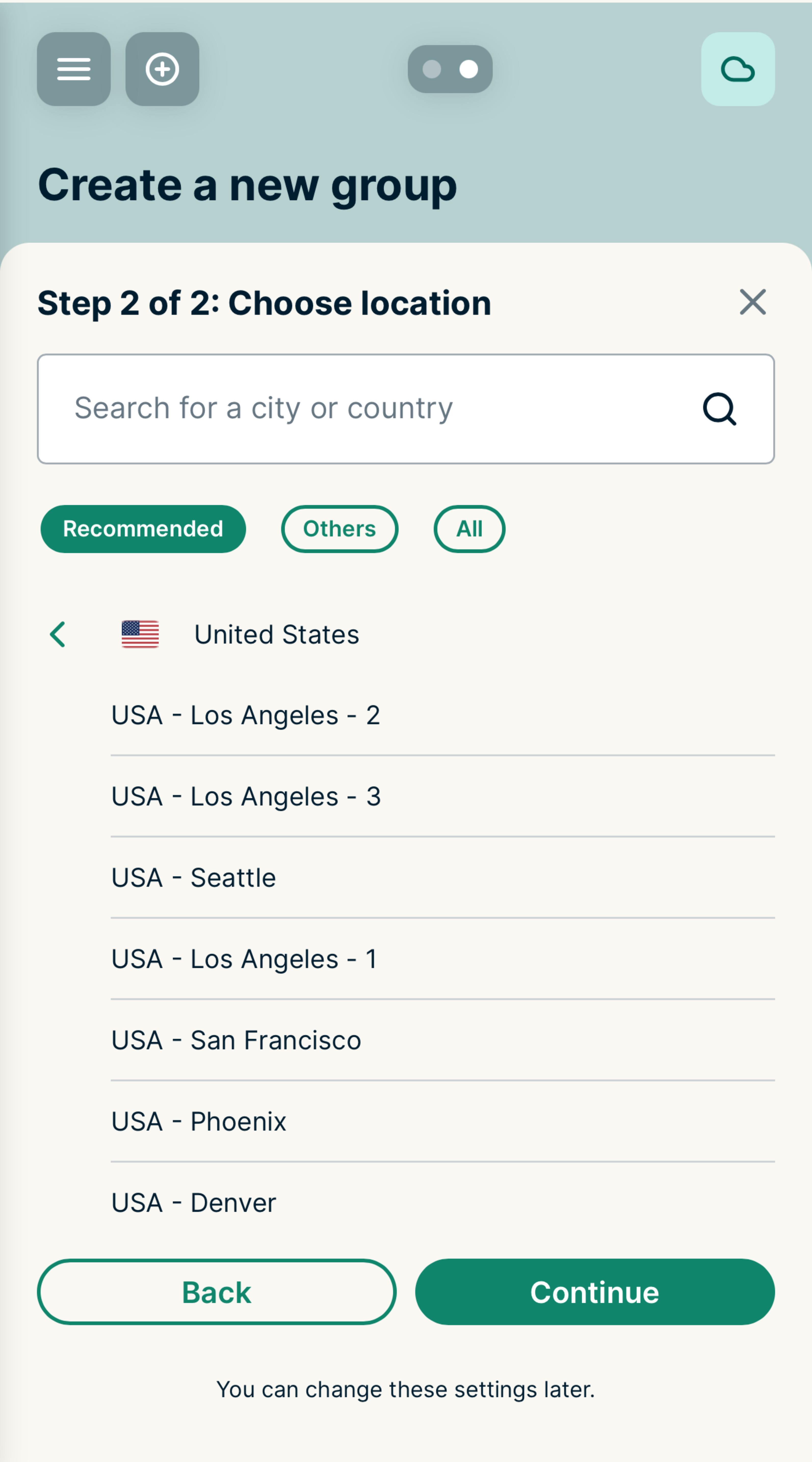
    The Step 2 Choose location screen on the ExpressVPN router dashboard, showing a list of recommended VPN locations.
  5. このグループで使用するロケーションを選択するよう求められます。リストからVPNロケーションを選択し、Continue(続行)を選択します。
新しいデバイスグループは、自動的にスマートロケーションに接続されます。

どのデバイスグループでも、現在のロケーションをタップして別のVPNロケーションを使用するよう設定できます。また、VPN接続を使用しない、またはインターネットに接続しないよう設定することもできます。デフォルトで表示されるHome(ホーム)グループを含め、最大5つのデバイスグループを作成できます。

サポートが必要ですか? すぐにサポートを受けるには、ExpressVPNサポートチームまでお問い合わせください。

トップへ戻る


デフォルトグループの変更

ルーターに初めて接続されたデバイスは、ホームグループと呼ばれる指定されたデフォルトグループ内に表示されます。別のデフォルトグループを設定する方法を紹介します。

  1. ExpressVPNが動作中のルーターにサインイン
  2. 新しいデフォルトに設定するデバイスグループまでスワイプします。
  3. グループ画面の右下にある歯車アイコンSettings icon.をタップします。
  4. デフォルトに設定するを選択

注意:デフォルトグループをインターネット接続なしにした場合、そのグループに追加されたすべての新規デバイスは、インターネットに接続できなくなります。デバイスをインターネットに接続させたい場合は、別のデバイスグループに移動させましょう。

サポートが必要ですか? すぐにサポートを受けるには、ExpressVPNサポートチームまでお問い合わせください。

トップへ戻る


デバイスグループにデバイスを追加(またはデバイスから削除)

デバイスグループにデバイスを追加する(またはデバイスからデバイスを削除する)方法を紹介します。

  1. ExpressVPNが動作中のルーターにサインイン
  2. 移動するデバイスをタップして、Edit device details(デバイスの詳細を編集)画面を開きます。
  3. Device group(デバイスグループ)のドロップダウンメニューをタップし、新しいグループを選択します。
  4. Save(保存)をタップします。(別の方法として、ダッシュボード上でデバイスをあるグループから別のグループへドラッグ&ドロップすることもできます。)

デバイスグループには、デバイスを無制限に追加できます。接続済みのデバイスはいずれかのデバイスグループに所属している必要があります。

デバイスでVPNを使用しない場合は、グループを作成し、そのグループでVPNを使用しないよう設定できます:

  1. ExpressVPNが動作中のルーターにサインイン
  2. 変更するグループの現在のロケーションをタップして、ロケーション選択画面を開きます。
  3. Others(その他)タブを選択します。
  4. VPNなしを選択
  5. このグループにデバイスをドラッグする

注意:キーボードのショートカット機能を使うと、グループ間でデバイスを素早く移動させることができます。Tabキーでデバイスを選択し、Shift + LeftまたはShift + Rightを押すと、グループ間でデバイスが移動します。Shift + ?を押すと、ショートカットコマンドの全リストが表示されます。

サポートが必要ですか? すぐにサポートを受けるには、ExpressVPNサポートチームまでお問い合わせください。

トップへ戻る


デバイスグループ名の変更

  1. ExpressVPNが動作中のルーターにサインイン
  2. 名前を変更するデバイスグループまでスワイプします。
  3. グループ画面の右下にある歯車アイコンSettings icon.をタップします。
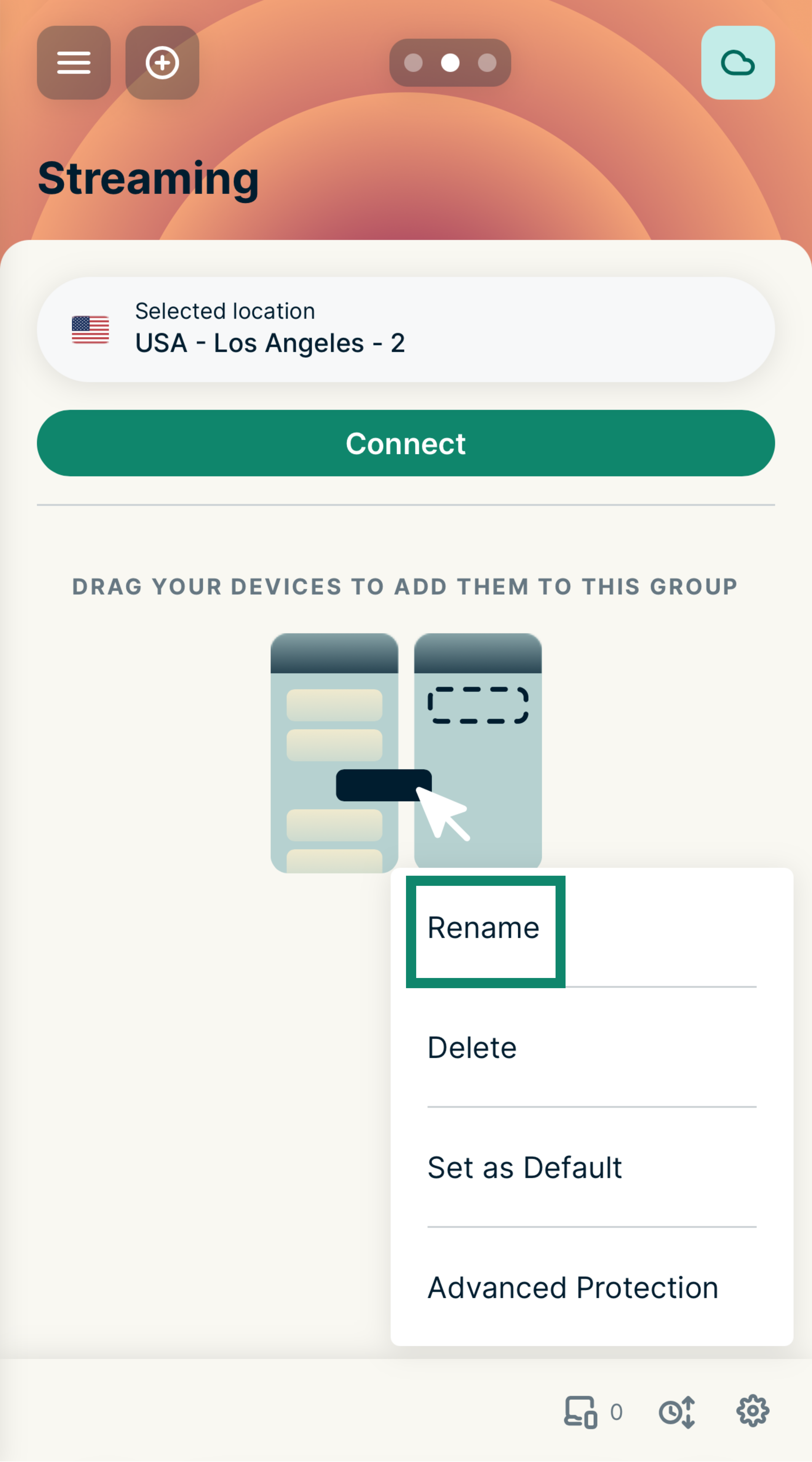
  4. Rename(名前を変更)を選択します。
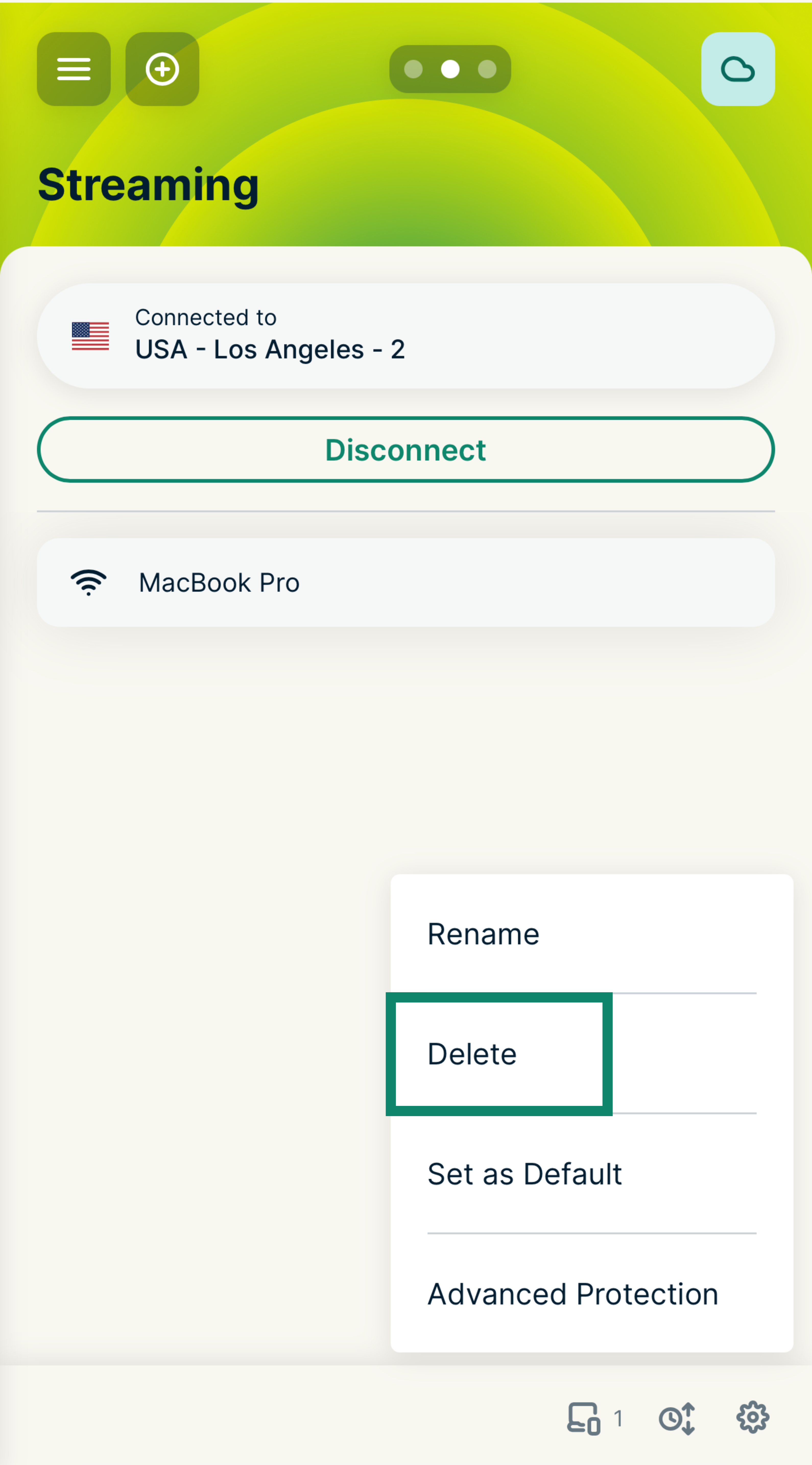
    The options menu for the Streaming device group on the ExpressVPN router dashboard, with a green box highlighting the Rename option.
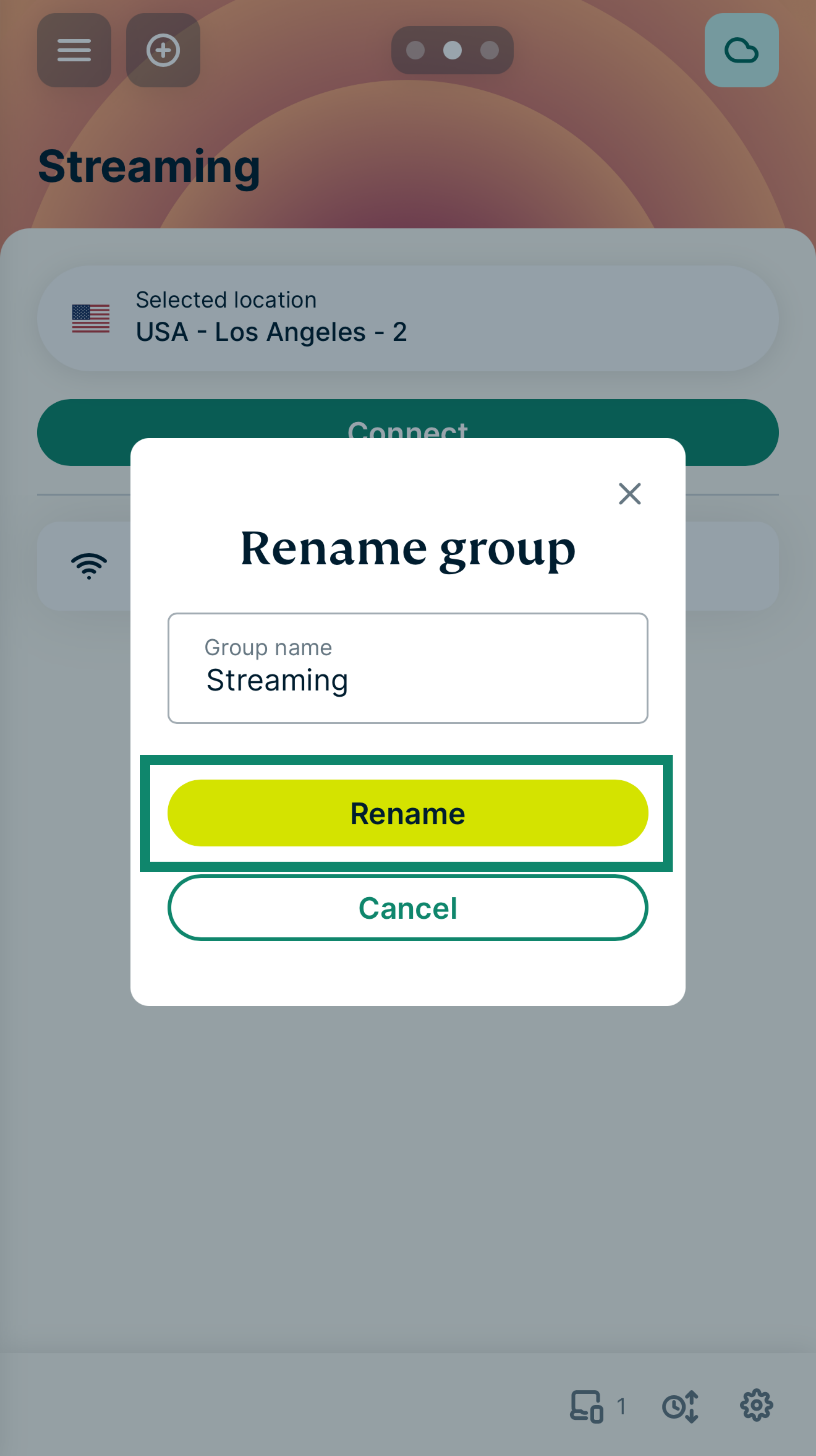
  5. 新しい名前を入力し、Rename(名前を変更)を選択します。
    The Rename group pop-up on the ExpressVPN router dashboard, with a green box highlighting the yellow Rename confirmation button.

サポートが必要ですか? すぐにサポートを受けるには、ExpressVPNサポートチームまでお問い合わせください。

トップへ戻る


デバイス名とIPアドレスの変更

  1. ExpressVPNが動作中のルーターにサインイン
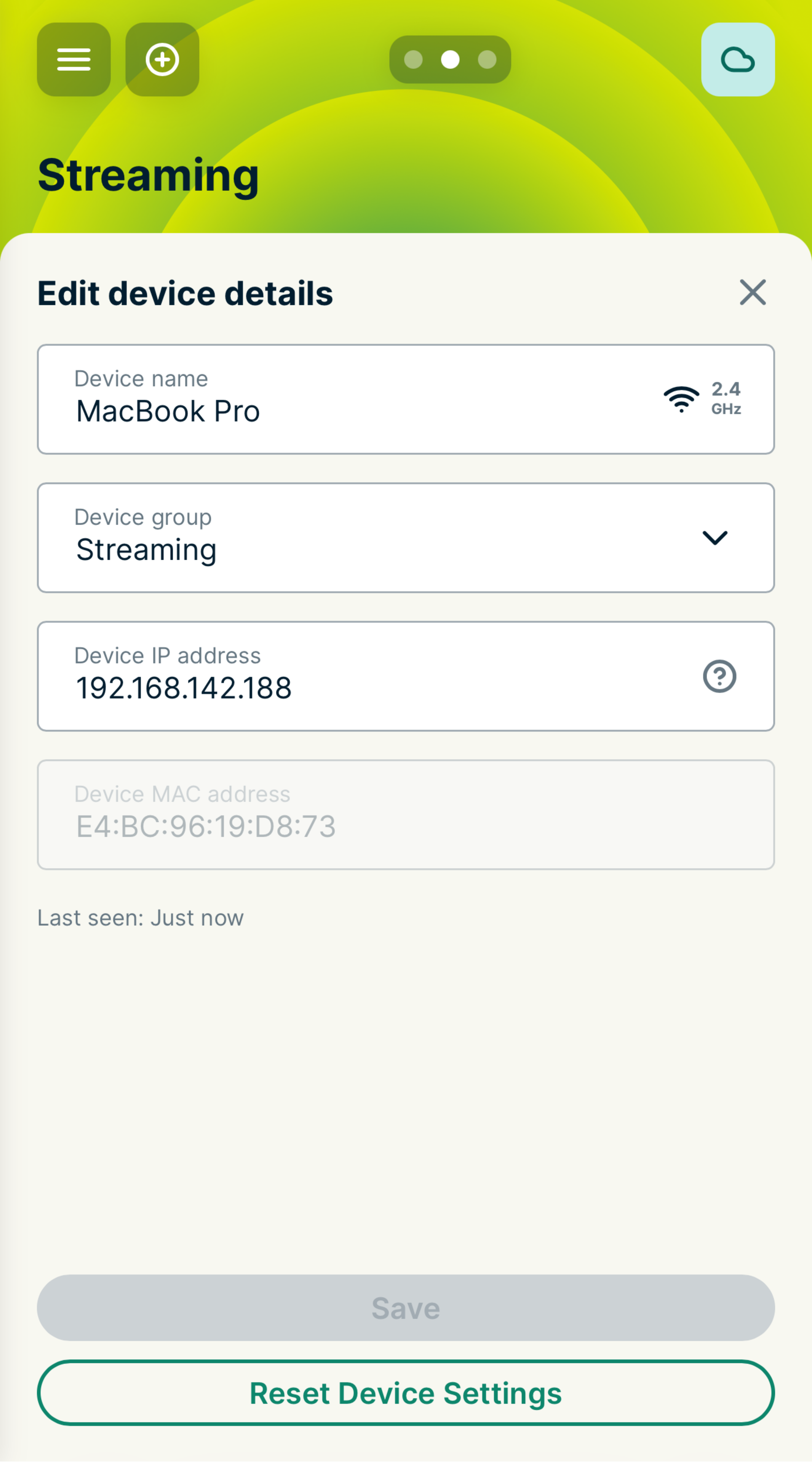
  2. 任意のデバイス名を選択して、Edit device details(デバイスの詳細を編集)画面を開きます。
    The Edit device details screen for a connected device on the ExpressVPN router dashboard, showing the Device group dropdown menu set to the Streaming group.
  3. 次の2つの編集が可能です
    • デバイス名:新しいデバイス名を入力可能
    • デバイスのIPアドレス:DHCPの範囲内でデバイスのIPアドレスを変更可能(ローカルネットワーク設定を参照してください)
  4. 保存を選択

サポートが必要ですか? すぐにサポートを受けるには、ExpressVPNサポートチームまでお問い合わせください。

トップへ戻る


デバイスグループの削除

注意:ホームグループは削除できません。

  1. ExpressVPNが動作中のルーターにサインイン
  2. 削除するデバイスグループまでスワイプします。
  3. グループ画面の右下にある歯車アイコンSettings icon.をタップします。
  4. Delete(削除)を選択し、もう一度Delete(削除)を選択して確定します。

これで、管理画面からデバイスグループが削除されました。削除したデバイスグループに属していたデバイスはすべて、あらかじめ指定していたデフォルトグループに戻ります。

サポートが必要ですか? すぐにサポートを受けるには、ExpressVPNサポートチームまでお問い合わせください。

トップへ戻る

Share in FacebookShare in TwitterShare in WhatsappShare in TelegramShare by email
この記事は役立ちましたか?

ご不便をおかけして申し訳ございません。よろしければ、今後の改善策をお聞かせください。

Please enter a valid email address.

サポートチームのメンバーがこの問題についてフォローアップいたします。

Share in FacebookShare in TwitterShare in WhatsappShare in TelegramShare by email
  • マルウェアとは?
  • ネットワークセキュリティキーとは?
  • VPNは合法ですか?
  • iPhoneで国を変更する方法
  • デジタルフットプリントとは?
  • VPNとTorを併用してネット上で匿名性を守る方法
  • 複数のデバイスに最適なVPNを入手
各デバイス対応のVPN
  • ExpressVPNのダウンロード
  • MacOS
  • Windows PC
  • iOS (iPhone & iPad)
  • Android
  • Linux
  • ルーター
  • Apple TV
  • Fire Stick
  • Android TV
  • Chrome拡張機能
VPNサーバーロケーション
  • 113ヶ国のサーバー
  • アメリカ対応VPN
  • イギリス対応VPN
  • カナダ対応VPN
  • オーストラリア対応VPN
特徴
  • 全ての機能を見る
  • VPNトライアル
  • プランと価格
プロダクト
  • ExpressKeys
  • ExpressMailGuard
  • ExpressAI
ExpressVPNについて
  • 弊社について
  • 信頼できるVPNへの取り組み
  • デジタルの権利
  • セキュリティ監査
  • ExpressVPNのレビュー
  • 弊社のエキスパートたち
  • プレス
  • 採用
プログラム
  • トッテナム・ホットスパー
  • Brooklyn Nets
  • パートナー
  • アフィリエイト
  • インフルエンサー
サポート
  • VPN設定方法
  • よくある質問 (FAQ)
  • VPNを購入する
詳しく知る
  • VPNとは?
  • 自分のIPを確認する
  • 私のIPを隠す
  • VPN用途トップ5
  • ブログ

© 2026 ExpressVPN. All rights reserved.(無断転載および引用禁止)

  • プライバシーポリシー
  • 利用規約
  • Cookieの設定

言語を選択してください

  • English
  • Dansk
  • Deutsch
  • Español
  • Français
  • Italiano
  • Nederlands
  • Norsk
  • Polski
  • Português
  • Suomi
  • Svenska
  • Türkçe
  • Русский
  • ภาษาไทย
  • 한국어

Live chat

Need help? Chat with us!

Online