
ExpressVPN
    • Politica No-log
    • Servers in 105 Countries
    • Use on Multiple Devices
    • High-Speed VPN
    • Access Online Services Securely
    • VPN per il gaming
    • 30-Day Money-Back Guarantee
    • Esplora tutte le caratteristiche
    • Informazioni su ExpressVPN
    Sign Up For Expressvpn

    One subscription gives you access to a fast-growing suite of privacy and security tools that work seamlessly together to improve your digital life.

    View all products
    • Protocollo VPN Lightway
    • Internet Kill Switch
    • Split-tunneling
    • Private, Encrypted DNS
    • Avoid ISP Throttling
    • Threat Manager
    • Blocco degli annunci
    • Controlli parentali
    • IP dedicato
  • Download VPN
    • Windows new
    • MacOS new
    • Linux new
    • iPhone / iPad
    • Android
    • Apple TV
    • Fire Stick
    • Android TV
    • VPN per router
    • Aircove Router
    • Chrome
    • Firefox
    • Edge
  • Pricing
    • VPN: cos’è?
    • VPN for Beginners
    • How To Use a VPN
    • VPN Encryption Explained
    • Blog
    • Glossary
    • IP Address Checker
    • Test di esposizione del DNS
    • Test di esposizione di WebRTC
    • Generatore di password
    • Centro di supporto
    • FAQ
    • Chat dal vivo
    • Tutorial installazione VPN
    • Redemption Code
  • Icon10VPN for Teams
  • Prodotti
    Icon11

    ExpressVPN for Teams Get fast, secure VPN protection for growing teams. Easy to deploy, simple to manage, built to scale.

    Img2
    • ExpressVPN

      ExpressVPN Industry-leading, ultra-fast VPN with secure servers in 105 countries.

    • ExpressMailGuard

      ExpressMailGuard Private email relay service to protect your inbox and identity.

    • ExpressKeys

      ExpressKeys Secure password management, multi-factor authentication, and more.

    • ExpressAI

      ExpressAI The first consumer AI powered by confidential computing for privacy-led intelligence.

    • Identity Defender

      Identity Defender Powerful suite of ID protection, monitoring, and data removal tools

    Other products from the family behind ExpressVPN

    • holiday.com eSIM

      holiday.com eSIM Unlimited data with a single eSIM across 150+ destinations.

    • Intego

      Intego Award-winning macOS antivirus, firewall, system tools, and more.

  • Il mio account
Abbonati qui
ExpressVPN
    • Politica No-log
    • Servers in 105 Countries
    • Use on Multiple Devices
    • High-Speed VPN
    • Access Online Services Securely
    • VPN per il gaming
    • 30-Day Money-Back Guarantee
    • Esplora tutte le caratteristiche
    • Informazioni su ExpressVPN
    Sign Up For Expressvpn

    One subscription gives you access to a fast-growing suite of privacy and security tools that work seamlessly together to improve your digital life.

    View all products
    • Protocollo VPN Lightway
    • Internet Kill Switch
    • Split-tunneling
    • Private, Encrypted DNS
    • Avoid ISP Throttling
    • Threat Manager
    • Blocco degli annunci
    • Controlli parentali
    • IP dedicato
  • Download VPN
    • Windows new
    • MacOS new
    • Linux new
    • iPhone / iPad
    • Android
    • Apple TV
    • Fire Stick
    • Android TV
    • VPN per router
    • Aircove Router
    • Chrome
    • Firefox
    • Edge
  • Pricing
    • VPN: cos’è?
    • VPN for Beginners
    • How To Use a VPN
    • VPN Encryption Explained
    • Blog
    • Glossary
    • IP Address Checker
    • Test di esposizione del DNS
    • Test di esposizione di WebRTC
    • Generatore di password
    • Centro di supporto
    • FAQ
    • Chat dal vivo
    • Tutorial installazione VPN
    • Redemption Code
  • VPN for Teams
  • Prodotti
    • ExpressVPN

      ExpressVPN Industry-leading, ultra-fast VPN with secure servers in 105 countries.

    • ExpressMailGuard

      ExpressMailGuard Private email relay service to protect your inbox and identity.

    • ExpressKeys

      ExpressKeys Secure password management, multi-factor authentication, and more.

    • ExpressAI

      ExpressAI The first consumer AI powered by confidential computing for privacy-led intelligence.

    • Identity Defender

      Identity Defender Powerful suite of ID protection, monitoring, and data removal tools

    Other products from the family behind ExpressVPN

    • holiday.com eSIM

      holiday.com eSIM Unlimited data with a single eSIM across 150+ destinations.

    • Intego

      Intego Award-winning macOS antivirus, firewall, system tools, and more.

    Icon11

    ExpressVPN for Teams Get fast, secure VPN protection for growing teams. Easy to deploy, simple to manage, built to scale.

    Img2
  • Il mio account
Abbonati qui
Home Home » Come modificare o recuperare il tuo indirizzo email ExpressVPN

Gestisci il tuo account

Come modificare o recuperare il tuo indirizzo email ExpressVPN

Ultimo aggiornamento: 20/01/2026

Share in FacebookShare in TwitterShare in WhatsappShare in TelegramShare by email

Per utilizzare le nostre app e configurazioni, prima devi aprire un nuovo account su ExpressVPN.

Questa guida ti mostrerà come modificare e recuperare l’indirizzo email del tuo account ExpressVPN. Puoi modificare l’indirizzo email registrato solo sul sito web di ExpressVPN, non nell’app ExpressVPN.

Vai a…

Modifica email
Recupera email


Modifica email

Quando acquisti un account ExpressVPN, devi fornire un indirizzo email che verrà utilizzato per accedere al tuo account (ad eccezione degli utenti iOS, che possono acquistare un account ExpressVPN tramite l’App Store).

Per modificare l’indirizzo email associato al tuo account ExpressVPN:

  1. Accedi al tuo account ExpressVPN.
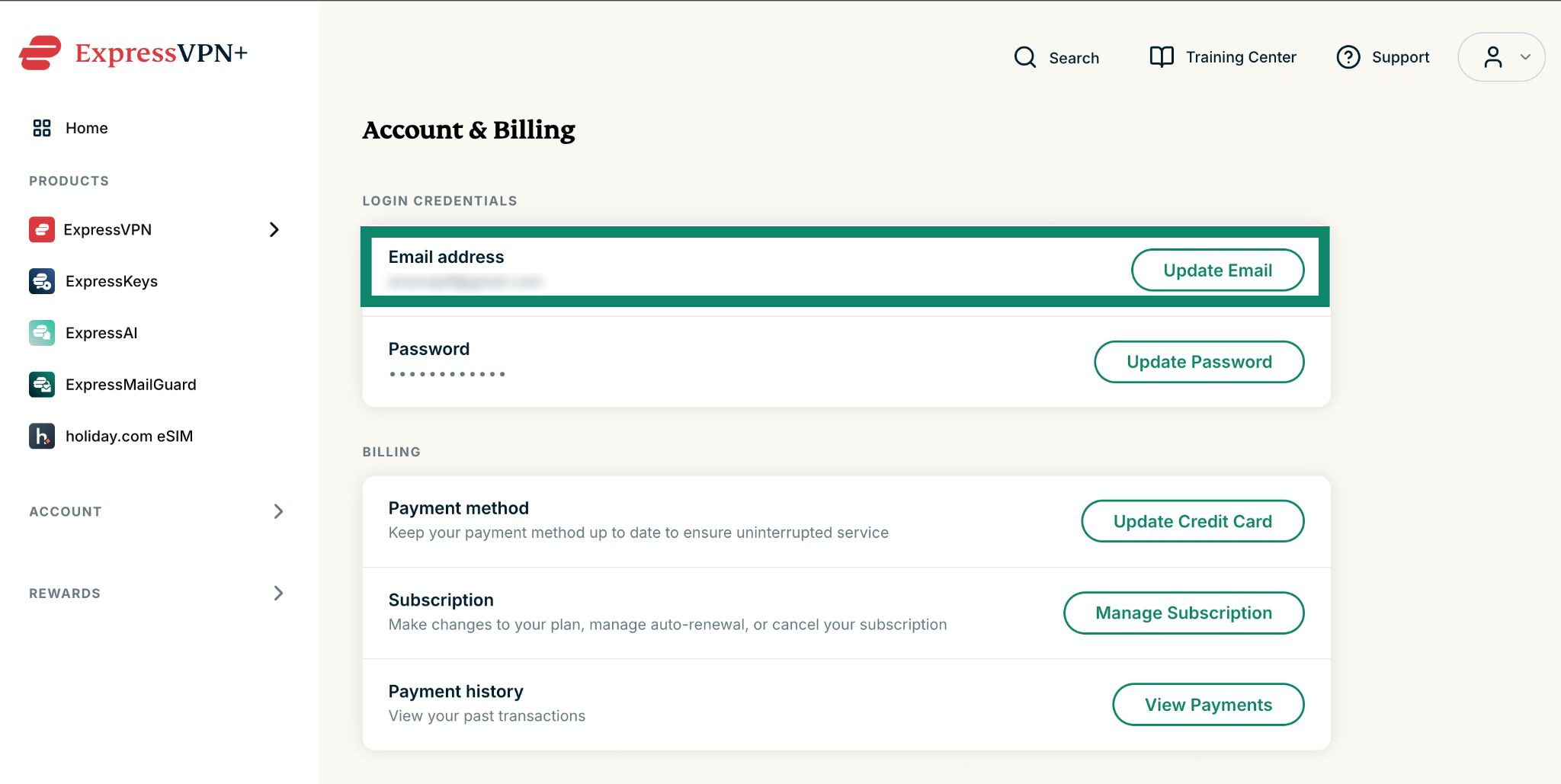
  2. Seleziona Account e fatturazione.
  3. Nella sezione Indirizzo e-mail, seleziona Aggiorna.
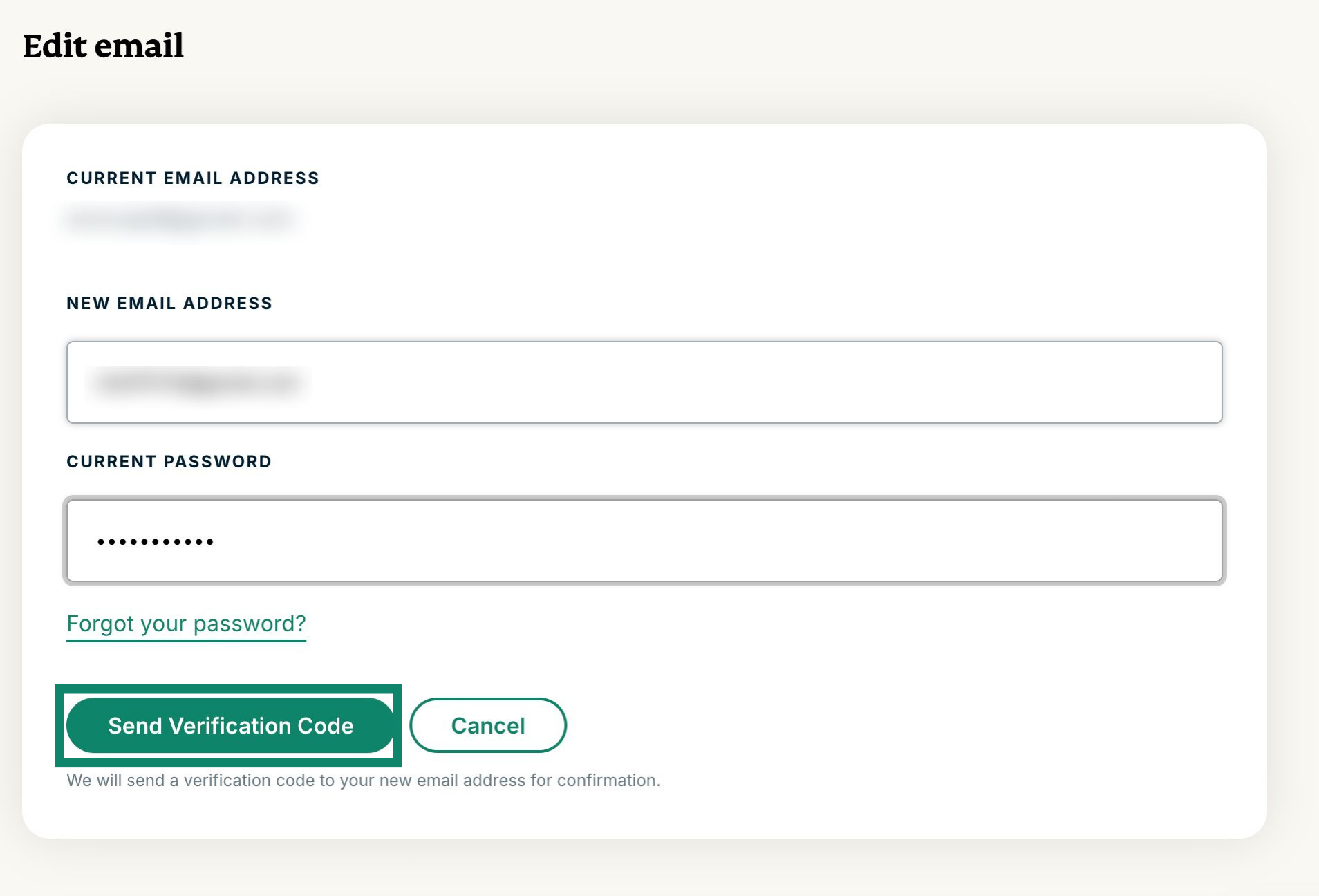
  4. Seleziona nuovamente Aggiorna nella prossima sezione Indirizzo e-mail.
  5. Compila i seguenti campi:
      • Nuovo indirizzo e-mail
      • Conferma il nuovo indirizzo e-mail
      • Password

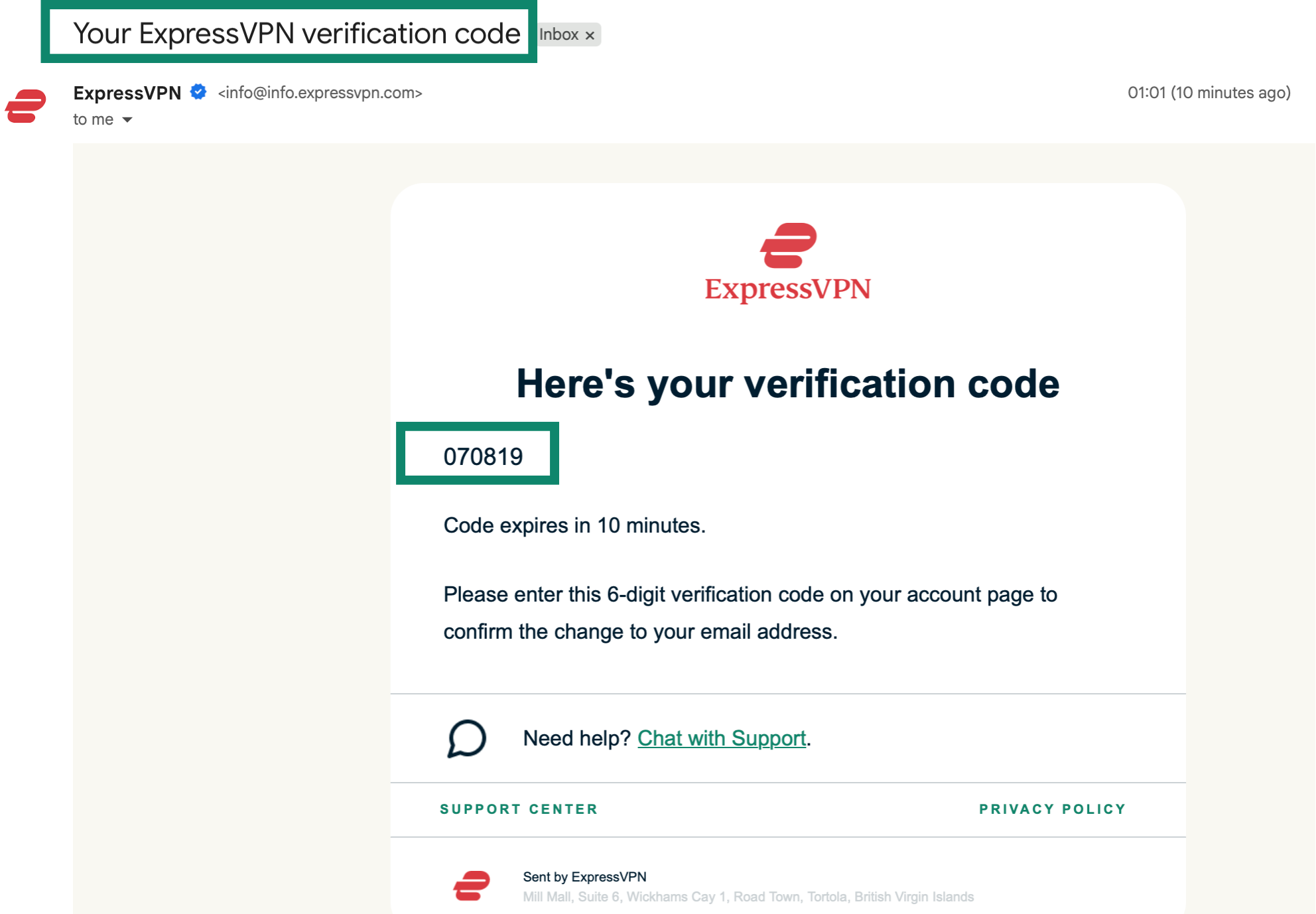
    Una volta compilati i campi, seleziona Invia codice di verifica. Il codice di verifica a 6 cifre verrà inviato al tuo nuovo indirizzo e-mail. L’e-mail avrà come oggetto “Richiesta di aggiornamento dell’indirizzo e-mail ExpressVPN”.

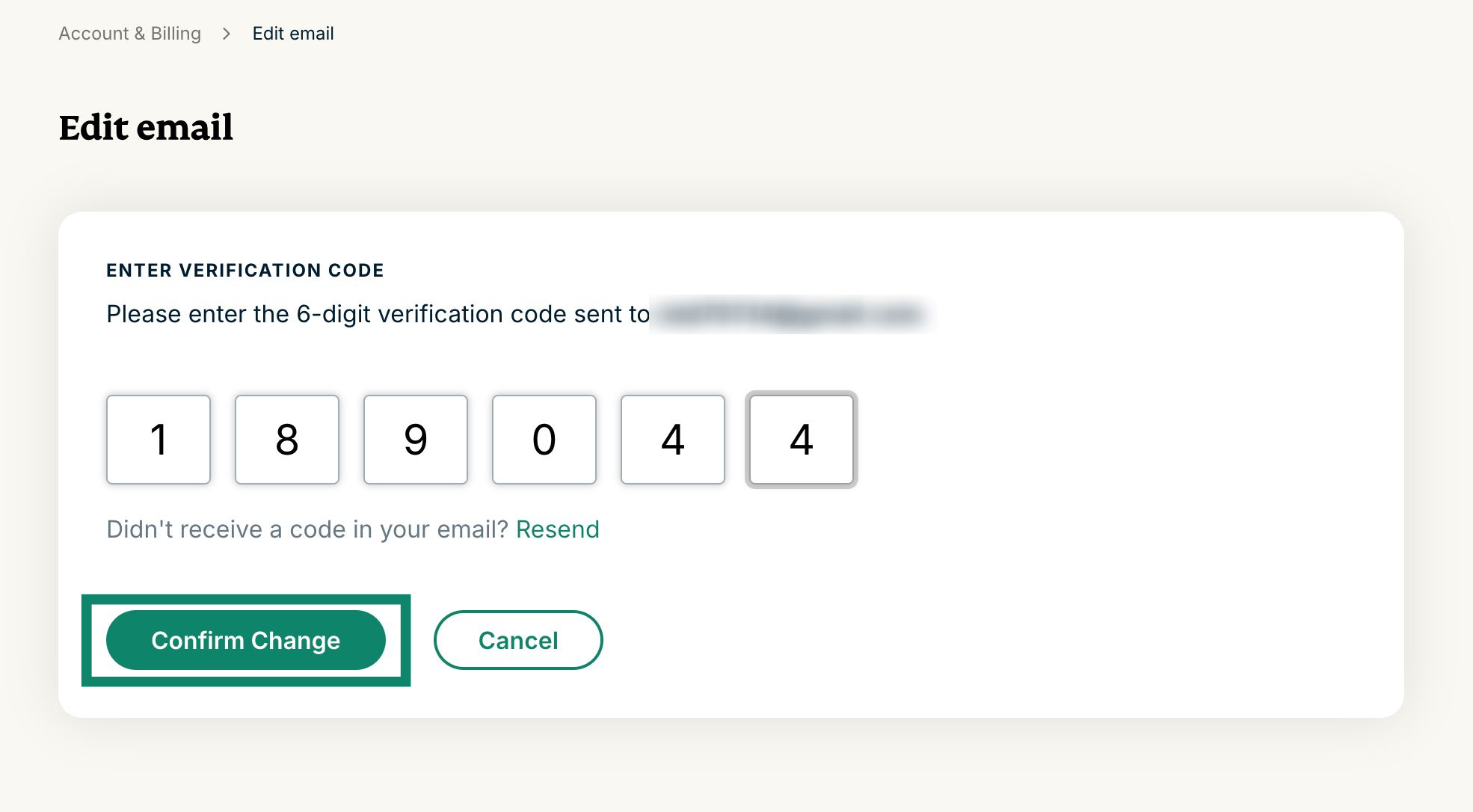
  6.  Inserisci il codice di verifica a 6 cifre, quindi seleziona Conferma modifica.
  7. Se l’operazione è andata a buon fine, verrà visualizzato il messaggio “Il tuo indirizzo e-mail è stato aggiornato correttamente!”

Hai bisogno di aiuto? Contatta il team di supporto ExpressVPN per assistenza immediata.

Torna in alto


Recupera email

Se hai dimenticato l’indirizzo email associato al tuo account ExpressVPN o desideri cambiarlo, contatta il team di supporto ExpressVPN per confermare il tuo indirizzo email o presentare una richiesta di cambio email.

Prima di contattare il team di supporto ExpressVPN, prepara le informazioni del tuo account e i dettagli di pagamento per la verifica.

Torna in alto

Share in FacebookShare in TwitterShare in WhatsappShare in TelegramShare by email
Questo articolo ti ha aiutato?

Siamo spiacenti di sentirlo. Facci sapere come possiamo migliorare.

Please enter a valid email address.

Un membro del nostro team di supporto seguirà il tuo problema.

Share in FacebookShare in TwitterShare in WhatsappShare in TelegramShare by email
  • Cos'è un malware?
  • Cos'è una chiave di sicurezza di rete?
  • Le VPN sono legali?
  • Come cambiare la posizione sull'iPhone
  • Cosa si intende per impronte digitali online?
  • Come combinare una VPN con Tor per l'anonimato online
  • Ottieni la migliore VPN per molteplici dispositivi
VPN per tutti i dispositivi
  • Download ExpressVPN
  • MacOS
  • Windows PC
  • iOS (iPhone & iPad)
  • Android
  • Linux
  • Aircove Router
  • Apple TV
  • Fire Stick
  • Android TV
  • Estensione Chrome
Posizioni server VPN
  • Server in 105 paesi
  • VPN USA
  • VPN UK
  • VPN Canada
  • VPN Australia
Caratteristiche
  • Esplora tutte le caratteristiche
  • Prova la VPN senza rischi
  • Piani e prezzi
Prodotti
  • ExpressKeys
  • ExpressMailGuard
  • ExpressAI
Informazioni su ExpressVPN
  • Su di noi
  • Centro di fiducia
  • Centro per i diritti
  • Audit di sicurezza
  • Recensioni su ExpressVPN
  • I nostri esperti
  • Ufficio Stampa
  • Opportunità di lavoro
Programmi
  • Tottenham Hotspur
  • Brooklyn Nets
  • Diventa partner
  • Affiliati
  • Influencer
Supporto
  • Tutorial installazione VPN
  • FAQ
  • Acquista la VPN
Scopri di più
  • VPN: cos’è?
  • Qual è il mio IP?
  • Nascondi il mio IP
  • 5 modi di usare una VPN
  • Blog

© 2026 ExpressVPN. Tutti i diritti riservati.

  • Informativa sulla privacy
  • Termini di servizio
  • Preferenze cookie

Seleziona una lingua

  • English
  • Dansk
  • Deutsch
  • Español
  • Français
  • Nederlands
  • Norsk
  • Polski
  • Português
  • Suomi
  • Svenska
  • Türkçe
  • Русский
  • ภาษาไทย
  • 한국어
  • 日本語

Live chat

Need help? Chat with us!

Online