






ExpressVPN gives you control over how your account data is used for marketing, diagnostics, and other non-VPN purposes. This article explains the controls available and how to manage them.
For details on what data ExpressVPN collects and how it’s handled, you can read our full privacy policy at: https://www.expressvpn.com/privacy-policy. To manage cookies specifically, see our Cookie Policy.
Jump to…
What your privacy preferences control
How to manage your preferences
About marketing personalization
About app diagnostics
About marketing emails
Who to contact with questions
What your privacy preferences control
Your privacy preferences in the ExpressVPN app cover three main areas:
- Marketing personalization: How account and device identifiers may be used to show you ExpressVPN ads on other platforms.
- App diagnostics: Whether anonymized crash reports and performance data are shared with us to help improve the app.
- Marketing emails: Whether you receive promotional emails from ExpressVPN.
These settings cover account and marketing data only. They don’t affect your VPN connection or our no-logs commitment.
How to manage your preferences
Open the ExpressVPN app on your iOS or Android device.
- Tap Profile.


- Tap Privacy preferences.
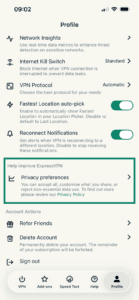
- Use the toggles to manage each preference individually, then choose Confirm Selection.

If you’re using ExpressVPN on desktop, or you don’t have access to the in-app controls for any reason, you can opt out by emailing our Data Protection Officer at dpo@expressvpn.com.
About marketing personalization
When marketing personalization is enabled, ExpressVPN may share a hashed version of your email address or your device’s advertising identifier with advertising platforms such as Meta and Google. These platforms use the hashed identifier to show you ExpressVPN ads.
Your email address is hashed before it leaves our systems, so it isn’t shared in readable form. Your VPN activity, browsing history, and connection data are not involved. These identifiers are used only to promote ExpressVPN.
You can turn marketing personalization off at any time using the controls described above, or by emailing our Data Protection Officer at dpo@expressvpn.com.
About app diagnostics
App diagnostics is an optional feature that, when enabled, shares anonymized crash reports and performance data with ExpressVPN. This helps us identify and fix problems with the app.
App diagnostics data cannot be tied back to individual users and never includes browsing or VPN activity.
About marketing emails
You can manage whether you receive promotional emails from ExpressVPN. Transactional emails, such as receipts, renewal notices, and security alerts, are sent regardless of this setting because they’re necessary for your account.
To unsubscribe from marketing emails, use the unsubscribe link at the bottom of any marketing email, or update your preferences in the app.
Who to contact with questions
If you have questions about the privacy policy or your data, our Data Protection Officer can be reached at dpo@expressvpn.com.
For other support, you can contact our Support Team via live chat for immediate assistance.