


ExpressVPN
    • ノーログポリシー
    • Servers in 113 Countries
    • Use on Multiple Devices
    • High-Speed VPN
    • Access Online Services Securely
    • ゲームに最適なVPN
    • 全ての機能を見る
    • ExpressVPNについて
    Sign Up For Expressvpn

    One subscription gives you access to a fast-growing suite of privacy and security tools that work seamlessly together to improve your digital life.

    View all products
    • Lightway VPNプロトコル
    • Internet Kill Switch
    • スプリットトンネル
    • Private, Encrypted DNS
    • Avoid ISP Throttling
    • Threat Manager
    • 広告ブロッカー
    • ペアレンタルコントロール
    • 固定IP
  • VPNのダウンロード
    • Windows new
    • MacOS new
    • Linux new
    • iPhone / iPad
    • Android
    • Apple TV
    • Fire Stick
    • Android TV
    • ルーター版VPN
    • Aircoveルーター
    • Chrome
    • Firefox
    • Edge
  • Pricing
    • VPNとは?
    • VPN for Beginners
    • How To Use a VPN
    • VPN Encryption Explained
    • ブログ
    • Glossary
    • IP Address Checker
    • DNS漏洩テスト
    • WebRTC漏洩テスト
    • パスワード生成
    • サポートセンター
    • よくある質問 (FAQ)
    • ライブチャット
    • VPN設定方法
    • Redemption Code
  • Icon10VPN for Teams
  • プロダクト
    Icon11

    ExpressVPN for Teams Get fast, secure VPN protection for growing teams. Easy to deploy, simple to manage, built to scale.

    Img2
    • ExpressVPN

      ExpressVPN Industry-leading, ultra-fast VPN with secure servers in 113 countries.

    • ExpressMailGuard

      ExpressMailGuard Private email relay service to protect your inbox and identity.

    • ExpressKeys

      ExpressKeys Secure password management, multi-factor authentication, and more.

    • ExpressAI

      ExpressAI The first consumer AI powered by confidential computing for privacy-led intelligence.

    • Identity Defender

      Identity Defender Powerful suite of ID protection, monitoring, and data removal tools

    Other products from the family behind ExpressVPN

    • holiday.com eSIM

      holiday.com eSIM Unlimited data with a single eSIM across 150+ destinations.

    • Intego

      Intego Award-winning macOS antivirus, firewall, system tools, and more.

  • マイアカウント
プランを見る
ExpressVPN
    • ノーログポリシー
    • Servers in 113 Countries
    • Use on Multiple Devices
    • High-Speed VPN
    • Access Online Services Securely
    • ゲームに最適なVPN
    • 全ての機能を見る
    • ExpressVPNについて
    Sign Up For Expressvpn

    One subscription gives you access to a fast-growing suite of privacy and security tools that work seamlessly together to improve your digital life.

    View all products
    • Lightway VPNプロトコル
    • Internet Kill Switch
    • スプリットトンネル
    • Private, Encrypted DNS
    • Avoid ISP Throttling
    • Threat Manager
    • 広告ブロッカー
    • ペアレンタルコントロール
    • 固定IP
  • VPNのダウンロード
    • Windows new
    • MacOS new
    • Linux new
    • iPhone / iPad
    • Android
    • Apple TV
    • Fire Stick
    • Android TV
    • ルーター版VPN
    • Aircoveルーター
    • Chrome
    • Firefox
    • Edge
  • Pricing
    • VPNとは?
    • VPN for Beginners
    • How To Use a VPN
    • VPN Encryption Explained
    • ブログ
    • Glossary
    • IP Address Checker
    • DNS漏洩テスト
    • WebRTC漏洩テスト
    • パスワード生成
    • サポートセンター
    • よくある質問 (FAQ)
    • ライブチャット
    • VPN設定方法
    • Redemption Code
  • VPN for Teams
  • プロダクト
    • ExpressVPN

      ExpressVPN Industry-leading, ultra-fast VPN with secure servers in 113 countries.

    • ExpressMailGuard

      ExpressMailGuard Private email relay service to protect your inbox and identity.

    • ExpressKeys

      ExpressKeys Secure password management, multi-factor authentication, and more.

    • ExpressAI

      ExpressAI The first consumer AI powered by confidential computing for privacy-led intelligence.

    • Identity Defender

      Identity Defender Powerful suite of ID protection, monitoring, and data removal tools

    Other products from the family behind ExpressVPN

    • holiday.com eSIM

      holiday.com eSIM Unlimited data with a single eSIM across 150+ destinations.

    • Intego

      Intego Award-winning macOS antivirus, firewall, system tools, and more.

    Icon11

    ExpressVPN for Teams Get fast, secure VPN protection for growing teams. Easy to deploy, simple to manage, built to scale.

    Img2
  • マイアカウント
プランを見る
Home Home » ExpressVPNをダウンロードしてインストールする方法

ナレッジハブ

ExpressVPNをダウンロードしてインストールする方法

最終更新: 2026/08/26

Share in FacebookShare in TwitterShare in WhatsappShare in TelegramShare by email

弊社のアプリと設定を使用するには、まずExpressVPNアカウントに登録してください。

このガイドでは、お使いのデバイスにExpressVPNアプリをダウンロードしてインストールする方法を解説します。ExpressVPNアプリは無料でダウンロードできますが、VPNや付属の追加機能を利用するには、ExpressVPNのサブスクリプションが必要です。

ダウンロードとインストールの手順は、デバイスによって異なります。以下から、お使いのデバイスに該当するセクションをご確認ください。

目次:

  • Windows、Mac、Linux
  • Android
  • iOS

Windows、Mac、LinuxにExpressVPNをダウンロードしてインストールする

1. アカウントにサインインする

ExpressVPNアカウントダッシュボードにアクセスします。求められた場合は、ExpressVPNに登録したメールアドレスを入力し、Send Code(コードを送信)をクリックします。
ExpressVPN sign in page requesting email credentials.

メールに届いた認証コードを入力して確認します。

2. VPNアプリをダウンロードする

左側のメニューでACCOUNT(アカウント)を展開し、Set Up Devices(デバイスを設定)をクリックします。
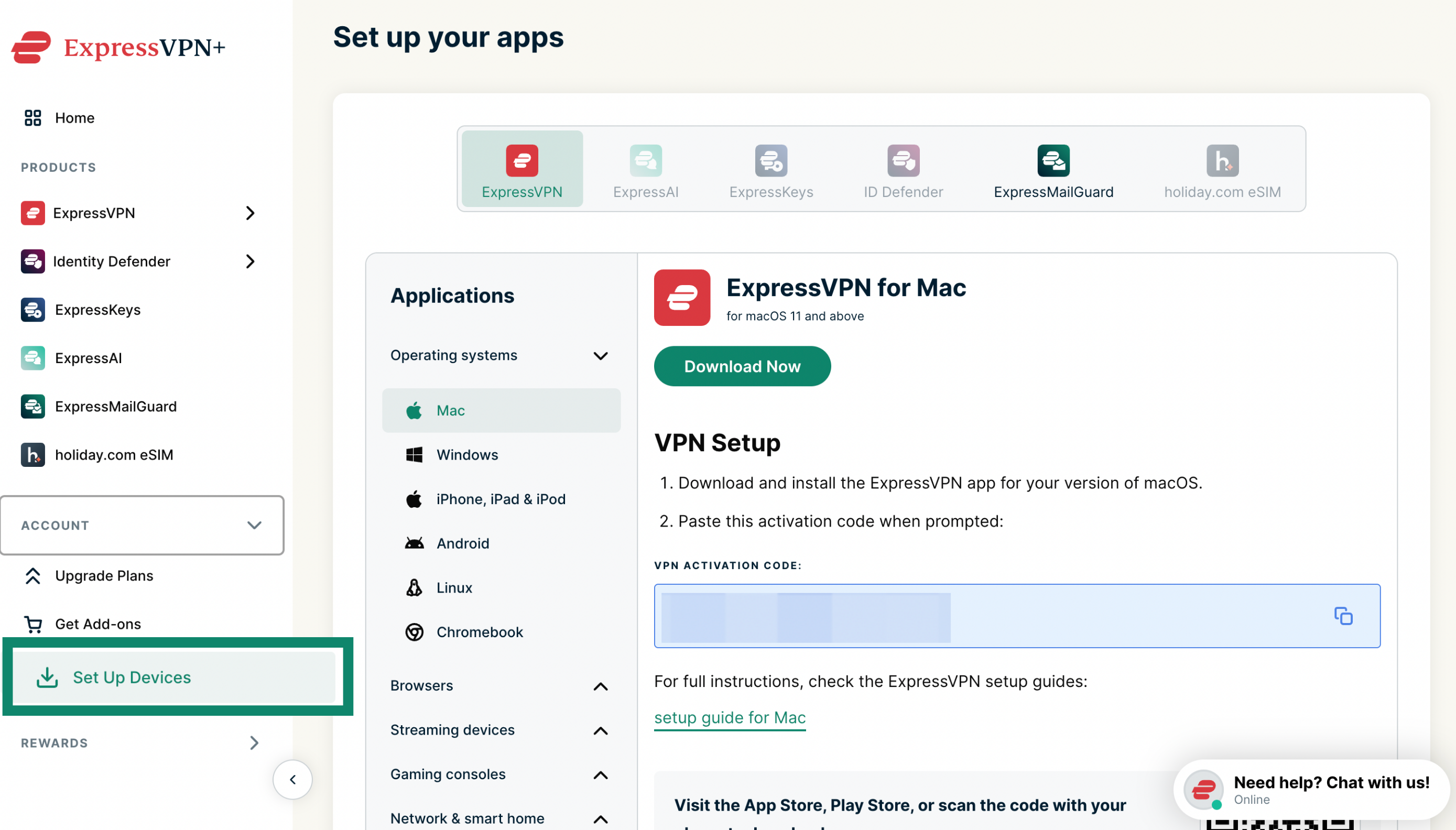
ExpressVPN+ portal setup page with Set Up Devices highlighted in the left menu.

Applications(アプリケーション) > Operating systems(オペレーティングシステム)で、お使いのデバイスに応じてWindows、Mac、またはLinuxを選択し、Download Now(今すぐダウンロード)をクリックします。
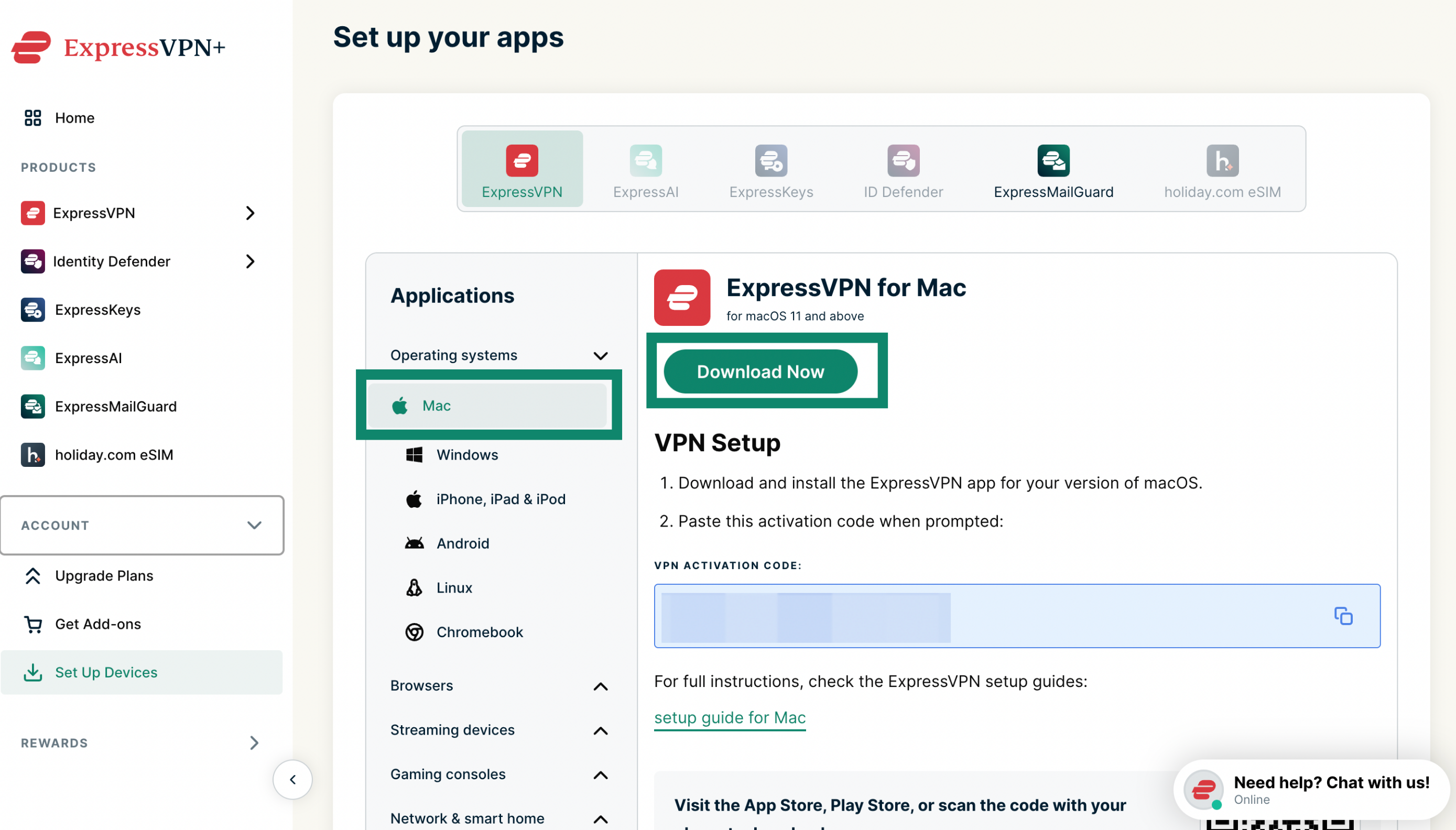
Set up your apps section in the ExpressVPN+ portal with the Download Now button highlighted for Mac.

このブラウザウィンドウは開いたままにしてください。 後の設定でアクティベーションコードが必要になります。
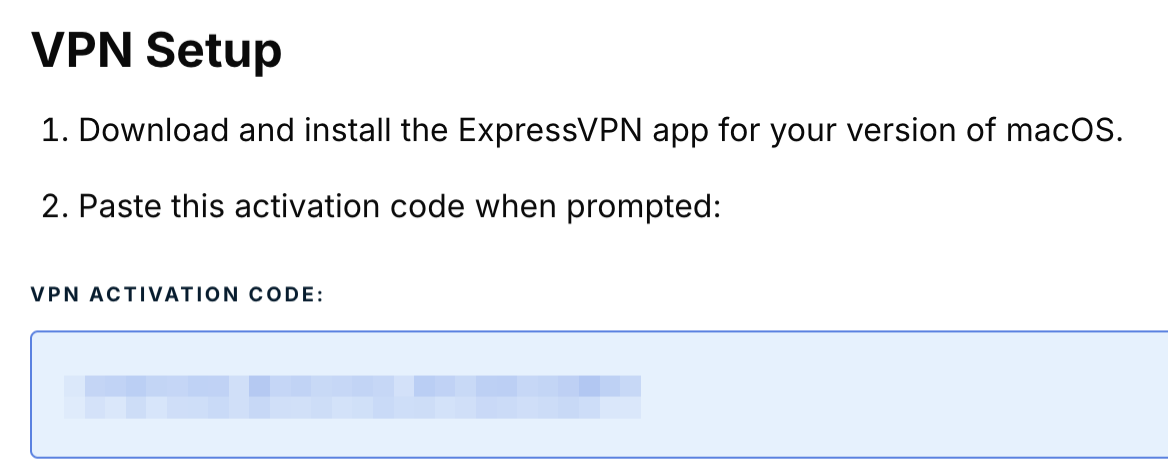
ExpressVPN setup activation code.

3. VPNアプリを設定する

以下から、お使いのデバイスに該当する設定手順をご覧ください。

  • Windows版ExpressVPN
  • Mac版ExpressVPN
  • Linux版ExpressVPN

サポートが必要ですか? すぐにサポートを受けるには、ExpressVPNサポートチームまでお問い合わせください。

トップへ戻る


AndroidにExpressVPNをダウンロードしてインストールする

以下の手順は、Androidスマートフォンやタブレット、およびChromebookなどのAndroidベースのデバイスに適用されます。

1. VPNアプリをダウンロードする

Google Play ストアまたはGalaxy StoreでExpressVPNを検索し、Install(インストール)をタップします。

重要: AndroidデバイスからGoogle Play ストアまたはGalaxy Storeにアクセスできない場合は、APKをデバイスに直接ダウンロードしてください。

2. VPNアプリを設定する

Android版ExpressVPNの設定手順をご覧ください。

サポートが必要ですか? すぐにサポートを受けるには、ExpressVPNサポートチームまでお問い合わせください。

トップへ戻る


iOSにExpressVPNをダウンロードしてインストールする

1. VPNアプリをダウンロードする

App StoreでExpressVPNを検索し、Get(入手)をタップします。

重要: App StoreにExpressVPNが表示されない場合は、ExpressVPNを利用できる国または地域にApp Storeの国または地域を変更してください。

2. VPNアプリを設定する

iOS版ExpressVPNの設定手順をご覧ください。

サポートが必要ですか? すぐにサポートを受けるには、ExpressVPNサポートチームまでお問い合わせください。

トップへ戻る


任意のデバイスでExpressVPNにサインインする方法

これらのデバイスでExpressVPNにサインインするには、以下が必要です。

  • メールアドレス
  • アクティベーションコード(Windows、Mac、Linux、またはルーター用ExpressVPNアプリの場合)

ExpressVPNアプリのアクティベーションで問題が発生した場合は、こちらのトラブルシューティングガイドをご覧ください。

サポートが必要ですか? すぐにサポートを受けるには、ExpressVPNサポートチームまでお問い合わせください。

トップへ戻る

Share in FacebookShare in TwitterShare in WhatsappShare in TelegramShare by email
この記事は役立ちましたか?

ご不便をおかけして申し訳ございません。よろしければ、今後の改善策をお聞かせください。

Please enter a valid email address.

サポートチームのメンバーがこの問題についてフォローアップいたします。

Share in FacebookShare in TwitterShare in WhatsappShare in TelegramShare by email
  • マルウェアとは?
  • ネットワークセキュリティキーとは?
  • VPNは合法ですか?
  • iPhoneで国を変更する方法
  • デジタルフットプリントとは?
  • VPNとTorを併用してネット上で匿名性を守る方法
  • 複数のデバイスに最適なVPNを入手
各デバイス対応のVPN
  • ExpressVPNのダウンロード
  • MacOS
  • Windows PC
  • iOS (iPhone & iPad)
  • Android
  • Linux
  • ルーター
  • Apple TV
  • Fire Stick
  • Android TV
  • Chrome拡張機能
VPNサーバーロケーション
  • 113ヶ国のサーバー
  • アメリカ対応VPN
  • イギリス対応VPN
  • カナダ対応VPN
  • オーストラリア対応VPN
特徴
  • 全ての機能を見る
  • VPNトライアル
  • プランと価格
プロダクト
  • ExpressKeys
  • ExpressMailGuard
  • ExpressAI
ExpressVPNについて
  • 弊社について
  • 信頼できるVPNへの取り組み
  • デジタルの権利
  • セキュリティ監査
  • ExpressVPNのレビュー
  • 弊社のエキスパートたち
  • プレス
  • 採用
プログラム
  • トッテナム・ホットスパー
  • Brooklyn Nets
  • パートナー
  • アフィリエイト
  • インフルエンサー
サポート
  • VPN設定方法
  • よくある質問 (FAQ)
  • VPNを購入する
詳しく知る
  • VPNとは?
  • 自分のIPを確認する
  • 私のIPを隠す
  • VPN用途トップ5
  • ブログ

© 2026 ExpressVPN. All rights reserved.(無断転載および引用禁止)

  • プライバシーポリシー
  • 利用規約
  • Cookieの設定

言語を選択してください

  • English
  • Dansk
  • Deutsch
  • Español
  • Français
  • Italiano
  • Nederlands
  • Norsk
  • Polski
  • Português
  • Suomi
  • Svenska
  • Türkçe
  • Русский
  • ภาษาไทย
  • 한국어

Live chat

Need help? Chat with us!

Online