
ExpressVPN
    • 노로그 정책
    • Servers in 105 Countries
    • Use on Multiple Devices
    • High-Speed VPN
    • Access Online Services Securely
    • 게임 VPN
    • 30-Day Money-Back Guarantee
    • 모든 기능 살펴보기
    • ExpressVPN 소개
    Sign Up For Expressvpn

    One subscription gives you access to a fast-growing suite of privacy and security tools that work seamlessly together to improve your digital life.

    View all products
    • Lightway VPN 프로토콜
    • Internet Kill Switch
    • 분할 터널링
    • Private, Encrypted DNS
    • Avoid ISP Throttling
    • Threat Manager
    • 광고 차단기
    • 자녀 보호 기능
    • 전용 IP
  • VPN 다운로드
    • Windows new
    • MacOS new
    • Linux new
    • iPhone / iPad
    • Android
    • Apple TV
    • Fire Stick
    • Android TV
    • 라우터용 VPN
    • Aircove 공유기
    • Chrome
    • Firefox
    • Edge
  • Pricing
    • VPN이란?
    • VPN for Beginners
    • How To Use a VPN
    • VPN Encryption Explained
    • 블로그
    • Glossary
    • IP Address Checker
    • DNS 유출 테스트
    • WebRTC 유출 테스트
    • 비빌번호 생성기
    • 지원 센터
    • 자주 묻는 질문
    • 실시간 채팅
    • VPN 설치 튜토리얼
    • Redemption Code
  • Icon10VPN for Teams
  • 제품
    Icon11

    ExpressVPN for Teams Get fast, secure VPN protection for growing teams. Easy to deploy, simple to manage, built to scale.

    Img2
    • ExpressVPN

      ExpressVPN Industry-leading, ultra-fast VPN with secure servers in 105 countries.

    • ExpressMailGuard

      ExpressMailGuard Private email relay service to protect your inbox and identity.

    • ExpressKeys

      ExpressKeys Secure password management, multi-factor authentication, and more.

    • ExpressAI

      ExpressAI The first consumer AI powered by confidential computing for privacy-led intelligence.

    • Identity Defender

      Identity Defender Powerful suite of ID protection, monitoring, and data removal tools

    Other products from the family behind ExpressVPN

    • holiday.com eSIM

      holiday.com eSIM Unlimited data with a single eSIM across 150+ destinations.

    • Intego

      Intego Award-winning macOS antivirus, firewall, system tools, and more.

  • 내 계정
시작하기
ExpressVPN
    • 노로그 정책
    • Servers in 105 Countries
    • Use on Multiple Devices
    • High-Speed VPN
    • Access Online Services Securely
    • 게임 VPN
    • 30-Day Money-Back Guarantee
    • 모든 기능 살펴보기
    • ExpressVPN 소개
    Sign Up For Expressvpn

    One subscription gives you access to a fast-growing suite of privacy and security tools that work seamlessly together to improve your digital life.

    View all products
    • Lightway VPN 프로토콜
    • Internet Kill Switch
    • 분할 터널링
    • Private, Encrypted DNS
    • Avoid ISP Throttling
    • Threat Manager
    • 광고 차단기
    • 자녀 보호 기능
    • 전용 IP
  • VPN 다운로드
    • Windows new
    • MacOS new
    • Linux new
    • iPhone / iPad
    • Android
    • Apple TV
    • Fire Stick
    • Android TV
    • 라우터용 VPN
    • Aircove 공유기
    • Chrome
    • Firefox
    • Edge
  • Pricing
    • VPN이란?
    • VPN for Beginners
    • How To Use a VPN
    • VPN Encryption Explained
    • 블로그
    • Glossary
    • IP Address Checker
    • DNS 유출 테스트
    • WebRTC 유출 테스트
    • 비빌번호 생성기
    • 지원 센터
    • 자주 묻는 질문
    • 실시간 채팅
    • VPN 설치 튜토리얼
    • Redemption Code
  • VPN for Teams
  • 제품
    • ExpressVPN

      ExpressVPN Industry-leading, ultra-fast VPN with secure servers in 105 countries.

    • ExpressMailGuard

      ExpressMailGuard Private email relay service to protect your inbox and identity.

    • ExpressKeys

      ExpressKeys Secure password management, multi-factor authentication, and more.

    • ExpressAI

      ExpressAI The first consumer AI powered by confidential computing for privacy-led intelligence.

    • Identity Defender

      Identity Defender Powerful suite of ID protection, monitoring, and data removal tools

    Other products from the family behind ExpressVPN

    • holiday.com eSIM

      holiday.com eSIM Unlimited data with a single eSIM across 150+ destinations.

    • Intego

      Intego Award-winning macOS antivirus, firewall, system tools, and more.

    Icon11

    ExpressVPN for Teams Get fast, secure VPN protection for growing teams. Easy to deploy, simple to manage, built to scale.

    Img2
  • 내 계정
시작하기
Home Home » ExpressVPN 다운로드 및 설치 방법

지식 허브

ExpressVPN 다운로드 및 설치 방법

최신 업데이트: 2025/10/20

Share in FacebookShare in TwitterShare in WhatsappShare in TelegramShare by email

ExpressVPN 앱 및 구성을 이용하시려면, 먼저 계정을 만들어주세요.

이 가이드에서는 기기에 ExpressVPN 앱을 다운로드하고 설치하는 방법을 설명합니다. ExpressVPN은 무료로 다운로드할 수 있지만 VPN 기능을 이용하려면 ExpressVPN 정액제를 구매하셔야 합니다.

다운로드 및 설치 단계는 기기에 따라 다릅니다. 고객님의 기기에 해당하는 섹션을 참고하세요.

원하는 섹션으로 이동하기

  • Windows, Mac 또는 Linux
  • Android
  • iOS
  • 라우터

Windows, Mac 또는 Linux에 ExpressVPN 다운로드 및 설치하기

1. 계정에 로그인하기

ExpressVPN 계정 대시보드로 이동하세요. 메시지가 나타나면 ExpressVPN 자격 증명을 입력하고 로그인을 클릭하세요.

Enter your account credentials, then click "Sign In."

이메일로 전송된 인증 코드를 입력하세요.

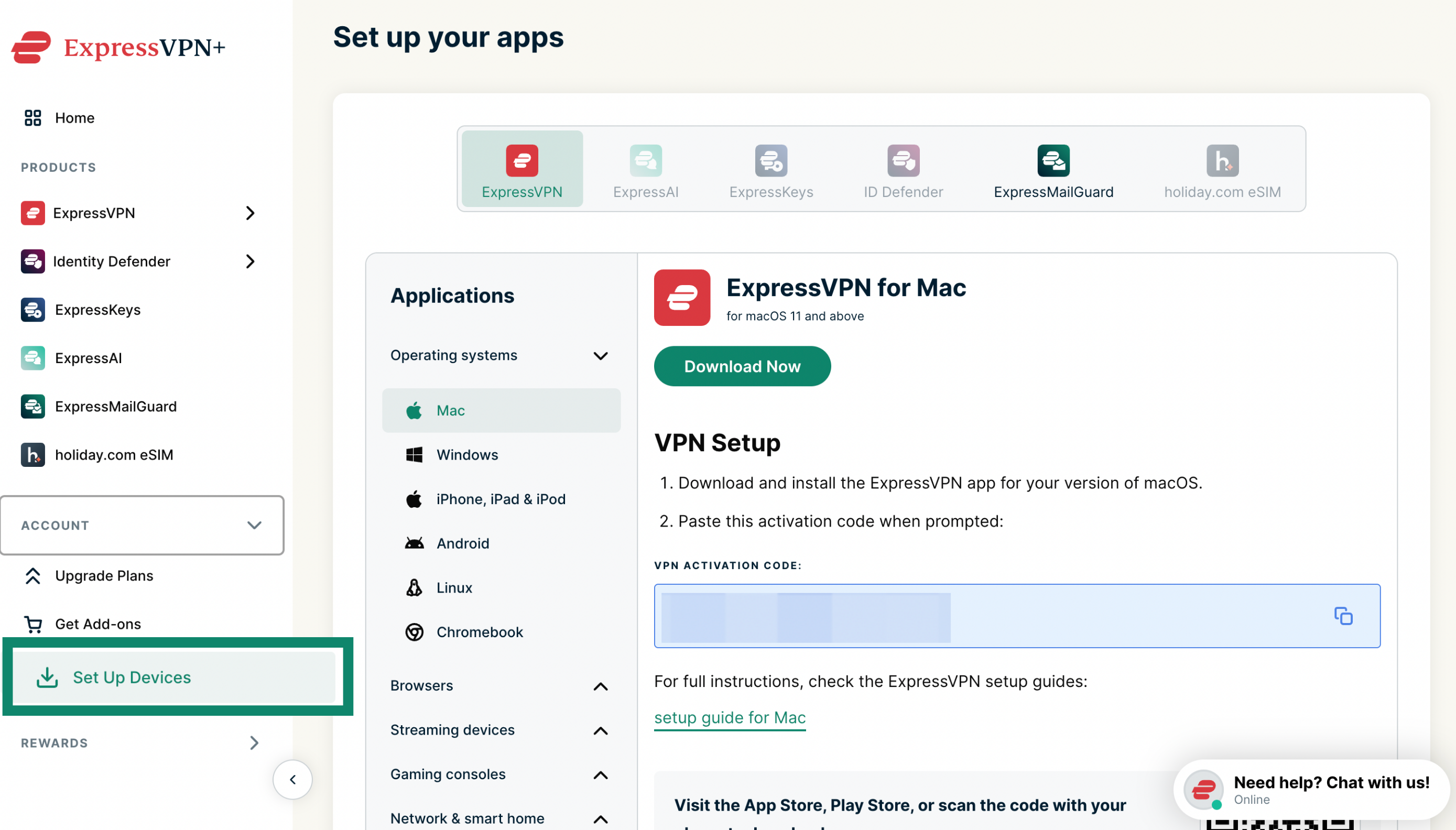
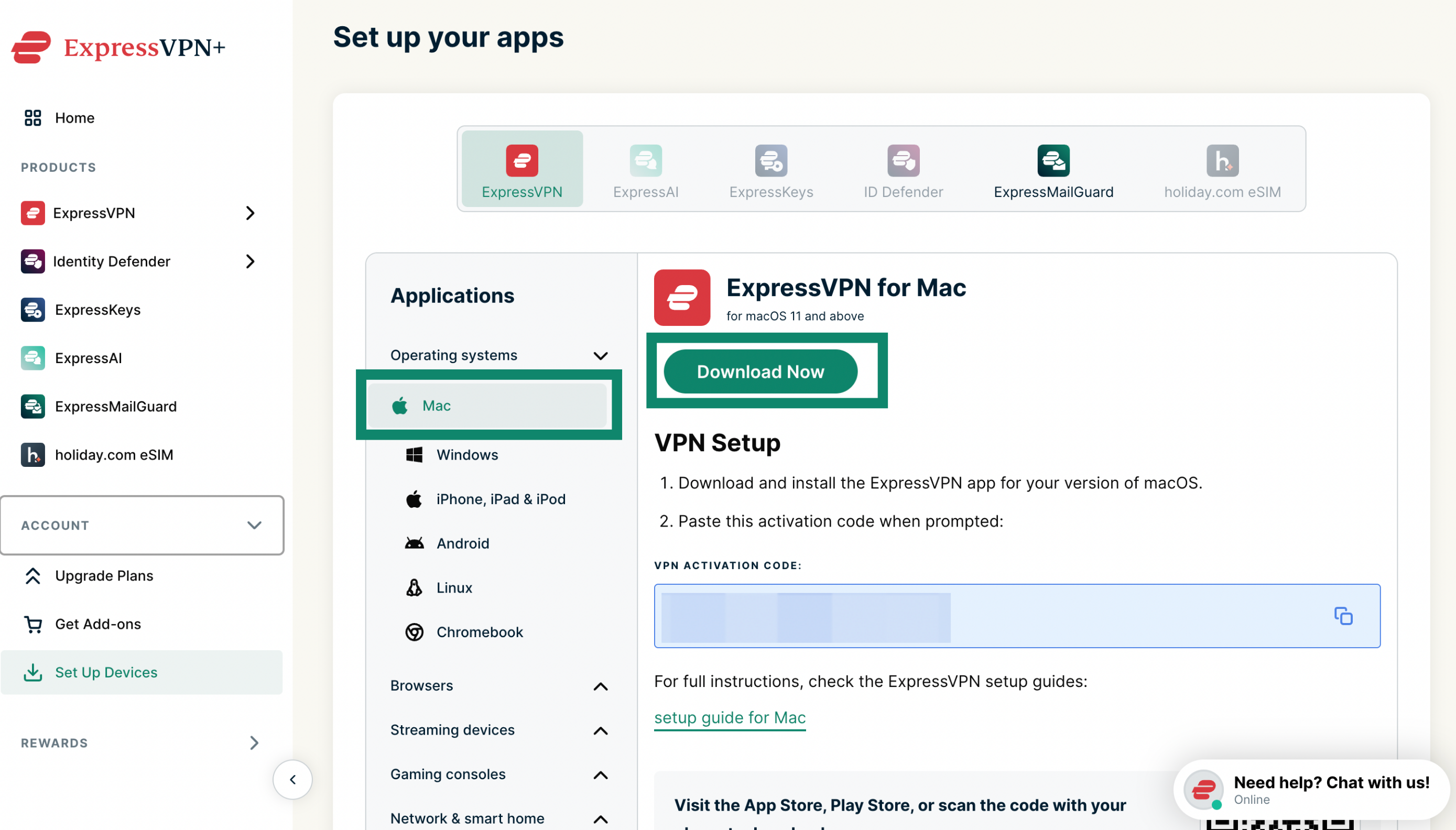
2. VPN 앱 다운로드하기

다운로드 버튼을 클릭하여 운영 체제에 맞는 ExpressVPN 앱을 다운로드 받으세요.

In your account dashboard, click "Download for Mac."

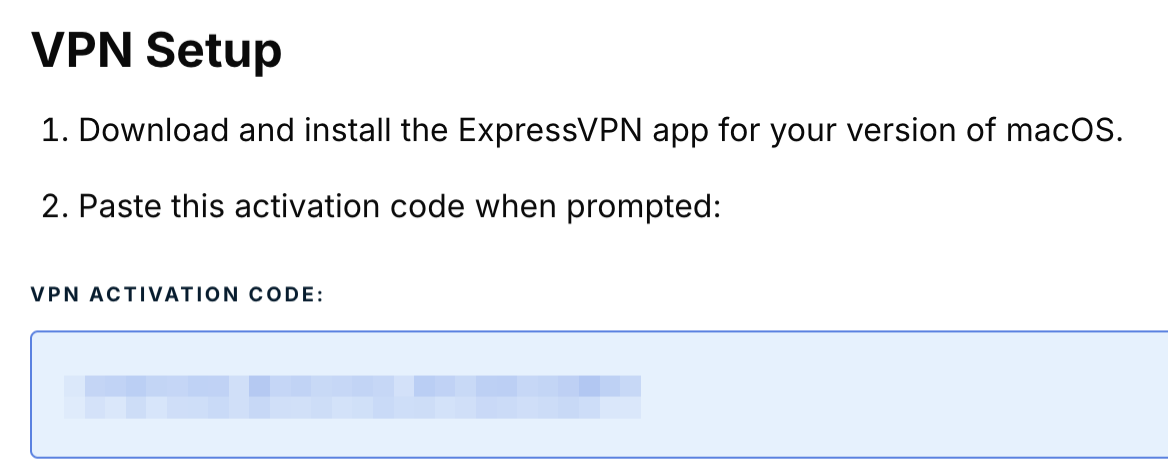
이 브라우저 창을 열어두세요. 나중에 설치 시 이 활성화 코드가 필요합니다.

Click the activation code in the box to copy it to your clipboard.

3. VPN 앱 설치하기

고객님의 기기에 해당하는 단계별 가이드를 참고하세요.

  • Windows용 ExpressVPN
  • Mac용 ExpressVPN
  • Linux용 ExpressVPN

도움이 필요하신가요? ExpressVPN 지원팀에 연락하여 즉시 도움을 받으세요.

위로 이동


Android에 ExpressVPN 다운로드 및 설치하기

다음 단계는 Android 모바일 기기 및 Chromebook과 같은 Android 기반 기기에서 적용됩니다.

1. VPN 앱 다운로드하기

Google Play Store 또는 Galaxy Store에서 ExpressVPN을 검색하세요. 설치를 탭하세요.

중요: Android 모바일 기기에서 Google Play Store 또는 Galaxy Store에 액세스할 수 없는 경우, 기기에 APK를 바로 다운로드하세요.

2. VPN 앱 설치하기

Android용 ExpressVPN 설치 가이드를 참고하세요.

도움이 필요하신가요? ExpressVPN 지원팀에 연락하여 즉시 도움을 받으세요.

위로 이동


iOS에 ExpressVPN 다운로드 및 설치하기

1. VPN 앱 다운로드하기

App Store에서 ExpressVPN을 검색하세요. 열기를 탭하세요.

Tap "GET."

중요: App Store에서 ExpressVPN을 찾을 수 없는 경우, ExpressVPN을 다운로드하기 위해 App Store 국가를 변경해야 할 수 있습니다.

2. VPN 앱 설치하기

iOS용 ExpressVPN 설치 가이드를 참고하세요.

도움이 필요하신가요? ExpressVPN 지원팀에 연락하여 즉시 도움을 받으세요.

위로 이동


라우터에 ExpressVPN 다운로드 및 설치하기

중요: 라우터용 ExpressVPN은 Asus, Linksys, Netgear 라우터와 호환됩니다.

호환되는 라우터 모델을 사용하는 경우, 해당 모델에 ExpressVPN을 다운로드하고 설치하는 방법을 알아보세요.

도움이 필요하신가요? ExpressVPN 지원팀에 연락하여 즉시 도움을 받으세요.

위로 이동


모든 기기에서 ExpressVPN에 로그인하는 방법

기기에서 ExpressVPN에 로그인하려면 다음 정보가 필요합니다.

  • 이메일 주소
  • 활성화 코드(Windows, Mac, 라우터용 ExpressVPN 앱에 대한 활성화 코드)

ExpressVPN 앱을 활성화하는 데 문제가 있다면 이 문제 해결 가이드를 참고하세요.

도움이 필요하신가요? ExpressVPN 지원팀에 연락하여 즉시 도움을 받으세요.

위로 이동

Share in FacebookShare in TwitterShare in WhatsappShare in TelegramShare by email
이 글이 도움이 되었나요?

죄송합니다. 저희가 어떻게 개선할 수 있을지 알려주세요.

Please enter a valid email address.

저희 지원팀이 문제를 처리할 것입니다.

Share in FacebookShare in TwitterShare in WhatsappShare in TelegramShare by email
  • 멀웨어란?
  • 네트워크 보안 키란?
  • VPN은 합법일까요?
  • 아이폰에서 위치 변경하는 방법
  • 디지털 발자국이란?
  • 온라인 익명성을 위해 VPN과 Tor 결합하는 방법
  • 다수 기기에서 최고의 VPN 사용하기
모든 기기를 위한 VPN
  • ExpressVPN 다운로드
  • 맥OS
  • 윈도우 컴퓨터
  • iOS (아이폰 & 아이패드)
  • 안드로이드
  • 리눅스
  • Aircove 공유기
  • 애플 TV
  • 파이어스틱
  • 안드로이드 TV
  • 크롬 확장 프로그램
VPN 서버
  • 105개국 서버 위치
  • 미국 VPN
  • 영국 VPN
  • 캐나다 VPN
  • 호주 VPN
기능
  • 모든 기능 살펴보기
  • 부담 없는 VPN 체험
  • 요금제 및 가격
제품
  • ExpressKeys
  • ExpressMailGuard
  • ExpressAI
ExpressVPN 소개
  • 회사 소개
  • 트러스트 센터
  • 권리 센터
  • 보안 감사
  • ExpressVPN 후기
  • 내부 전문가
  • 언론 보도
  • 채용
프로그램
  • 토트넘 홋스퍼 FC
  • Brooklyn Nets
  • 파트너십 제안
  • 제휴
  • 인플루언서
지원
  • VPN 설치 튜토리얼
  • 자주 묻는 질문
  • VPN 구매
더 보기
  • VPN이란?
  • 내 IP 확인
  • 내 IP 숨기기
  • VPN 사용법 Top 5
  • 블로그

© 2026 ExpressVPN. 모든 권리 보유.

  • 개인 정보 보호 정책
  • 서비스 약관
  • 쿠키 기본 설정

언어 선택

  • English
  • Dansk
  • Deutsch
  • Español
  • Français
  • Italiano
  • Nederlands
  • Norsk
  • Polski
  • Português
  • Suomi
  • Svenska
  • Türkçe
  • Русский
  • ภาษาไทย
  • 日本語

Live chat

Need help? Chat with us!

Online