
ExpressVPN
    • ノーログポリシー
    • Servers in 105 Countries
    • Use on Multiple Devices
    • High-Speed VPN
    • Access Online Services Securely
    • ゲームに最適なVPN
    • 30-Day Money-Back Guarantee
    • 全ての機能を見る
    • ExpressVPNについて
    Sign Up For Expressvpn

    One subscription gives you access to a fast-growing suite of privacy and security tools that work seamlessly together to improve your digital life.

    View all products
    • Lightway VPNプロトコル
    • Internet Kill Switch
    • スプリットトンネル
    • Private, Encrypted DNS
    • Avoid ISP Throttling
    • Threat Manager
    • 広告ブロッカー
    • ペアレンタルコントロール
    • 固定IP
  • VPNのダウンロード
    • Windows new
    • MacOS new
    • Linux new
    • iPhone / iPad
    • Android
    • Apple TV
    • Fire Stick
    • Android TV
    • ルーター版VPN
    • Aircoveルーター
    • Chrome
    • Firefox
    • Edge
  • Pricing
    • VPNとは?
    • VPN for Beginners
    • How To Use a VPN
    • VPN Encryption Explained
    • ブログ
    • Glossary
    • IP Address Checker
    • DNS漏洩テスト
    • WebRTC漏洩テスト
    • パスワード生成
    • サポートセンター
    • よくある質問 (FAQ)
    • ライブチャット
    • VPN設定方法
    • Redemption Code
  • Icon10VPN for Teams
  • プロダクト
    Icon11

    ExpressVPN for Teams Get fast, secure VPN protection for growing teams. Easy to deploy, simple to manage, built to scale.

    Img2
    • ExpressVPN

      ExpressVPN Industry-leading, ultra-fast VPN with secure servers in 105 countries.

    • ExpressMailGuard

      ExpressMailGuard Private email relay service to protect your inbox and identity.

    • ExpressKeys

      ExpressKeys Secure password management, multi-factor authentication, and more.

    • ExpressAI

      ExpressAI The first consumer AI powered by confidential computing for privacy-led intelligence.

    • Identity Defender

      Identity Defender Powerful suite of ID protection, monitoring, and data removal tools

    Other products from the family behind ExpressVPN

    • holiday.com eSIM

      holiday.com eSIM Unlimited data with a single eSIM across 150+ destinations.

    • Intego

      Intego Award-winning macOS antivirus, firewall, system tools, and more.

  • マイアカウント
プランを見る
ExpressVPN
    • ノーログポリシー
    • Servers in 105 Countries
    • Use on Multiple Devices
    • High-Speed VPN
    • Access Online Services Securely
    • ゲームに最適なVPN
    • 30-Day Money-Back Guarantee
    • 全ての機能を見る
    • ExpressVPNについて
    Sign Up For Expressvpn

    One subscription gives you access to a fast-growing suite of privacy and security tools that work seamlessly together to improve your digital life.

    View all products
    • Lightway VPNプロトコル
    • Internet Kill Switch
    • スプリットトンネル
    • Private, Encrypted DNS
    • Avoid ISP Throttling
    • Threat Manager
    • 広告ブロッカー
    • ペアレンタルコントロール
    • 固定IP
  • VPNのダウンロード
    • Windows new
    • MacOS new
    • Linux new
    • iPhone / iPad
    • Android
    • Apple TV
    • Fire Stick
    • Android TV
    • ルーター版VPN
    • Aircoveルーター
    • Chrome
    • Firefox
    • Edge
  • Pricing
    • VPNとは?
    • VPN for Beginners
    • How To Use a VPN
    • VPN Encryption Explained
    • ブログ
    • Glossary
    • IP Address Checker
    • DNS漏洩テスト
    • WebRTC漏洩テスト
    • パスワード生成
    • サポートセンター
    • よくある質問 (FAQ)
    • ライブチャット
    • VPN設定方法
    • Redemption Code
  • VPN for Teams
  • プロダクト
    • ExpressVPN

      ExpressVPN Industry-leading, ultra-fast VPN with secure servers in 105 countries.

    • ExpressMailGuard

      ExpressMailGuard Private email relay service to protect your inbox and identity.

    • ExpressKeys

      ExpressKeys Secure password management, multi-factor authentication, and more.

    • ExpressAI

      ExpressAI The first consumer AI powered by confidential computing for privacy-led intelligence.

    • Identity Defender

      Identity Defender Powerful suite of ID protection, monitoring, and data removal tools

    Other products from the family behind ExpressVPN

    • holiday.com eSIM

      holiday.com eSIM Unlimited data with a single eSIM across 150+ destinations.

    • Intego

      Intego Award-winning macOS antivirus, firewall, system tools, and more.

    Icon11

    ExpressVPN for Teams Get fast, secure VPN protection for growing teams. Easy to deploy, simple to manage, built to scale.

    Img2
  • マイアカウント
プランを見る
Home Home » お使いのルーターのデフォルトサインイン詳細情報の確認方法

ナレッジハブ

お使いのルーターのデフォルトサインイン詳細情報の確認方法

最終更新: 2025/10/01

Share in FacebookShare in TwitterShare in WhatsappShare in TelegramShare by email

弊社のアプリと設定を使用するには、まずExpressVPNアカウントに登録してください。

このガイドでは、Asus、Linksys、Netgear、およびExpressVPN Aircoveルーターのデフォルトのサインイン情報の見つけ方をご紹介します。

目次

Asus
Linksys
Netgear
ExpressVPN Aircove
ExpressVPN Aircove Go


Asus

デフォルトのネットワーク名とパスワード

Asusルーターの底面にある2.4GHz SSIDおよび5GHz SSIDの横に、デフォルトのネットワーク名が表示されています。
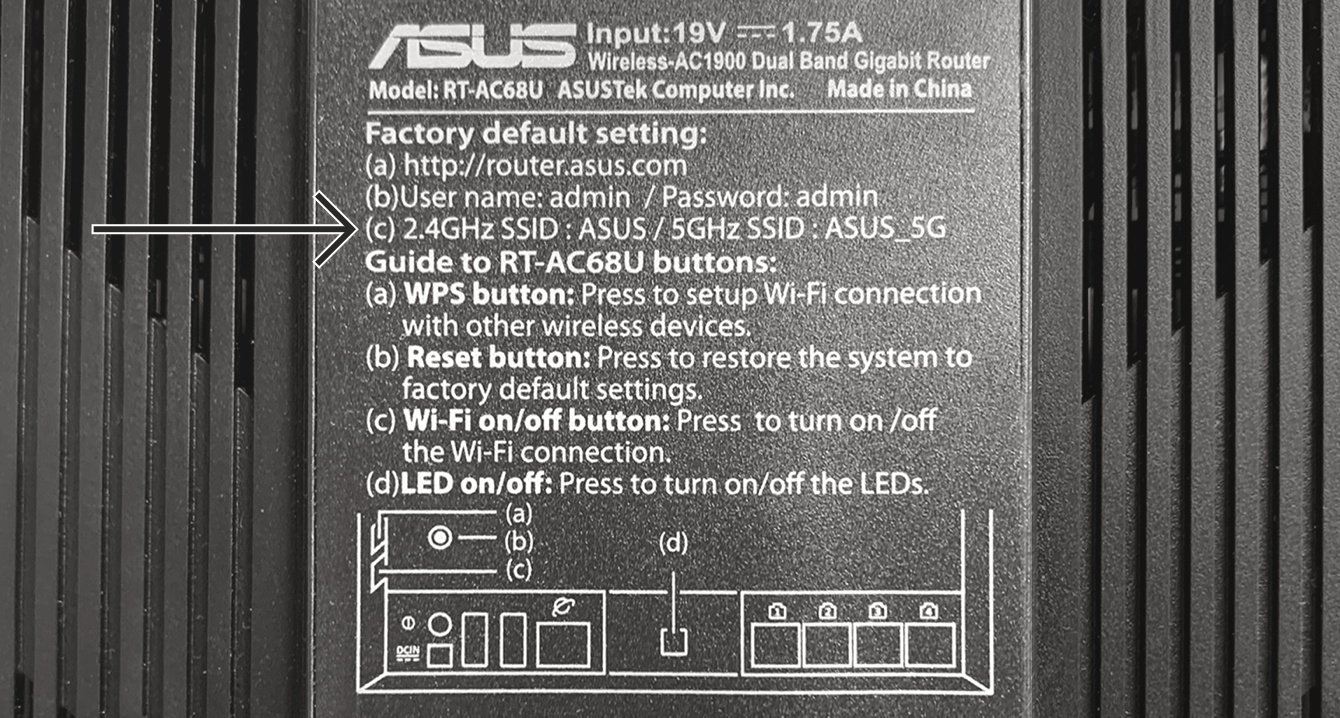
デフォルトのネットワーク名は、Asusルーターの底面に記載されています。
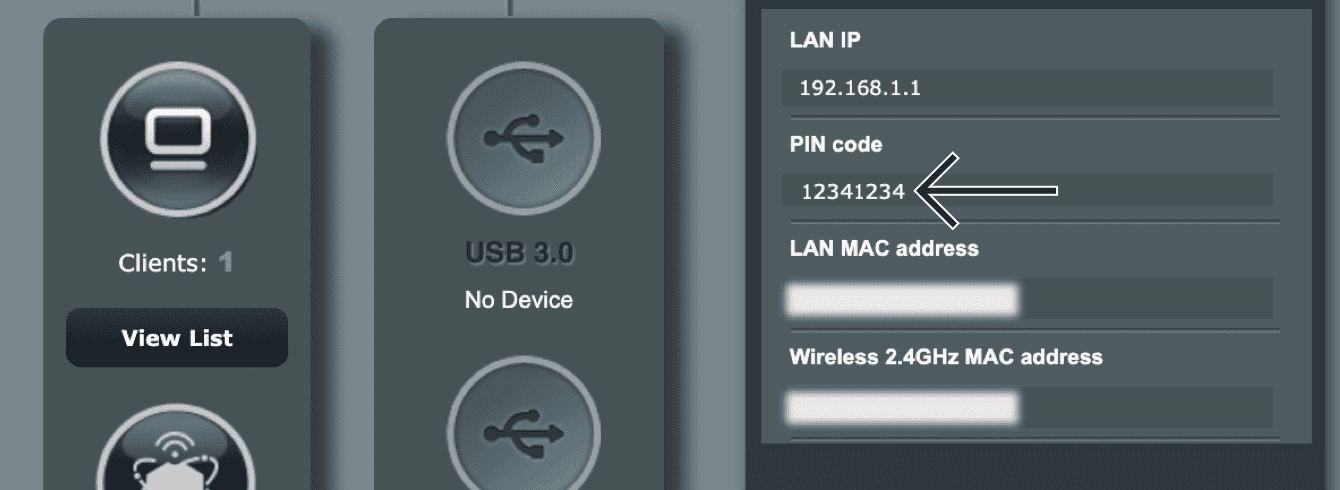
またPIN CODEの隣には、デフォルトのネットワークパスワードが記載されています。この情報は、別のラベルに記載されている場合もありますので、ご注意ください。

デフォルトのネットワークパスワードは、Asusルーターの別のラベルに記載されています。

PINコードがルーターに記載されていない場合は、Asusルーターの設定から確認できます。

  1. Asusルーター設定にアクセスするには、ブラウザのアドレスバーに192.168.1.1を入力します(ルーターのIPアドレスを過去に変更していて、覚えていない場合は、お使いのデバイス設定から確認できます)
  2. PINコード欄に、デフォルトのネットワークパスワードが記載されています

デフォルトのネットワークパスワードは、「PINコード」に記載されています。

ルーター設定にアクセスできない場合は、ルーターを工場出荷時の設定に戻して、ネットワークパスワードを再設定してください。

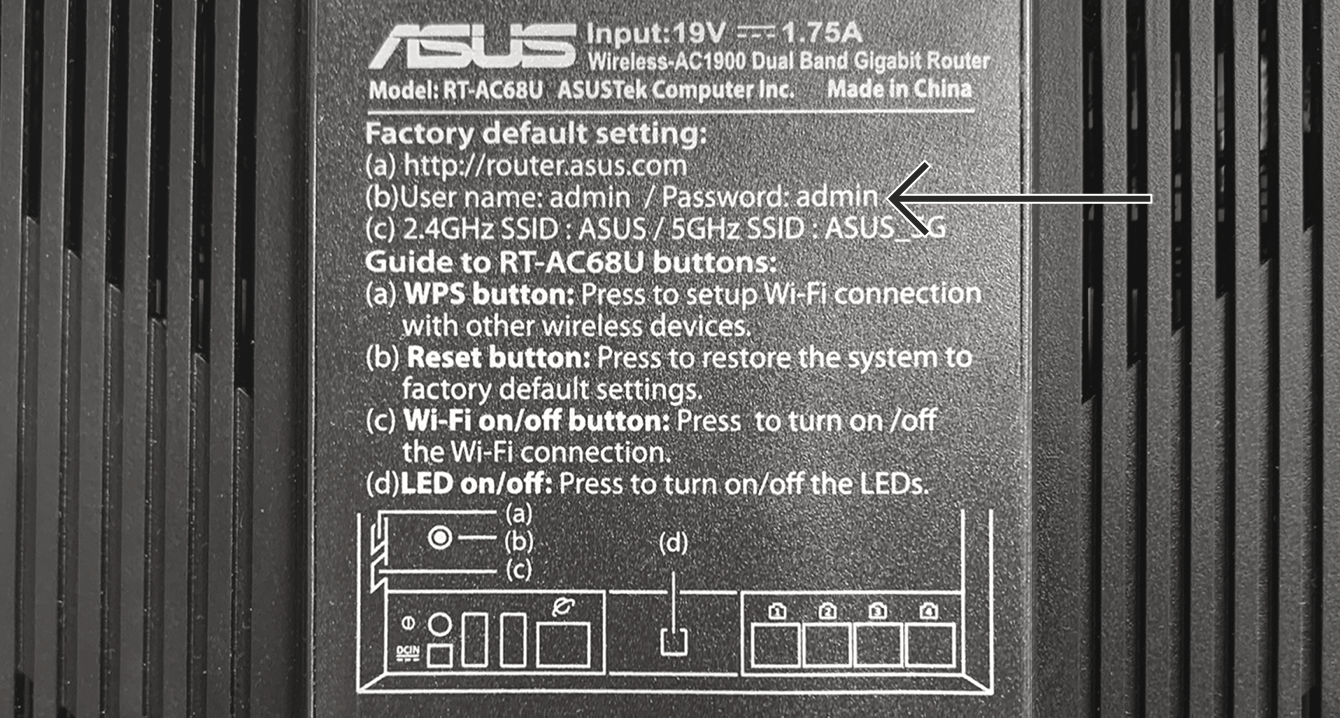
デフォルトのルーター管理者パスワード

ExpressVPNルーター管理画面にサインインする際、ルーター管理者パスワードを入力するよう求められます。

デフォルトのルーター管理者パスワードは、Asusルーター底面に記載されています。

デフォルトのルーター管理者パスワードは、Asusルーターの底面に記載されています。

ヘルプが必要ですか?ExpressVPNサポートチームに問い合わせを行い、迅速なサポートを受けましょう。

トップに戻る


Linksys

デフォルトのネットワーク名とパスワード

デフォルトのネットワーク名は、Linksysルーターの底面のWireless Network横に記載されています。
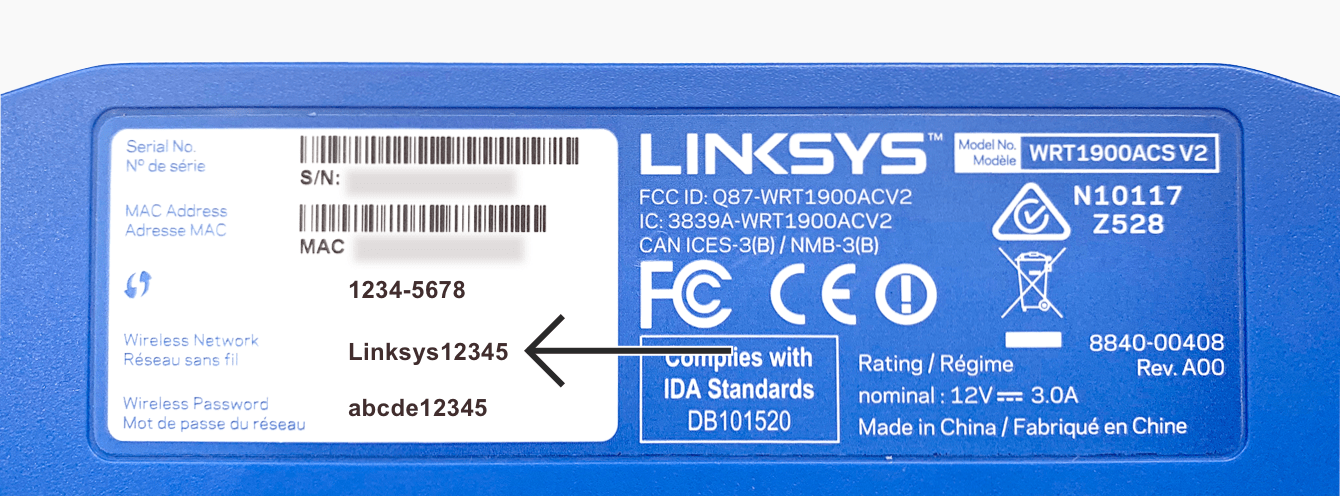
デフォルトのネットワーク名は、Linksysルーターの底面に記載されています。

また、同じシールのWireless Password横に、デフォルトのネットワークパスワードが記載されています。
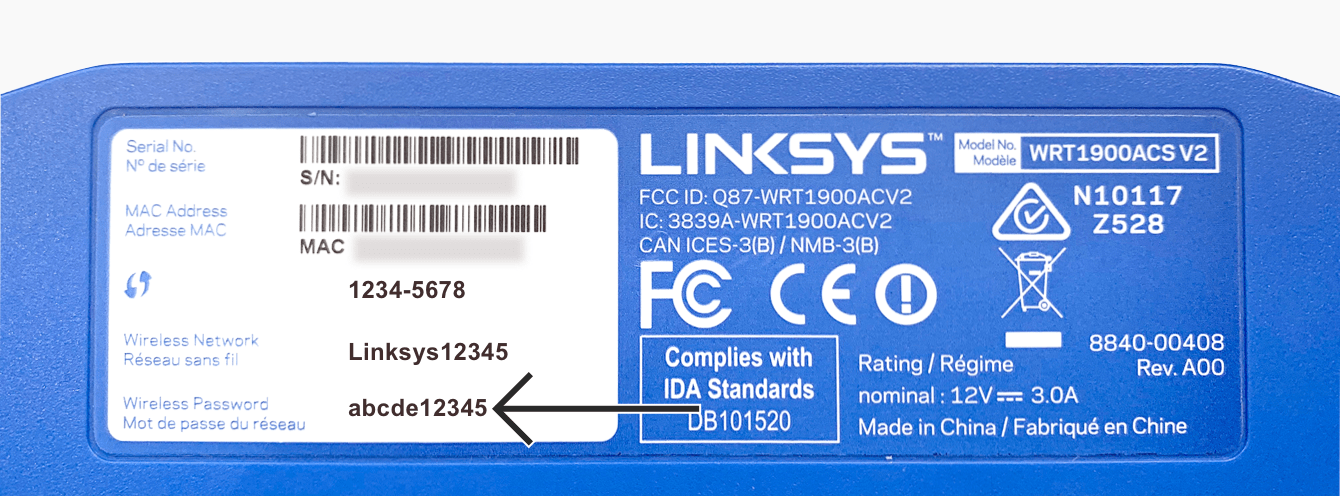
デフォルトのネットワークパスワードは、Linksysルータの底面に記載されています。

デフォルトのルーター管理者パスワード

ExpressVPNルーター管理画面にサインインする際、ルーター管理者パスワードを入力するよう求められます。

デフォルトのルーター管理者パスワードは、Linksysルーター底面に記載されています。
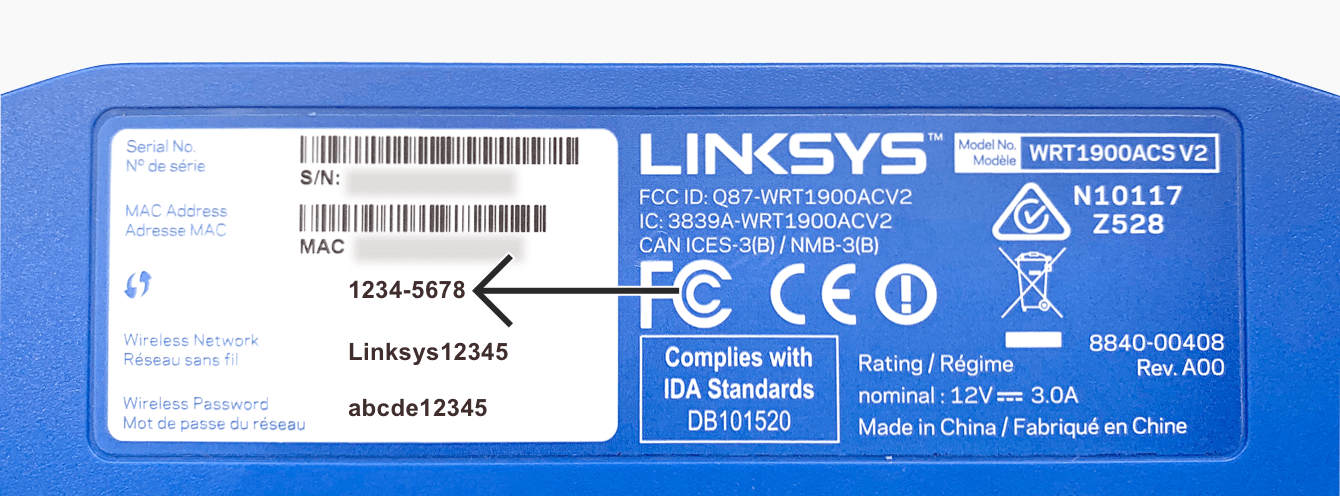
デフォルトのルーター管理者パスワードは、Linksysルーターの底面に記載されています。

ヘルプが必要ですか?ExpressVPNサポートチームに問い合わせを行い、迅速なサポートを受けましょう。

トップに戻る


Netgear

デフォルトのネットワーク名とパスワード

デフォルトのネットワーク名は、Netgearルーター底面のWiFi Network Name(SSID)欄に記載されています。
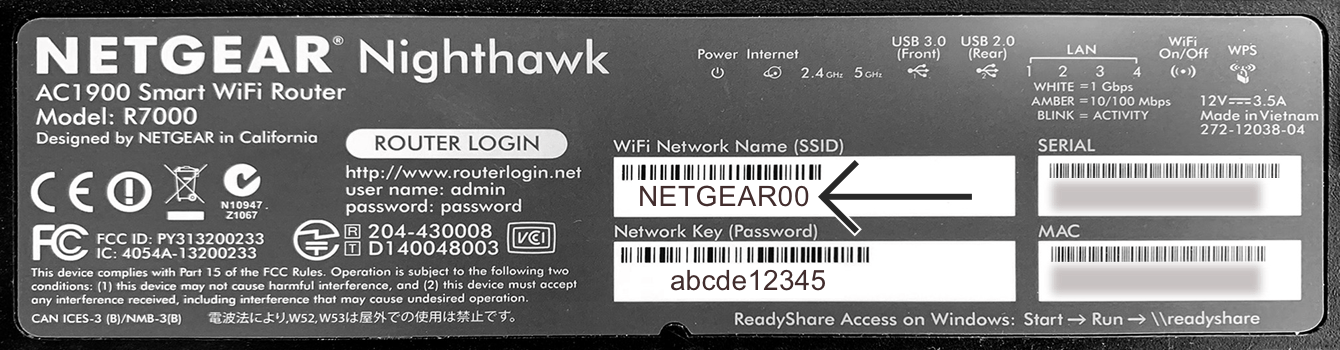
デフォルトのネットワーク名は、Netgearルーターの底面に記載されています。

また、同じシールのNetwork Key(Password)欄には、デフォルトのネットワークパスワードが記載されています。
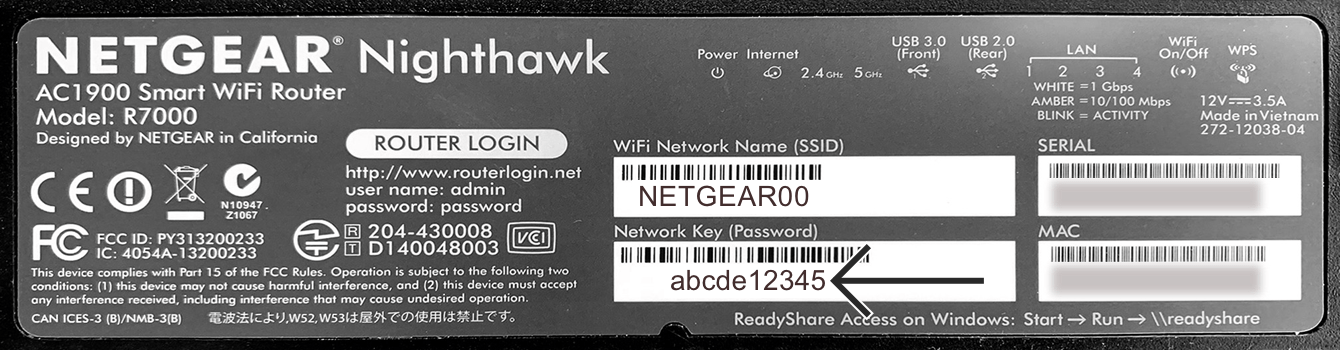
デフォルトのネットワークパスワードは、Netgearルーターの底面に記載されています。

デフォルトのルーター管理者パスワード

ExpressVPNルーター管理画面にサインインする際、ルーター管理者パスワードを入力するよう求められます。

デフォルトのルーター管理者パスワードは、Netgearルーター底面のパスワード横に記載されています。
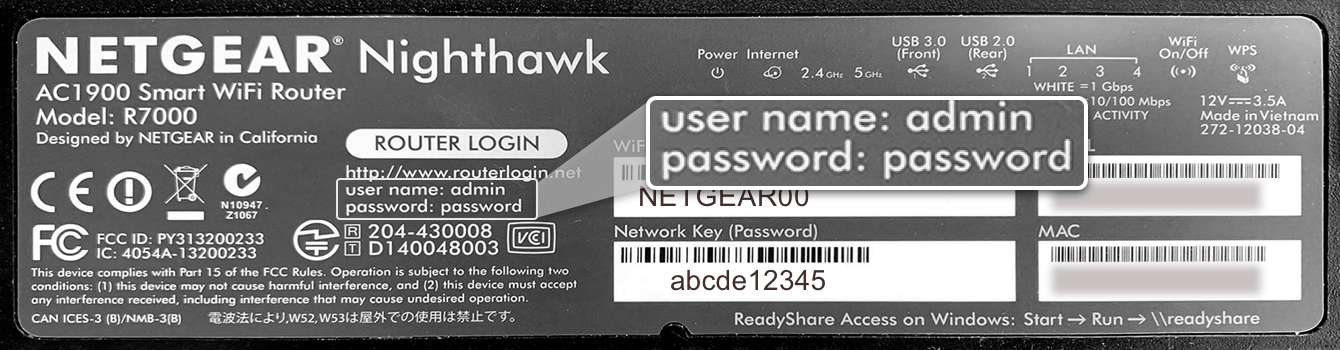
デフォルトのルーター管理者パスワードは、Netgearルーターの底面に記載されています。

ヘルプが必要ですか?ExpressVPNサポートチームに問い合わせを行い、迅速なサポートを受けましょう。

トップに戻る


ExpressVPN Aircove

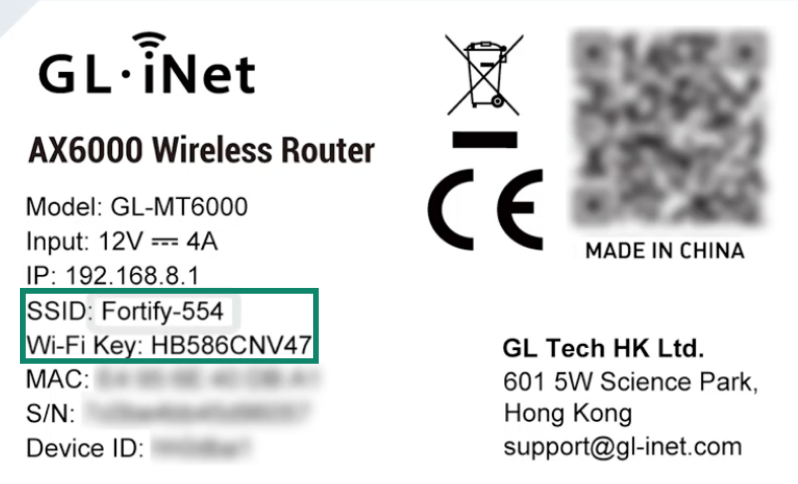
デフォルトのWi-Fi名とパスワードは、Aircoveルーターの底面に記載されています。


Wi-FIにログイン後、expressvpnrouter.comにアクセスして、ルーターのWi-Fiと管理者パスワードを設定します。

ヘルプが必要ですか?ExpressVPNサポートチームに問い合わせを行い、迅速なサポートを受けましょう。

トップに戻る


ExpressVPN Aircove Go

デフォルトのWi-Fi名とパスワードは、Aircove Goの底面に記載されています。

Wi-FIにログイン後、expressvpnrouter.comにアクセスして、ルーターのWi-Fiと管理者パスワードを設定します。

ヘルプが必要ですか?ExpressVPNサポートチームに問い合わせを行い、迅速なサポートを受けましょう。

トップに戻る

Share in FacebookShare in TwitterShare in WhatsappShare in TelegramShare by email
この記事は役立ちましたか?

ご不便をおかけして申し訳ございません。よろしければ、今後の改善策をお聞かせください。

Please enter a valid email address.

サポートチームのメンバーがこの問題についてフォローアップいたします。

Share in FacebookShare in TwitterShare in WhatsappShare in TelegramShare by email
  • マルウェアとは?
  • ネットワークセキュリティキーとは?
  • VPNは合法ですか?
  • iPhoneで国を変更する方法
  • デジタルフットプリントとは?
  • VPNとTorを併用してネット上で匿名性を守る方法
  • 複数のデバイスに最適なVPNを入手
各デバイス対応のVPN
  • ExpressVPNのダウンロード
  • MacOS
  • Windows PC
  • iOS (iPhone & iPad)
  • Android
  • Linux
  • ルーター
  • Apple TV
  • Fire Stick
  • Android TV
  • Chrome拡張機能
VPNサーバーロケーション
  • 105ヶ国のサーバー
  • アメリカ対応VPN
  • イギリス対応VPN
  • カナダ対応VPN
  • オーストラリア対応VPN
特徴
  • 全ての機能を見る
  • VPNトライアル
  • プランと価格
プロダクト
  • ExpressKeys
  • ExpressMailGuard
  • ExpressAI
ExpressVPNについて
  • 弊社について
  • 信頼できるVPNへの取り組み
  • デジタルの権利
  • セキュリティ監査
  • ExpressVPNのレビュー
  • 弊社のエキスパートたち
  • プレス
  • 採用
プログラム
  • トッテナム・ホットスパー
  • Brooklyn Nets
  • パートナー
  • アフィリエイト
  • インフルエンサー
サポート
  • VPN設定方法
  • よくある質問 (FAQ)
  • VPNを購入する
詳しく知る
  • VPNとは?
  • 自分のIPを確認する
  • 私のIPを隠す
  • VPN用途トップ5
  • ブログ

© 2026 ExpressVPN. All rights reserved.(無断転載および引用禁止)

  • プライバシーポリシー
  • 利用規約
  • Cookieの設定

言語を選択してください

  • English
  • Dansk
  • Deutsch
  • Español
  • Français
  • Italiano
  • Nederlands
  • Norsk
  • Polski
  • Português
  • Suomi
  • Svenska
  • Türkçe
  • Русский
  • ภาษาไทย
  • 한국어

Live chat

Need help? Chat with us!

Online