ExpressVPN
    • Politica No-log
    • Servers in 113 Countries
    • Use on Multiple Devices
    • High-Speed VPN
    • Access Online Services Securely
    • VPN per il gaming
    • Esplora tutte le caratteristiche
    • Informazioni su ExpressVPN
    Sign Up For Expressvpn

    One subscription gives you access to a fast-growing suite of privacy and security tools that work seamlessly together to improve your digital life.

    View all products
    • Protocollo VPN Lightway
    • Internet Kill Switch
    • Split-tunneling
    • Private, Encrypted DNS
    • Avoid ISP Throttling
    • Threat Manager
    • Blocco degli annunci
    • Controlli parentali
    • IP dedicato
  • Download VPN
    • Windows new
    • MacOS new
    • Linux new
    • iPhone / iPad
    • Android
    • Apple TV
    • Fire Stick
    • Android TV
    • VPN per router
    • Aircove Router
    • Chrome
    • Firefox
    • Edge
  • Pricing
    • VPN: cos’è?
    • VPN for Beginners
    • How To Use a VPN
    • VPN Encryption Explained
    • Blog
    • Glossary
    • IP Address Checker
    • Test di esposizione del DNS
    • Test di esposizione di WebRTC
    • Generatore di password
    • Centro di supporto
    • FAQ
    • Chat dal vivo
    • Tutorial installazione VPN
    • Redemption Code
  • Icon10VPN for Teams
  • Prodotti
    Icon11

    ExpressVPN for Teams Get fast, secure VPN protection for growing teams. Easy to deploy, simple to manage, built to scale.

    Img2
    • ExpressVPN

      ExpressVPN Industry-leading, ultra-fast VPN with secure servers in 113 countries.

    • ExpressMailGuard

      ExpressMailGuard Private email relay service to protect your inbox and identity.

    • ExpressKeys

      ExpressKeys Secure password management, multi-factor authentication, and more.

    • ExpressAI

      ExpressAI The first consumer AI powered by confidential computing for privacy-led intelligence.

    • Identity Defender

      Identity Defender Powerful suite of ID protection, monitoring, and data removal tools

    Other products from the family behind ExpressVPN

    • holiday.com eSIM

      holiday.com eSIM Unlimited data with a single eSIM across 150+ destinations.

    • Intego

      Intego Award-winning macOS antivirus, firewall, system tools, and more.

  • Il mio account
Abbonati qui
ExpressVPN
    • Politica No-log
    • Servers in 113 Countries
    • Use on Multiple Devices
    • High-Speed VPN
    • Access Online Services Securely
    • VPN per il gaming
    • Esplora tutte le caratteristiche
    • Informazioni su ExpressVPN
    Sign Up For Expressvpn

    One subscription gives you access to a fast-growing suite of privacy and security tools that work seamlessly together to improve your digital life.

    View all products
    • Protocollo VPN Lightway
    • Internet Kill Switch
    • Split-tunneling
    • Private, Encrypted DNS
    • Avoid ISP Throttling
    • Threat Manager
    • Blocco degli annunci
    • Controlli parentali
    • IP dedicato
  • Download VPN
    • Windows new
    • MacOS new
    • Linux new
    • iPhone / iPad
    • Android
    • Apple TV
    • Fire Stick
    • Android TV
    • VPN per router
    • Aircove Router
    • Chrome
    • Firefox
    • Edge
  • Pricing
    • VPN: cos’è?
    • VPN for Beginners
    • How To Use a VPN
    • VPN Encryption Explained
    • Blog
    • Glossary
    • IP Address Checker
    • Test di esposizione del DNS
    • Test di esposizione di WebRTC
    • Generatore di password
    • Centro di supporto
    • FAQ
    • Chat dal vivo
    • Tutorial installazione VPN
    • Redemption Code
  • VPN for Teams
  • Prodotti
    • ExpressVPN

      ExpressVPN Industry-leading, ultra-fast VPN with secure servers in 113 countries.

    • ExpressMailGuard

      ExpressMailGuard Private email relay service to protect your inbox and identity.

    • ExpressKeys

      ExpressKeys Secure password management, multi-factor authentication, and more.

    • ExpressAI

      ExpressAI The first consumer AI powered by confidential computing for privacy-led intelligence.

    • Identity Defender

      Identity Defender Powerful suite of ID protection, monitoring, and data removal tools

    Other products from the family behind ExpressVPN

    • holiday.com eSIM

      holiday.com eSIM Unlimited data with a single eSIM across 150+ destinations.

    • Intego

      Intego Award-winning macOS antivirus, firewall, system tools, and more.

    Icon11

    ExpressVPN for Teams Get fast, secure VPN protection for growing teams. Easy to deploy, simple to manage, built to scale.

    Img2
  • Il mio account
Abbonati qui
Home Home » Come trovare le tue credenziali per la configurazione manuale

Gestisci il tuo account

Come trovare le tue credenziali per la configurazione manuale

Ultimo aggiornamento: 11/09/2026

Share in FacebookShare in TwitterShare in WhatsappShare in TelegramShare by email
Get started with ExpressVPN.
Cosa può fare una VPN?
Mostra

Learn about five ways to use ExpressVPN.
5 modi per utilizzare la tua VPN
Vedi adesso

I dispositivi incompatibili con l’app ExpressVPN potranno essere configurati manualmente per consentire l’esecuzione di una VPN. Questa guida ti spiegherà come trovare le credenziali e gli indirizzi dei server necessari per la configurazione manuale.

Per trovare le credenziali necessarie per la configurazione manuale della VPN:

  1. Vai alla pagina dedicata alla configurazione manuale di ExpressVPN.
    1. Se richiesto, inserisci il tuo indirizzo e-mail e seleziona Send Code (invia codice)ExpressVPN's Sign in page on desktop.
    2. Inserisci il codice di verifica inviato alla tua e-mail, quindi seleziona Continue (Continua)ExpressVPN's Verification Needed page on desktop.
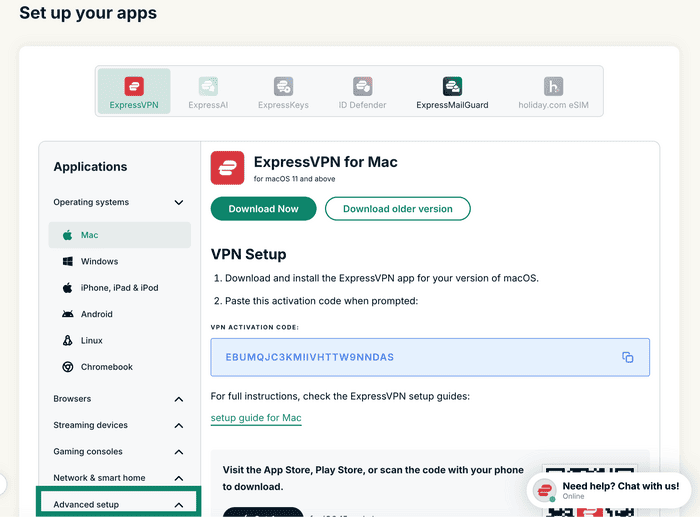
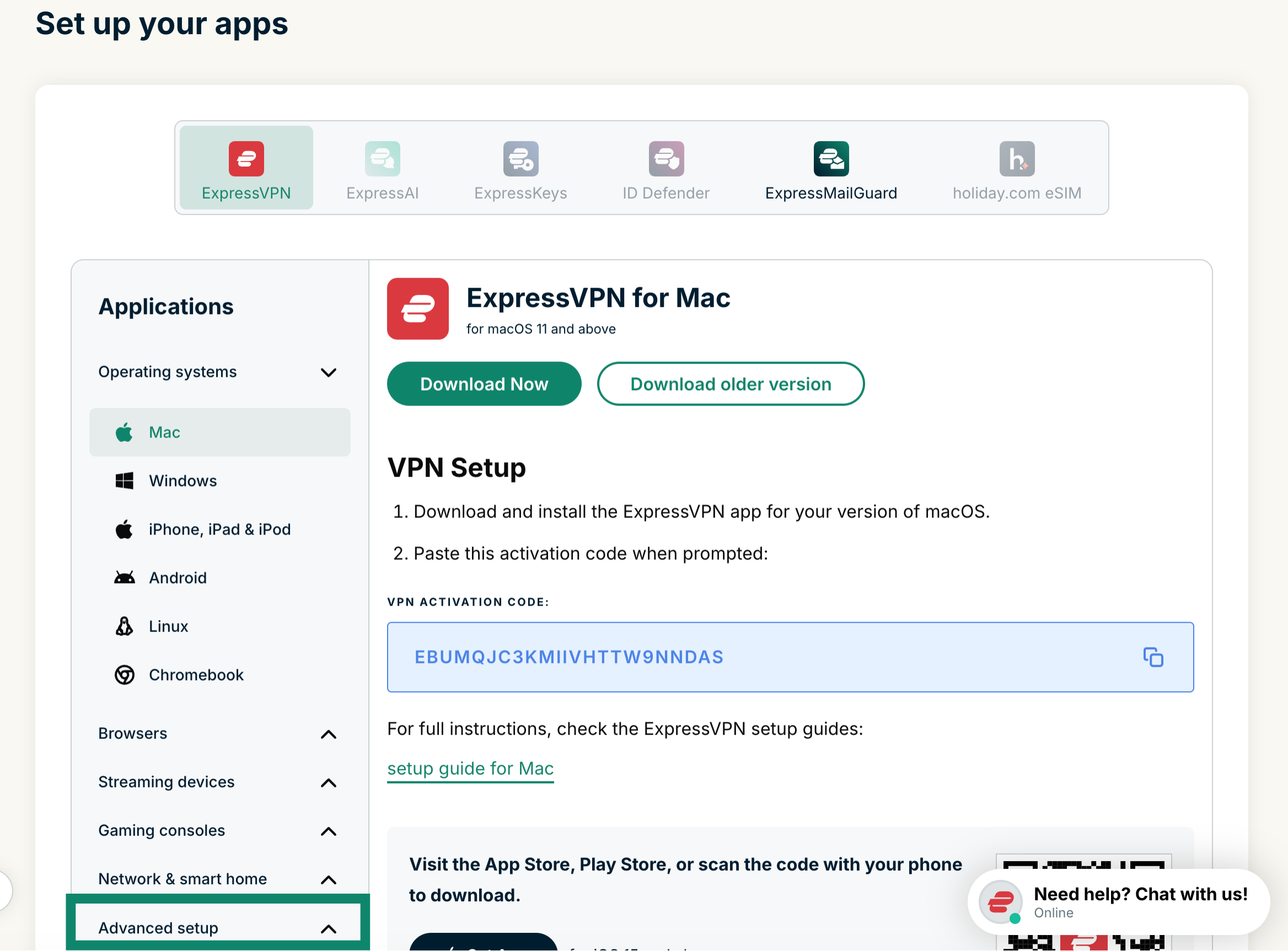
  2. Clicca su Advanced setup (configurazione avanzata) nel menu Applicazioni.The "Set up your apps" page in ExpressVPN+, with a highlighted "Advanced setup" option at the bottom.
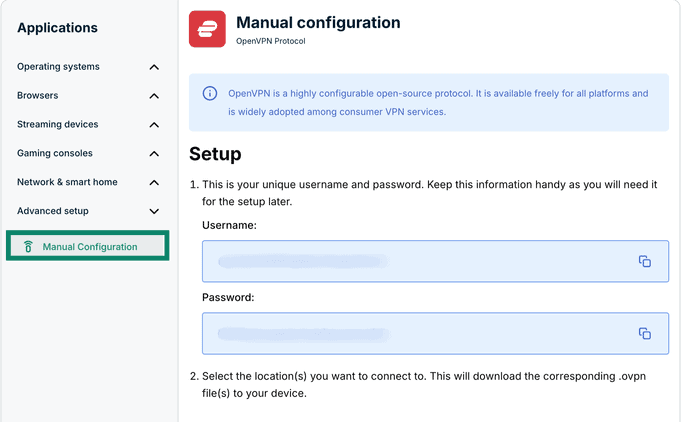
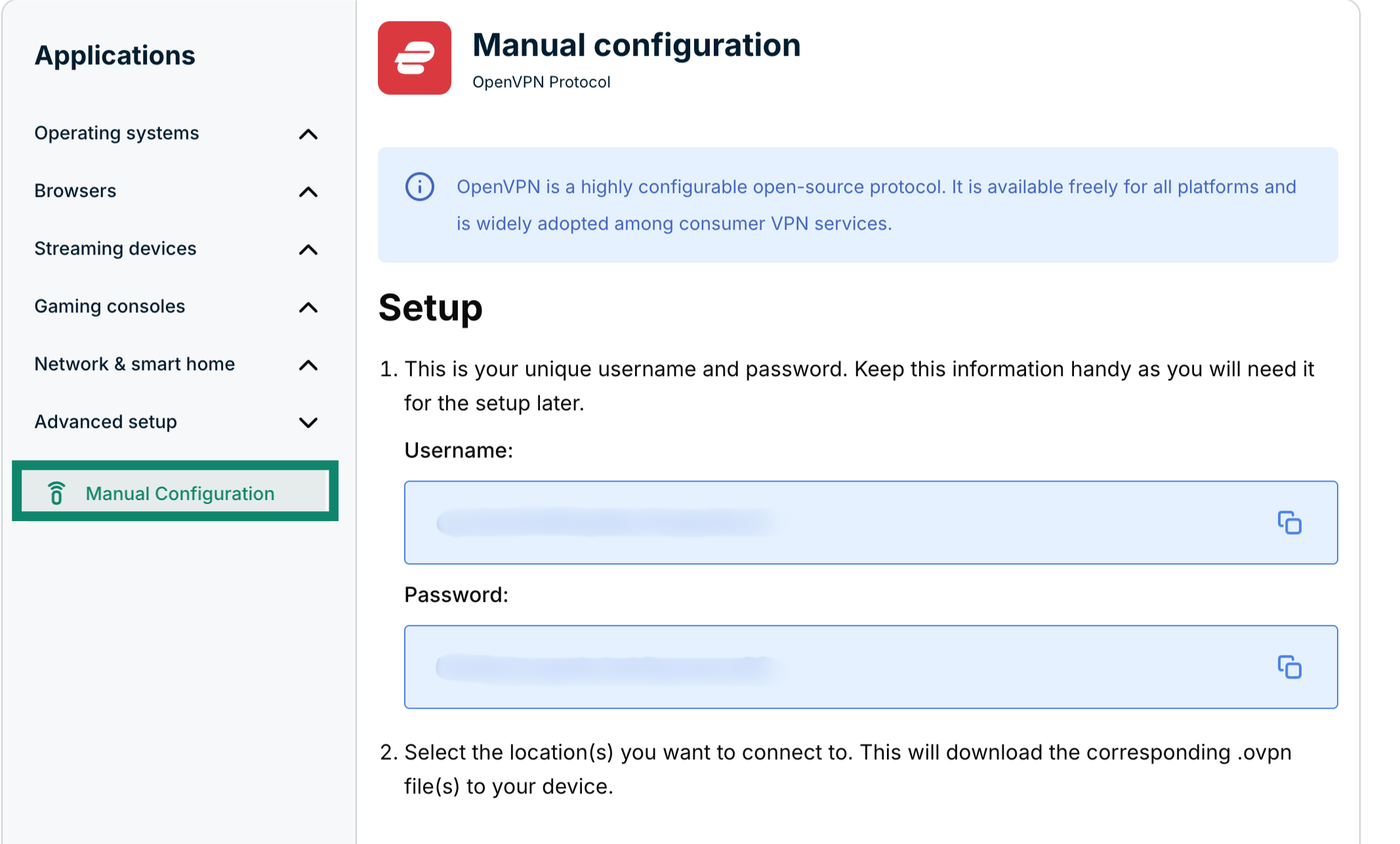
  3. Clicca su Manual configuration (configurazione manuale)The "Manual Configuration" option in ExpressVPN+ highlighted.
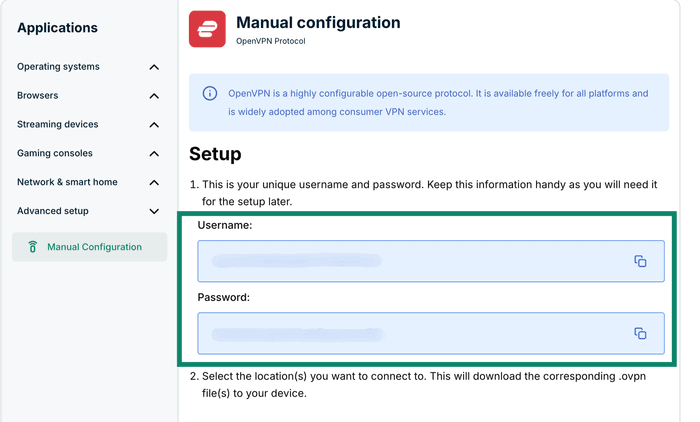
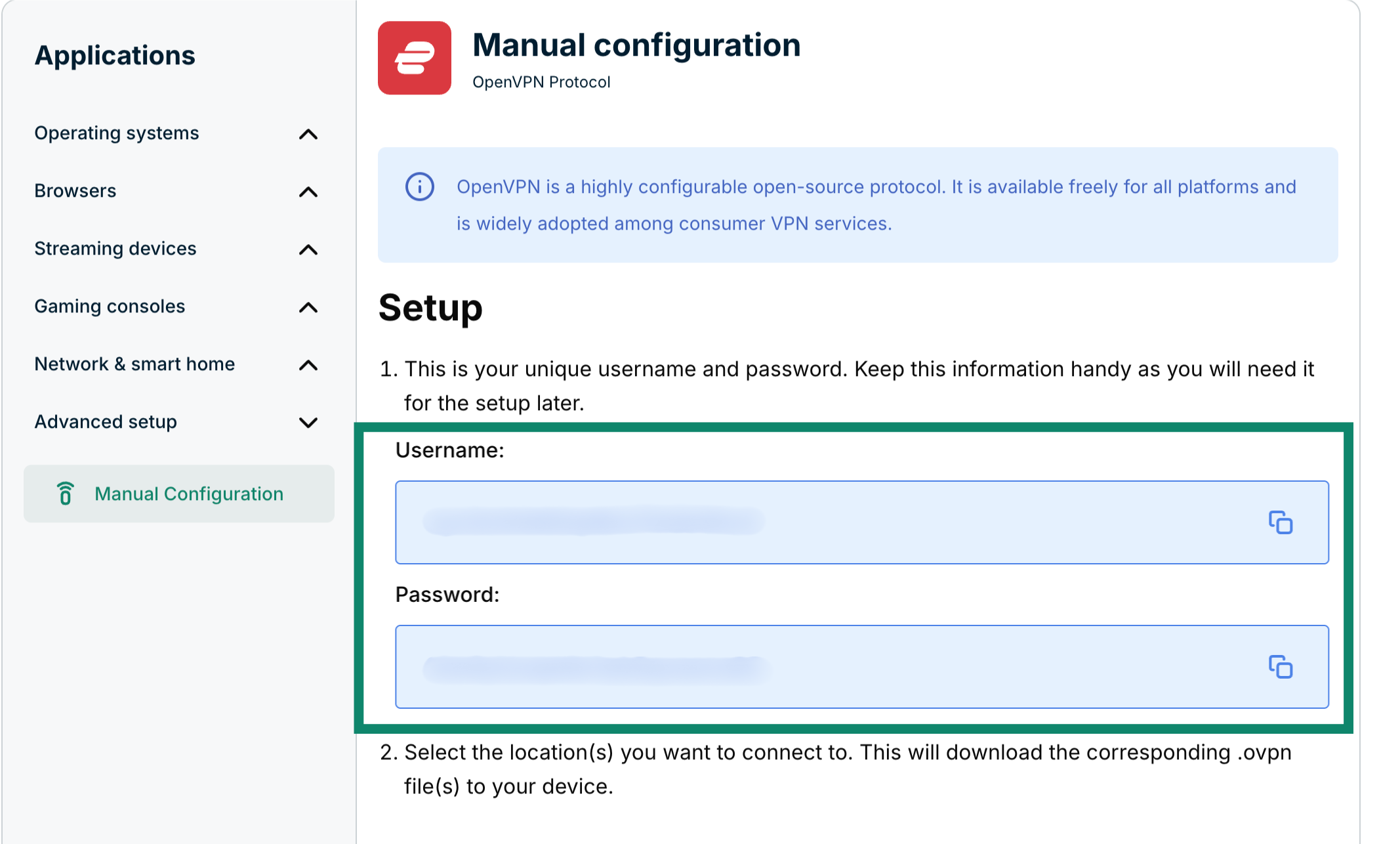
  4. Troverai il tuo nome utente e la tua password sul lato destro, sotto Setup (configurazione) nel passo 1.The Manual configuration page in ExpressVPN+, highlighting the username and password for the user.
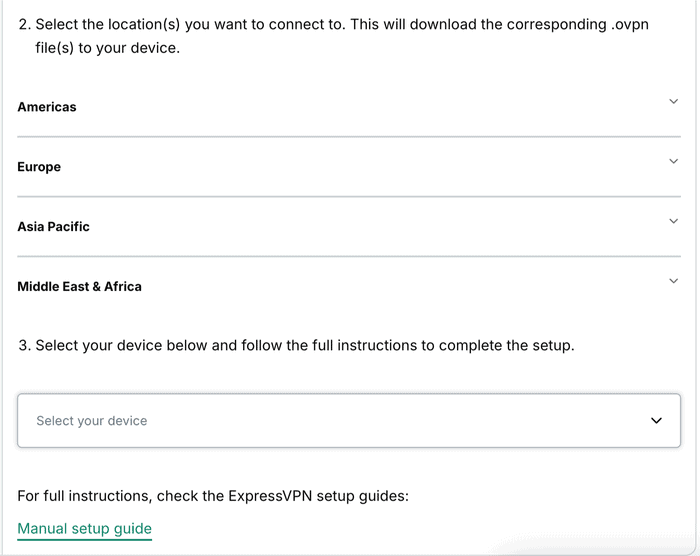
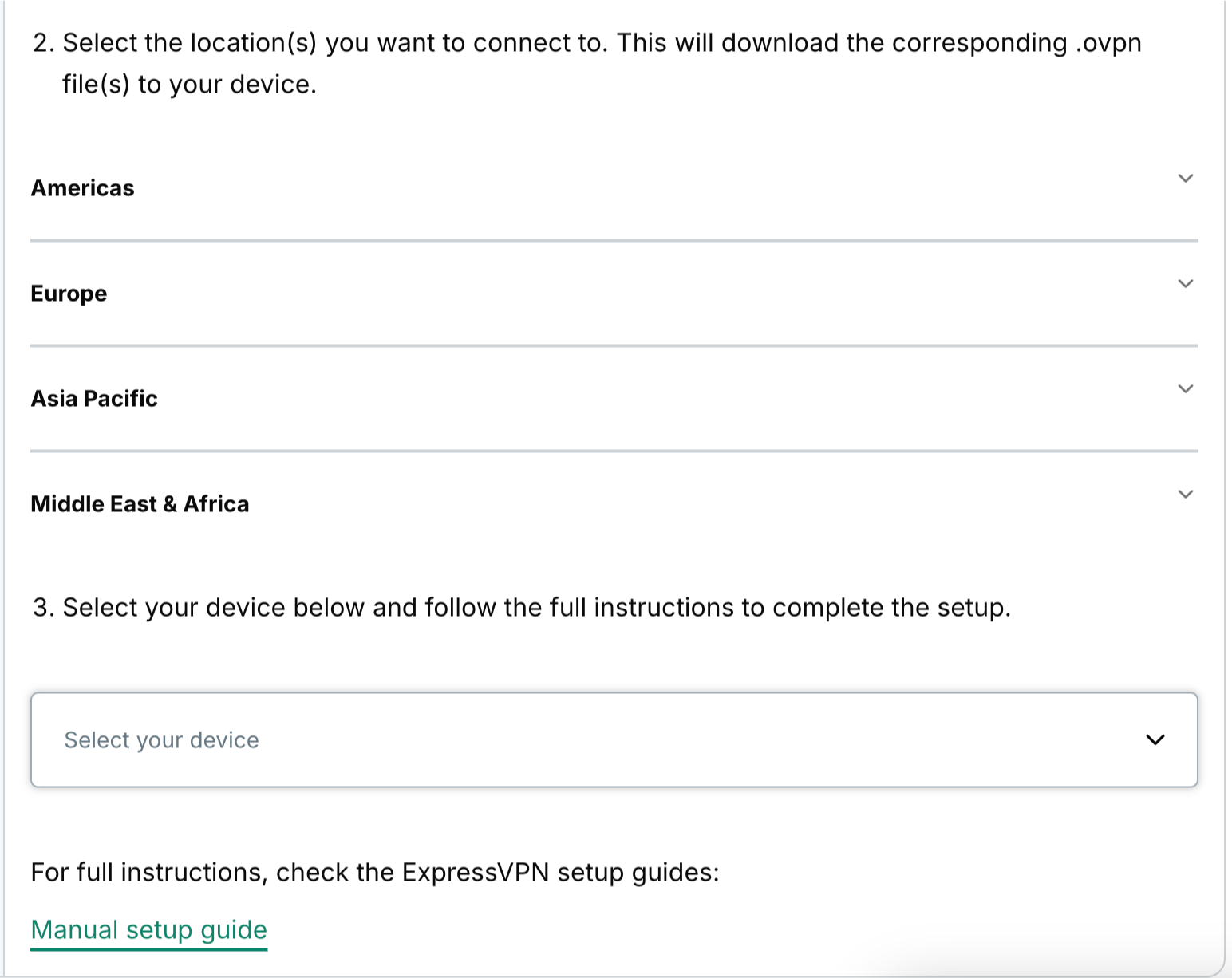
  5. Scorri fino al passaggio 2 per visualizzare le regioni disponibili. Clicca su una regione per aprire un menu a tendina e visualizzare le località disponibili.The available regions for manual configurations in ExpressVPN+.
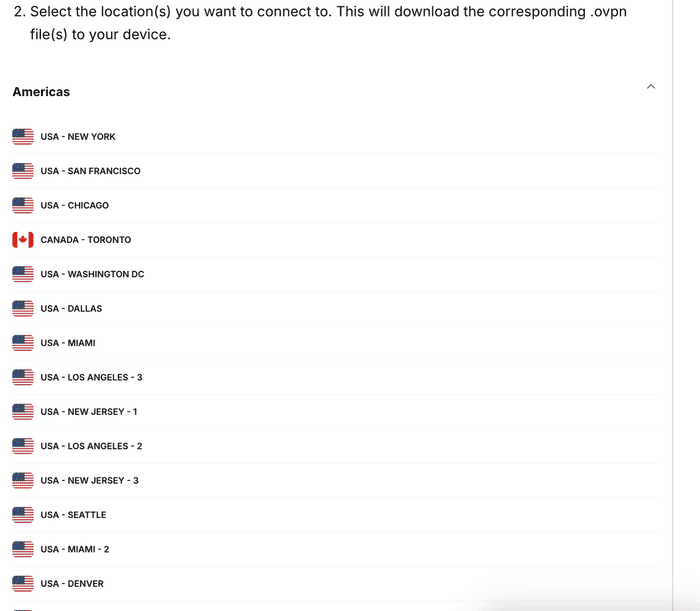
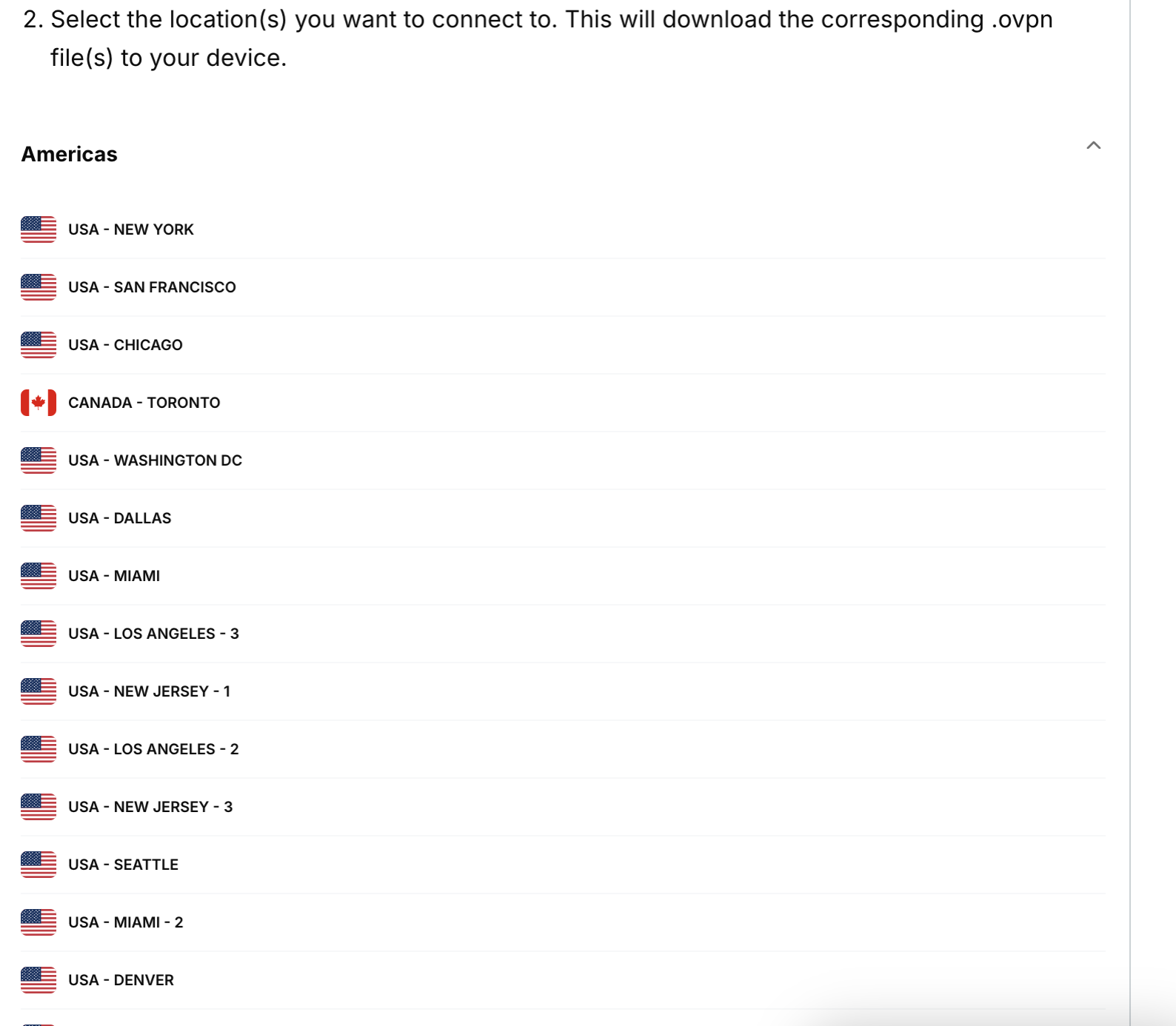
  6. Clicca su una località e il file verrà scaricato automaticamente.The Americas section in the available regions in the ExpressVPN+ portal, showing a list of available locations from that region.

Tieni aperta questa finestra del browser durante la procedura di configurazione manuale, in modo da poterla consultare facilmente.

Ti serve aiuto? Contatta il team di supporto ExpressVPN per ricevere assistenza immediata.

Volver arriba

Share in FacebookShare in TwitterShare in WhatsappShare in TelegramShare by email
Questo articolo ti ha aiutato?

Siamo spiacenti di sentirlo. Facci sapere come possiamo migliorare.

Please enter a valid email address.

Un membro del nostro team di supporto seguirà il tuo problema.

Share in FacebookShare in TwitterShare in WhatsappShare in TelegramShare by email

Articoli correlati

  • Windows 10 PPTP (manual setup)
  • Windows (OpenVPN manual setup)
  • Mac OS X (OpenVPN manual setup)
  • Windows XP (manual setup)
  • iOS PPTP (manual setup)
Questo articolo ti ha aiutato?

Siamo spiacenti di sentirlo. Facci sapere come possiamo migliorare.

Please enter a valid email address.

Un membro del nostro team di supporto seguirà il tuo problema.

  • Cos'è un malware?
  • Cos'è una chiave di sicurezza di rete?
  • Le VPN sono legali?
  • Come cambiare la posizione sull'iPhone
  • Cosa si intende per impronte digitali online?
  • Come combinare una VPN con Tor per l'anonimato online
  • Ottieni la migliore VPN per molteplici dispositivi
VPN per tutti i dispositivi
  • Download ExpressVPN
  • MacOS
  • Windows PC
  • iOS (iPhone & iPad)
  • Android
  • Linux
  • Aircove Router
  • Apple TV
  • Fire Stick
  • Android TV
  • Estensione Chrome
Posizioni server VPN
  • Server in 113 paesi
  • VPN USA
  • VPN UK
  • VPN Canada
  • VPN Australia
Caratteristiche
  • Esplora tutte le caratteristiche
  • Prova la VPN senza rischi
  • Piani e prezzi
Prodotti
  • ExpressKeys
  • ExpressMailGuard
  • ExpressAI
Informazioni su ExpressVPN
  • Su di noi
  • Centro di fiducia
  • Centro per i diritti
  • Audit di sicurezza
  • Recensioni su ExpressVPN
  • I nostri esperti
  • Ufficio Stampa
  • Opportunità di lavoro
Programmi
  • Tottenham Hotspur
  • Brooklyn Nets
  • Diventa partner
  • Affiliati
  • Influencer
Supporto
  • Tutorial installazione VPN
  • FAQ
  • Acquista la VPN
Scopri di più
  • VPN: cos’è?
  • Qual è il mio IP?
  • Nascondi il mio IP
  • 5 modi di usare una VPN
  • Blog

© 2026 ExpressVPN. Tutti i diritti riservati.

  • Informativa sulla privacy
  • Termini di servizio
  • Preferenze cookie

Seleziona una lingua

  • English
  • Dansk
  • Deutsch
  • Español
  • Français
  • Nederlands
  • Norsk
  • Polski
  • Português
  • Suomi
  • Svenska
  • Türkçe
  • Русский
  • ภาษาไทย
  • 한국어
  • 日本語

Live chat

Need help? Chat with us!

Online