ExpressVPN
    • Nul-lognings politik
    • Servers in 113 Countries
    • Use on Multiple Devices
    • High-Speed VPN
    • Access Online Services Securely
    • Gaming med en VPN
    • Se alle funktioner
    • Om ExpressVPN
    Sign Up For Expressvpn

    One subscription gives you access to a fast-growing suite of privacy and security tools that work seamlessly together to improve your digital life.

    View all products
    • Lightway VPN-protokol
    • Internet Kill Switch
    • Split Tunneling
    • Private, Encrypted DNS
    • Avoid ISP Throttling
    • Threat Manager
    • Annonceblokering
    • Forældrekontrol
    • Dedikeret IP
  • Download VPN
    • Windows new
    • MacOS new
    • Linux new
    • iPhone / iPad
    • Android
    • Apple TV
    • Fire Stick
    • Android TV
    • VPN til Routere
    • Aircove-routere
    • Chrome
    • Firefox
    • Edge
  • Pricing
    • Hvad er en VPN?
    • VPN for Beginners
    • How To Use a VPN
    • VPN Encryption Explained
    • Blog
    • Glossary
    • IP Address Checker
    • DNS-brudtest
    • WebRTC-brudtest
    • Adgangskodegenerator
    • Supportcenter
    • Ofte stillede spørgsmål
    • Livechat
    • VPN-opsætningsvejledninger
    • Redemption Code
  • Icon10VPN for Teams
  • Produkter
    Icon11

    ExpressVPN for Teams Get fast, secure VPN protection for growing teams. Easy to deploy, simple to manage, built to scale.

    Img2
    • ExpressVPN

      ExpressVPN Industry-leading, ultra-fast VPN with secure servers in 113 countries.

    • ExpressMailGuard

      ExpressMailGuard Private email relay service to protect your inbox and identity.

    • ExpressKeys

      ExpressKeys Secure password management, multi-factor authentication, and more.

    • ExpressAI

      ExpressAI The first consumer AI powered by confidential computing for privacy-led intelligence.

    • Identity Defender

      Identity Defender Powerful suite of ID protection, monitoring, and data removal tools

    Other products from the family behind ExpressVPN

    • holiday.com eSIM

      holiday.com eSIM Unlimited data with a single eSIM across 150+ destinations.

    • Intego

      Intego Award-winning macOS antivirus, firewall, system tools, and more.

  • Min konto
Kom i Gang
ExpressVPN
    • Nul-lognings politik
    • Servers in 113 Countries
    • Use on Multiple Devices
    • High-Speed VPN
    • Access Online Services Securely
    • Gaming med en VPN
    • Se alle funktioner
    • Om ExpressVPN
    Sign Up For Expressvpn

    One subscription gives you access to a fast-growing suite of privacy and security tools that work seamlessly together to improve your digital life.

    View all products
    • Lightway VPN-protokol
    • Internet Kill Switch
    • Split Tunneling
    • Private, Encrypted DNS
    • Avoid ISP Throttling
    • Threat Manager
    • Annonceblokering
    • Forældrekontrol
    • Dedikeret IP
  • Download VPN
    • Windows new
    • MacOS new
    • Linux new
    • iPhone / iPad
    • Android
    • Apple TV
    • Fire Stick
    • Android TV
    • VPN til Routere
    • Aircove-routere
    • Chrome
    • Firefox
    • Edge
  • Pricing
    • Hvad er en VPN?
    • VPN for Beginners
    • How To Use a VPN
    • VPN Encryption Explained
    • Blog
    • Glossary
    • IP Address Checker
    • DNS-brudtest
    • WebRTC-brudtest
    • Adgangskodegenerator
    • Supportcenter
    • Ofte stillede spørgsmål
    • Livechat
    • VPN-opsætningsvejledninger
    • Redemption Code
  • VPN for Teams
  • Produkter
    • ExpressVPN

      ExpressVPN Industry-leading, ultra-fast VPN with secure servers in 113 countries.

    • ExpressMailGuard

      ExpressMailGuard Private email relay service to protect your inbox and identity.

    • ExpressKeys

      ExpressKeys Secure password management, multi-factor authentication, and more.

    • ExpressAI

      ExpressAI The first consumer AI powered by confidential computing for privacy-led intelligence.

    • Identity Defender

      Identity Defender Powerful suite of ID protection, monitoring, and data removal tools

    Other products from the family behind ExpressVPN

    • holiday.com eSIM

      holiday.com eSIM Unlimited data with a single eSIM across 150+ destinations.

    • Intego

      Intego Award-winning macOS antivirus, firewall, system tools, and more.

    Icon11

    ExpressVPN for Teams Get fast, secure VPN protection for growing teams. Easy to deploy, simple to manage, built to scale.

    Img2
  • Min konto
Kom i Gang
Home Home » Sådan finder du dine loginoplysninger til manuel konfiguration

Administrer din konto

Sådan finder du dine loginoplysninger til manuel konfiguration

Sidst opdateret: 10. september 2026

Share in FacebookShare in TwitterShare in WhatsappShare in TelegramShare by email
Get started with ExpressVPN.
Hvad kan en VPN gøre?
Vis mig

Learn about five ways to use ExpressVPN.
5 måder at bruge din VPN på
Se dem nu

Enheder, der er inkompatible med ExpressVPN-appen, kan konfigureres manuelt til at køre en VPN. Denne vejledning viser dig, hvordan du finder de loginoplysninger og serveradresser, du skal bruge til manuelle konfigurationsopsætninger.

Sådan finder du de adgangsoplysninger, du har brug for til manuelle VPN-opsætninger:

  1. Gå til ExpressVPN’s opsætningsside til manuel konfiguration.
    1. Hvis du bliver bedt om det, skal du angive din e-mailadresse og vælge Send Code (Send kode).ExpressVPN's Sign in page on desktop.
    2. Angiv den bekræftelseskode, der sendes til din e-mail, og vælg derefter Continue (Fortsæt).ExpressVPN's Verification Needed page on desktop.
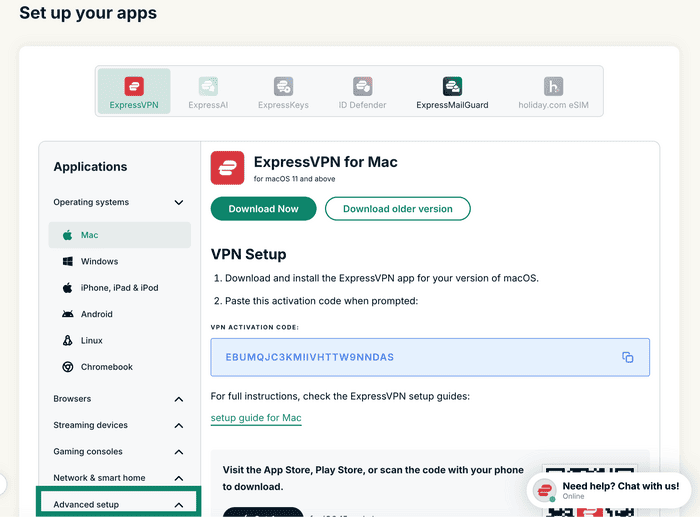
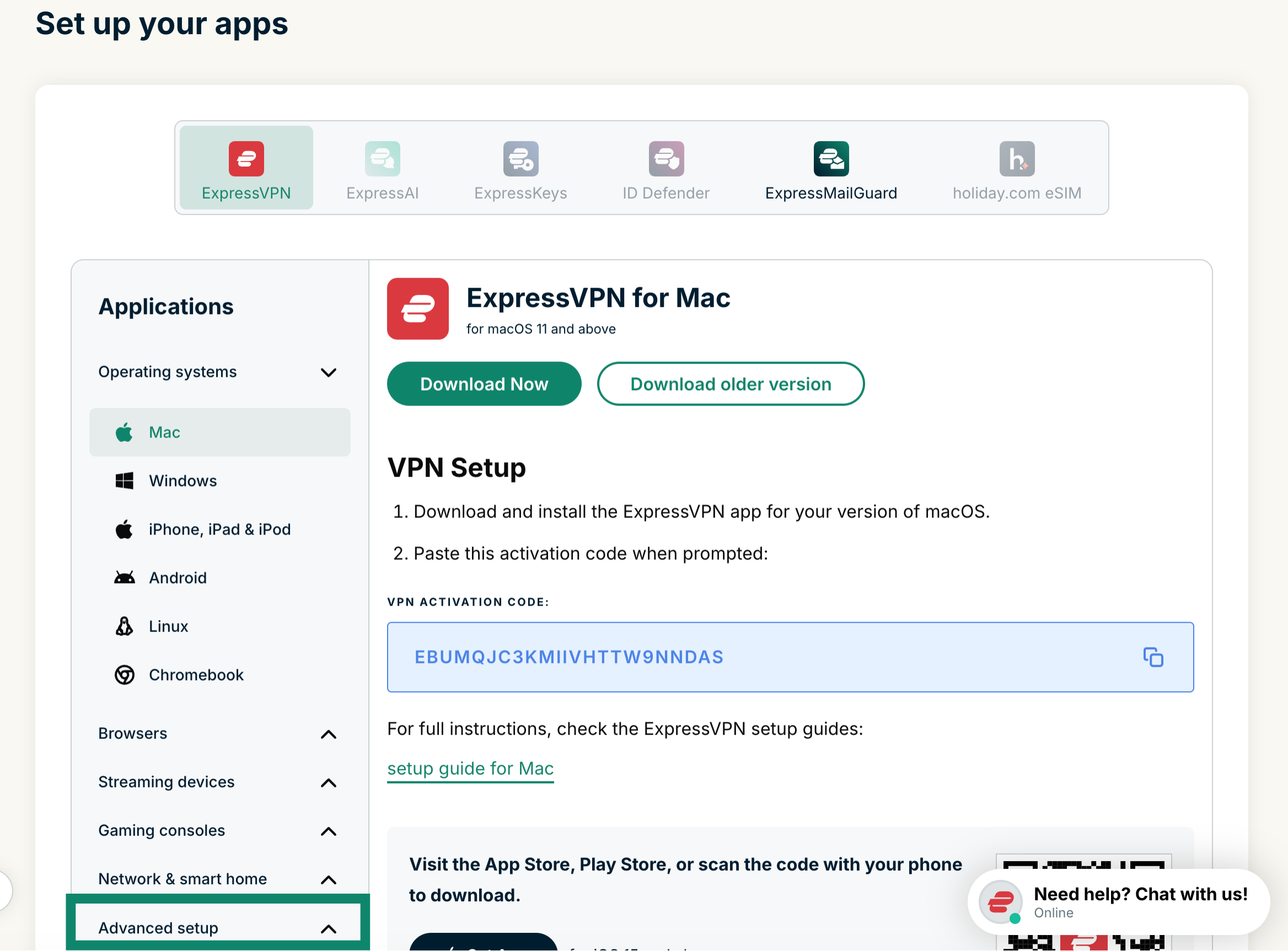
  2. Klik på Advanced setup (Avanceret opsætning) under Applikationer.The "Set up your apps" page in ExpressVPN+, with a highlighted "Advanced setup" option at the bottom.
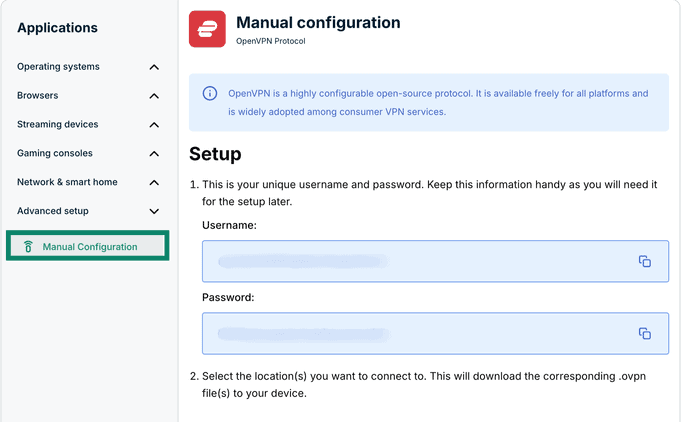
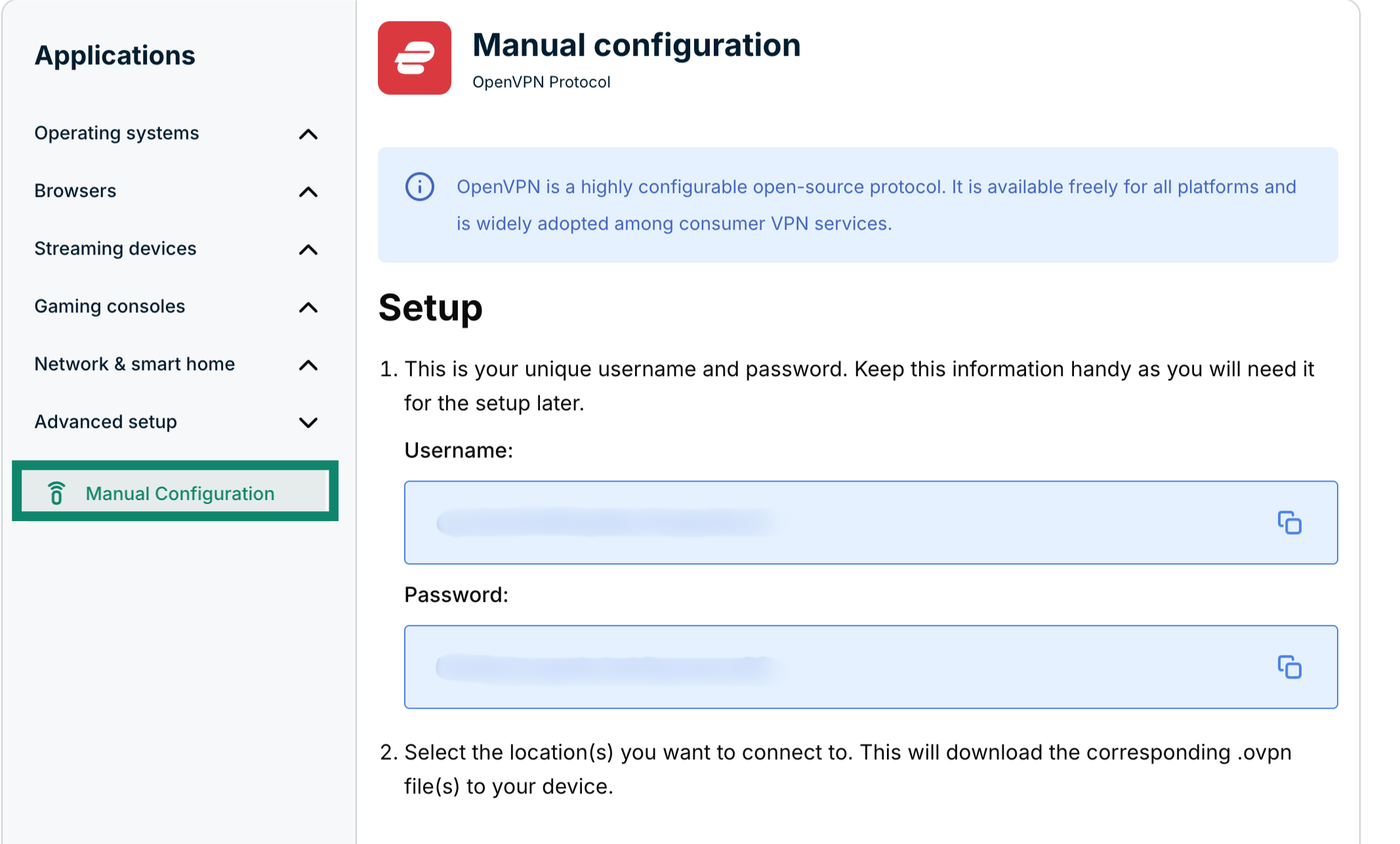
  3. Klik på Manual configuration (Manual konfiguration)The "Manual Configuration" option in ExpressVPN+ highlighted.
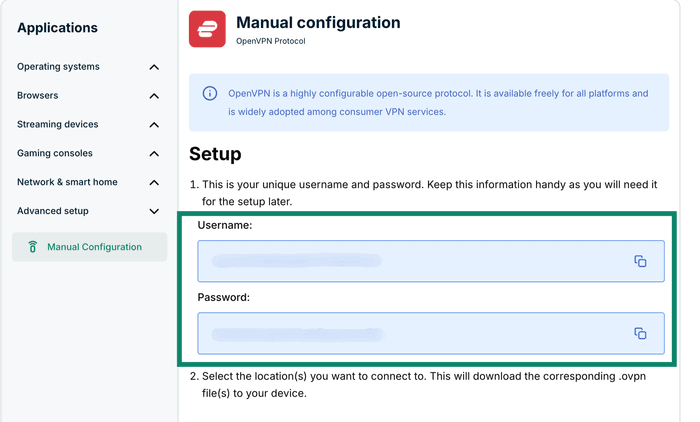
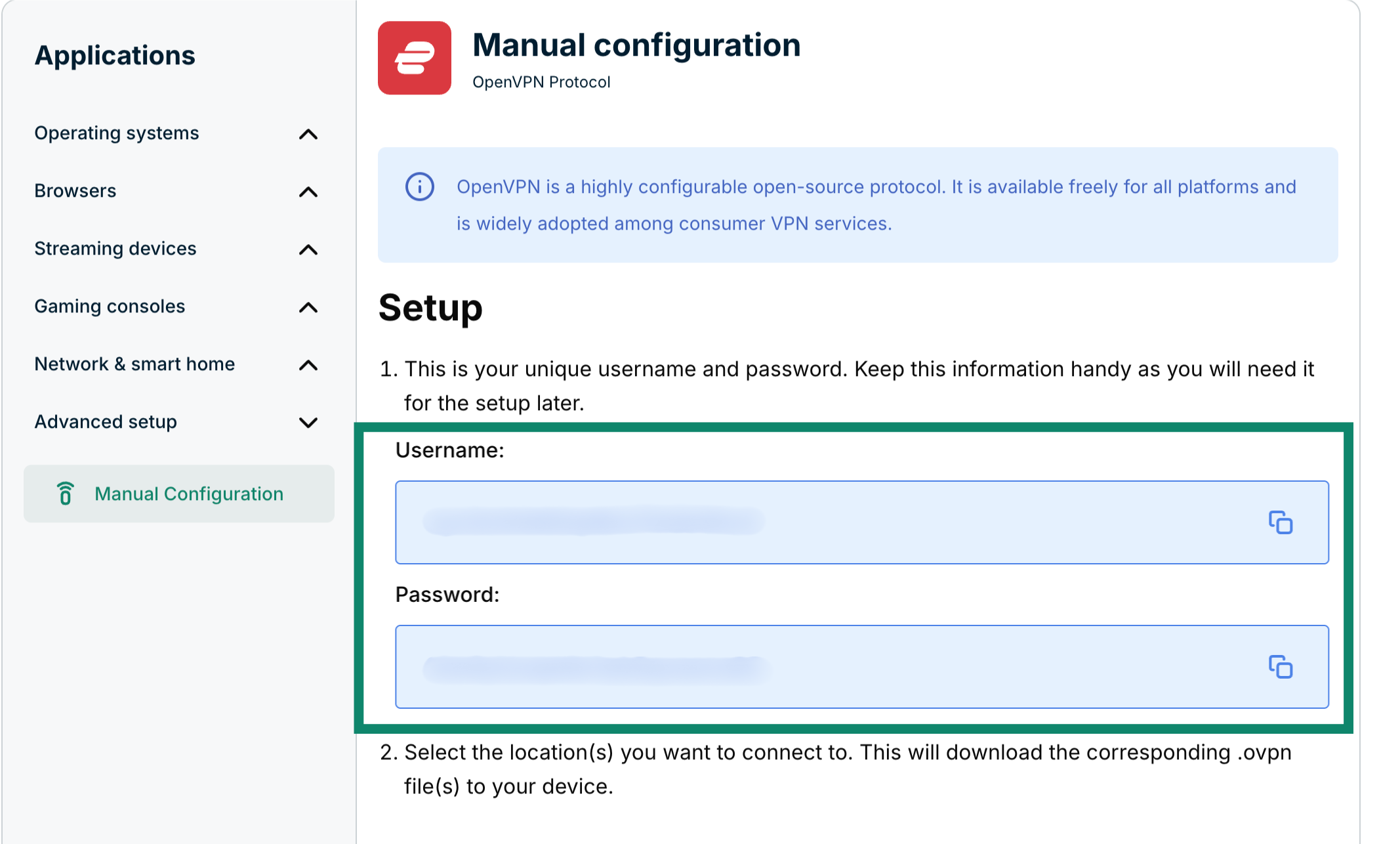
  4. Du får vist dit brugernavn og din adgangskode i højre side under Setup (Konfiguration) i trin 1.The Manual configuration page in ExpressVPN+, highlighting the username and password for the user.
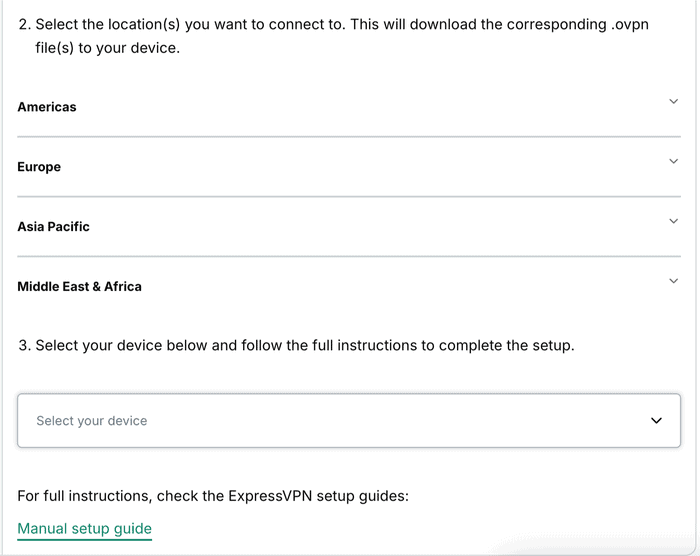
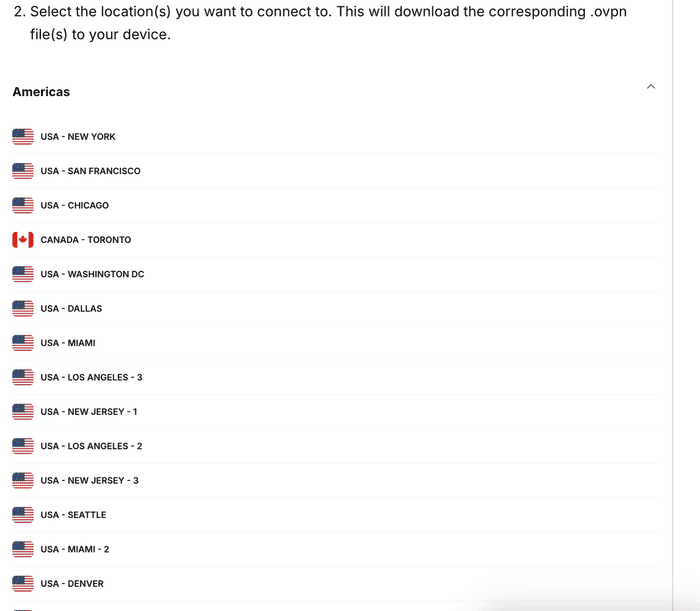
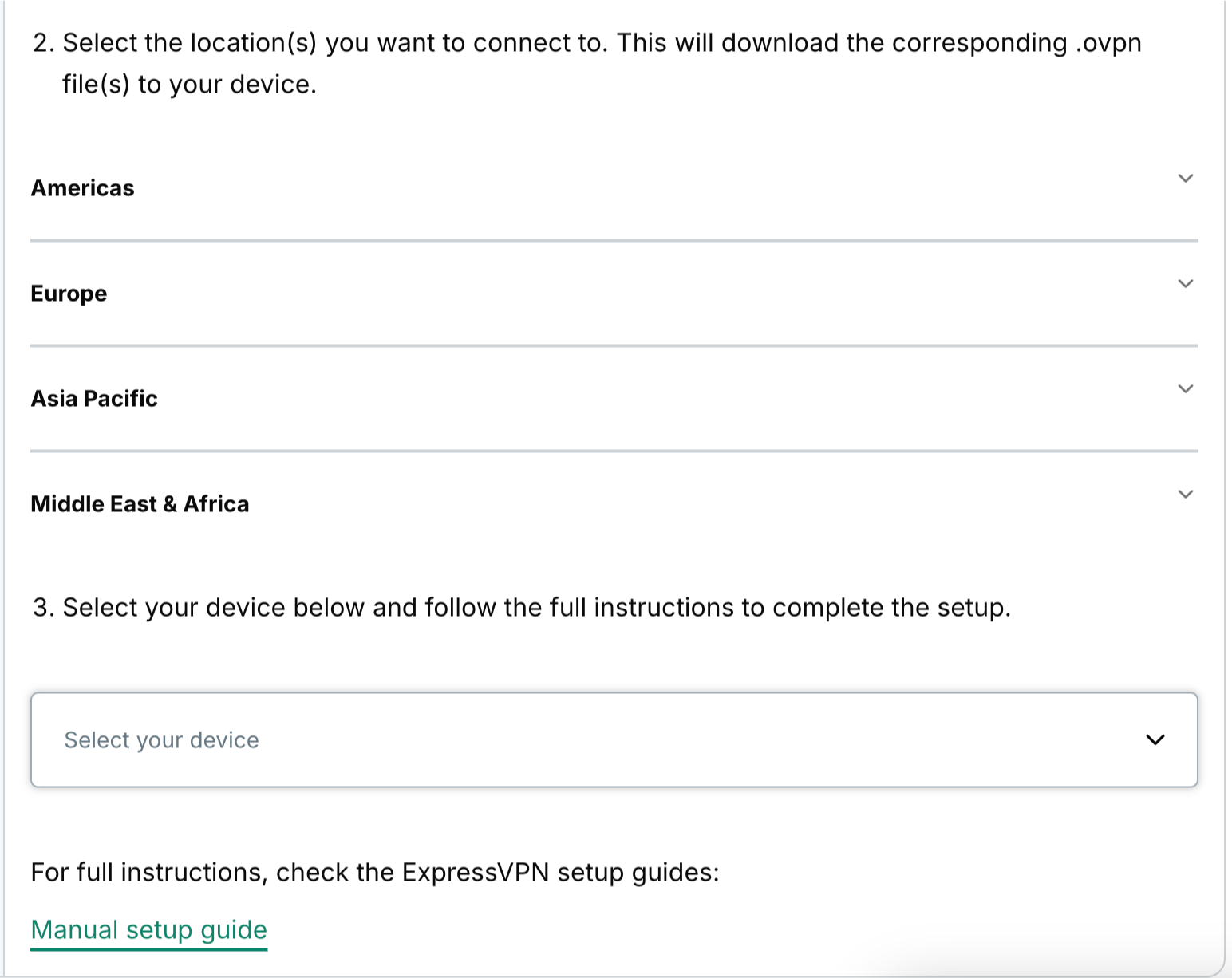
  5. Rul ned til trin 2 for at se de tilgængelige regioner. Klik på en region for at åbne en rullemenu og se de tilgængelige placeringer.The available regions for manual configurations in ExpressVPN+.
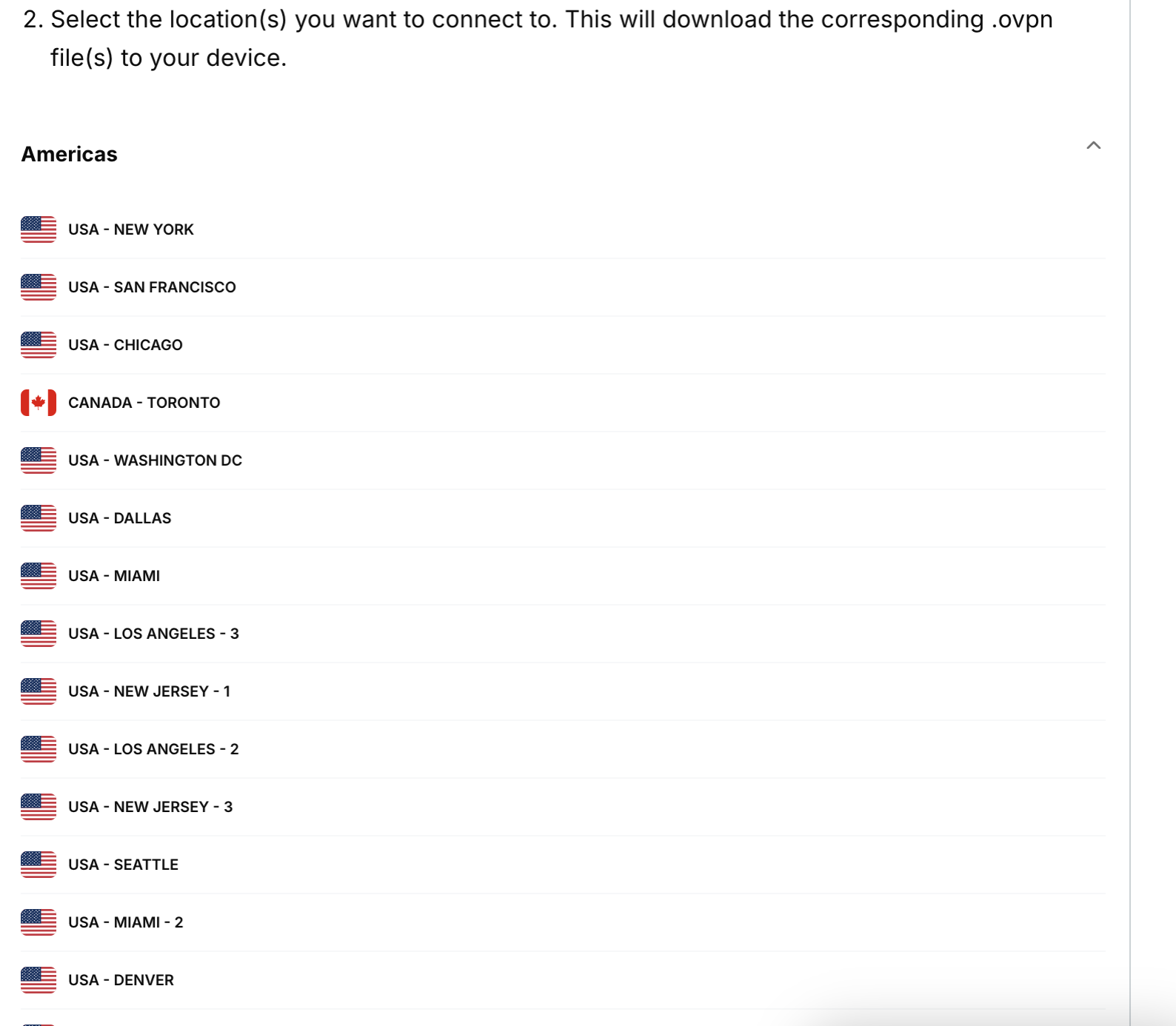
  6. Klik på en placering, så begynder filen automatisk at blive downloadet.The Americas section in the available regions in the ExpressVPN+ portal, showing a list of available locations from that region.

Hold dette browservindue åbent under den manuelle konfigurationsproces, så du nemt kan finde det.

Brug for hjælp? Kontakt ExpressVPN’s supportteam for øjeblikkelig hjælp.

Tilbage til toppen

Share in FacebookShare in TwitterShare in WhatsappShare in TelegramShare by email
Hjalp denne artikel dig?

Det er vi kede af at høre. Fortæl os, hvordan vi kan forbedre os.

Please enter a valid email address.

En medarbejder fra vores supportteam følger op på dit problem.

Share in FacebookShare in TwitterShare in WhatsappShare in TelegramShare by email
  • Hvad er malware?
  • Hvad er en netværkssikkerhedsnøgle?
  • Er VPN'er lovlige?
  • Sådan ændrer du placeringen på din iPhone
  • Hvad er et digitalt fodaftryk?
  • Sådan kombinerer du en VPN og Tor for online anonymitet
  • Få den bedste VPN til flere enheder
VPN til alle enheder
  • Download ExpressVPN
  • MacOS
  • Windows PC
  • iOS (iPhone og iPad)
  • Android
  • Linux
  • Router
  • Apple TV
  • Fire Stick
  • Android TV
  • Chrome-udvidelsen
VPN-serverplaceringer
  • Servere i 113 lande
  • VPN til USA
  • VPN til Storbritannien
  • VPN til Canada
  • VPN til Australien
Funktioner
  • Se alle funktioner
  • Risikofri VPN-prøveperiode
  • Abonnementer og priser
Produkter
  • ExpressKeys
  • ExpressMailGuard
  • ExpressAI
Om ExpressVPN
  • Om os
  • Trust Center
  • Rettighedscenter
  • Sikkerhedsrevisioner
  • ExpressVPN-anmeldelser
  • Vores eksperter
  • Presse
  • Karriere
Programmer
  • Tottenham Hotspur
  • Brooklyn Nets
  • Bliv vores partner
  • Partnerprogram
  • Influencere
Få Hjælp
  • VPN-opsætningsvejledninger
  • Ofte stillede spørgsmål
  • Køb en VPN
Få mere at vide
  • Hvad er en VPN?
  • Hvad er min IP?
  • Skjul min IP
  • 5 grunde til brug af VPN
  • Blog

© 2026 ExpressVPN. Alle rettigheder forbeholdes.

  • Databeskyttelsespolitik
  • Tjenestevilkår
  • Cookie-præferencer

Vælg sprog

  • English
  • Deutsch
  • Español
  • Français
  • Italiano
  • Nederlands
  • Norsk
  • Polski
  • Português
  • Suomi
  • Svenska
  • Türkçe
  • Русский
  • ภาษาไทย
  • 한국어
  • 日本語

Live chat

Need help? Chat with us!

Online