ExpressVPN
    • ノーログポリシー
    • Servers in 113 Countries
    • Use on Multiple Devices
    • High-Speed VPN
    • Access Online Services Securely
    • ゲームに最適なVPN
    • 全ての機能を見る
    • ExpressVPNについて
    Sign Up For Expressvpn

    One subscription gives you access to a fast-growing suite of privacy and security tools that work seamlessly together to improve your digital life.

    View all products
    • Lightway VPNプロトコル
    • Internet Kill Switch
    • スプリットトンネル
    • Private, Encrypted DNS
    • Avoid ISP Throttling
    • Threat Manager
    • 広告ブロッカー
    • ペアレンタルコントロール
    • 固定IP
  • VPNのダウンロード
    • Windows new
    • MacOS new
    • Linux new
    • iPhone / iPad
    • Android
    • Apple TV
    • Fire Stick
    • Android TV
    • ルーター版VPN
    • Aircoveルーター
    • Chrome
    • Firefox
    • Edge
  • Pricing
    • VPNとは?
    • VPN for Beginners
    • How To Use a VPN
    • VPN Encryption Explained
    • ブログ
    • Glossary
    • IP Address Checker
    • DNS漏洩テスト
    • WebRTC漏洩テスト
    • パスワード生成
    • サポートセンター
    • よくある質問 (FAQ)
    • ライブチャット
    • VPN設定方法
    • Redemption Code
  • Icon10VPN for Teams
  • プロダクト
    Icon11

    ExpressVPN for Teams Get fast, secure VPN protection for growing teams. Easy to deploy, simple to manage, built to scale.

    Img2
    • ExpressVPN

      ExpressVPN Industry-leading, ultra-fast VPN with secure servers in 113 countries.

    • ExpressMailGuard

      ExpressMailGuard Private email relay service to protect your inbox and identity.

    • ExpressKeys

      ExpressKeys Secure password management, multi-factor authentication, and more.

    • ExpressAI

      ExpressAI The first consumer AI powered by confidential computing for privacy-led intelligence.

    • Identity Defender

      Identity Defender Powerful suite of ID protection, monitoring, and data removal tools

    Other products from the family behind ExpressVPN

    • holiday.com eSIM

      holiday.com eSIM Unlimited data with a single eSIM across 150+ destinations.

    • Intego

      Intego Award-winning macOS antivirus, firewall, system tools, and more.

  • マイアカウント
プランを見る
ExpressVPN
    • ノーログポリシー
    • Servers in 113 Countries
    • Use on Multiple Devices
    • High-Speed VPN
    • Access Online Services Securely
    • ゲームに最適なVPN
    • 全ての機能を見る
    • ExpressVPNについて
    Sign Up For Expressvpn

    One subscription gives you access to a fast-growing suite of privacy and security tools that work seamlessly together to improve your digital life.

    View all products
    • Lightway VPNプロトコル
    • Internet Kill Switch
    • スプリットトンネル
    • Private, Encrypted DNS
    • Avoid ISP Throttling
    • Threat Manager
    • 広告ブロッカー
    • ペアレンタルコントロール
    • 固定IP
  • VPNのダウンロード
    • Windows new
    • MacOS new
    • Linux new
    • iPhone / iPad
    • Android
    • Apple TV
    • Fire Stick
    • Android TV
    • ルーター版VPN
    • Aircoveルーター
    • Chrome
    • Firefox
    • Edge
  • Pricing
    • VPNとは?
    • VPN for Beginners
    • How To Use a VPN
    • VPN Encryption Explained
    • ブログ
    • Glossary
    • IP Address Checker
    • DNS漏洩テスト
    • WebRTC漏洩テスト
    • パスワード生成
    • サポートセンター
    • よくある質問 (FAQ)
    • ライブチャット
    • VPN設定方法
    • Redemption Code
  • VPN for Teams
  • プロダクト
    • ExpressVPN

      ExpressVPN Industry-leading, ultra-fast VPN with secure servers in 113 countries.

    • ExpressMailGuard

      ExpressMailGuard Private email relay service to protect your inbox and identity.

    • ExpressKeys

      ExpressKeys Secure password management, multi-factor authentication, and more.

    • ExpressAI

      ExpressAI The first consumer AI powered by confidential computing for privacy-led intelligence.

    • Identity Defender

      Identity Defender Powerful suite of ID protection, monitoring, and data removal tools

    Other products from the family behind ExpressVPN

    • holiday.com eSIM

      holiday.com eSIM Unlimited data with a single eSIM across 150+ destinations.

    • Intego

      Intego Award-winning macOS antivirus, firewall, system tools, and more.

    Icon11

    ExpressVPN for Teams Get fast, secure VPN protection for growing teams. Easy to deploy, simple to manage, built to scale.

    Img2
  • マイアカウント
プランを見る
Home Home » ExpressVPNアカウントを削除する方法

アカウント管理

ExpressVPNアカウントを削除する方法

最終更新: 2026/08/25

Share in FacebookShare in TwitterShare in WhatsappShare in TelegramShare by email
Use ExpressVPN on your devices.
デバイスにVPNまたはDNSが必要ですか?
今すぐExpressVPNを購入する
Use ExpressVPN on your devices.
ひとつのExpressVPNアカウントで全デバイスに対応
無料アプリを入手

このガイドでは、ExpressVPNアカウントを削除する手順をご案内します。ExpressVPNの利用だけを停止し、アカウントは残しておきたい場合は、 こちらの手順でサブスクリプションをキャンセルしてください。

注: アカウントを削除すると元に戻すことはできません。削除リクエストの処理が完了すると、アカウントへのログインや復元はできなくなり、関連するすべてのサービスやアカウントデータにもアクセスできなくなります。削除時点でサブスクリプションが有効な場合は、以降の自動更新も停止されます。手続きを進める前に、ExpressVPNを今後利用する必要がないことをご確認ください。

ExpressVPNアカウントを削除するには、次の2つの方法があります。

オプション1:ExpressVPN+ポータルから削除する

    • デスクトップでの手順
    • モバイルでの手順

オプション2:ExpressVPN iOSアプリから削除する

オプション1:ExpressVPN+ポータルから削除する

デスクトップでの手順

Windows PCやMacなどのデスクトップ端末をお使いの場合は、以下の手順に従ってください。

ExpressVPNのウェブサイトからアカウントの削除をリクエストできます。手順は次のとおりです。

  1. ExpressVPN+ポータルのAccount & Billing(アカウントと請求)ページを開きます。
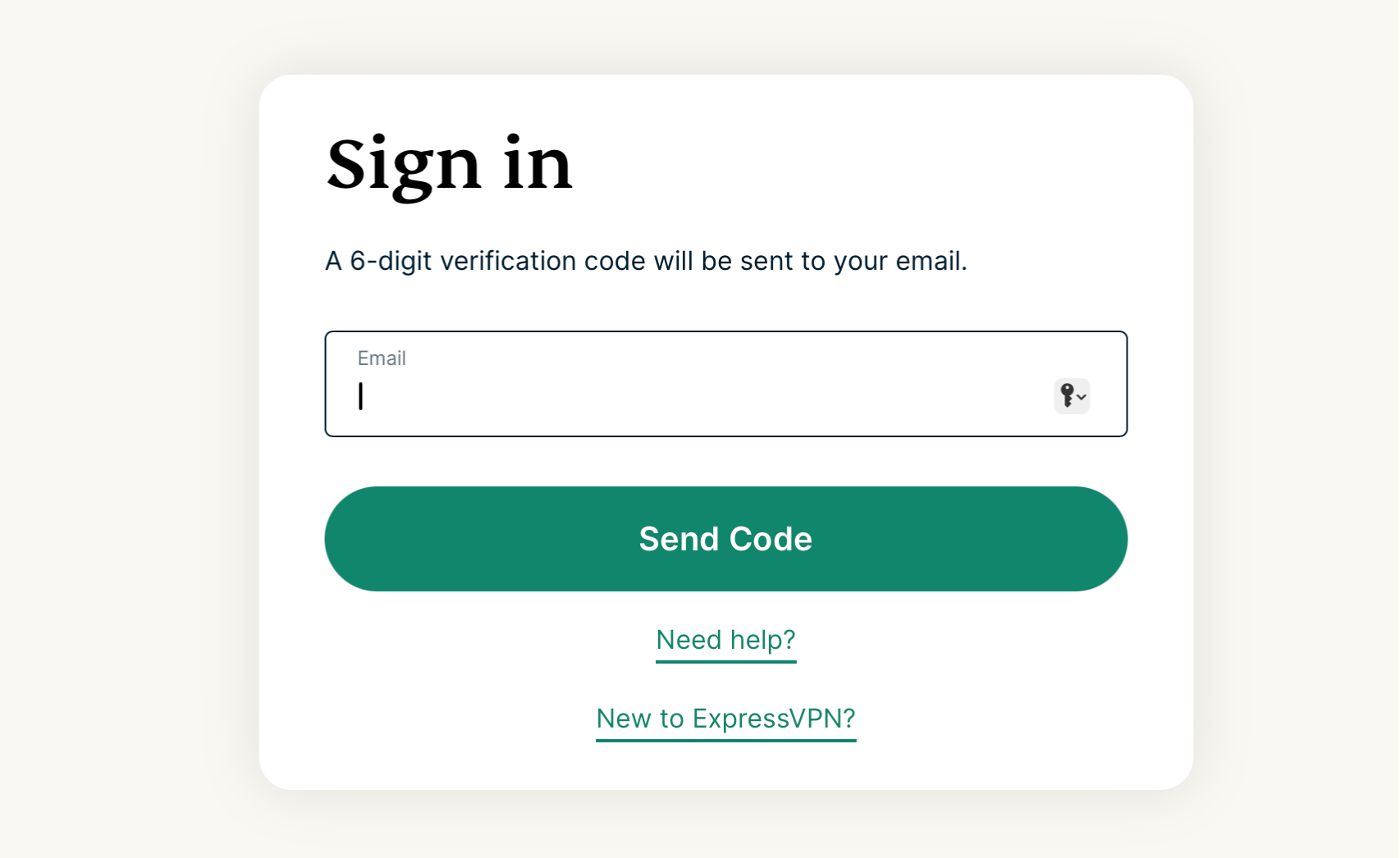
    • 画面に表示された場合は、メールアドレスを入力し、Send Code(コードを送信)を選択します。ExpressVPN's Sign in pageo on desktop.
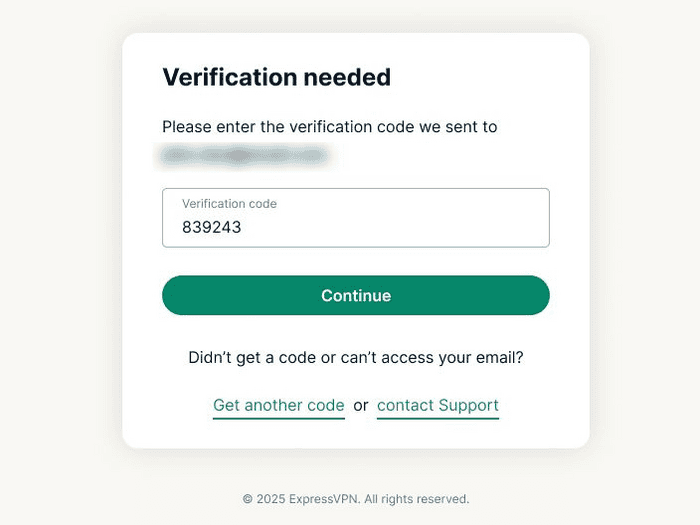
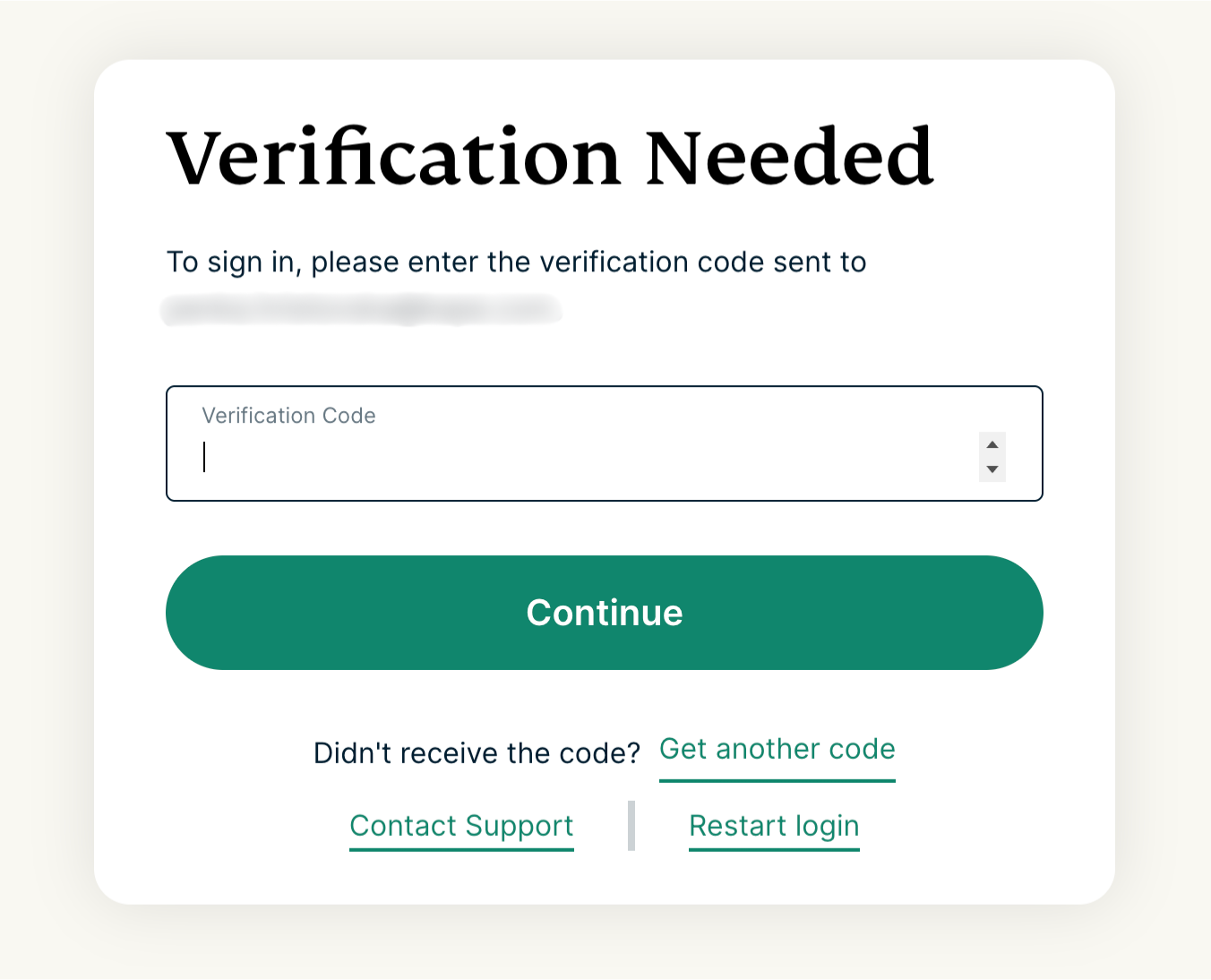
    • メールで届いた認証コードを入力し、Continue(続行)を選択します。ExpressVPN's Verification Needed page on desktop.
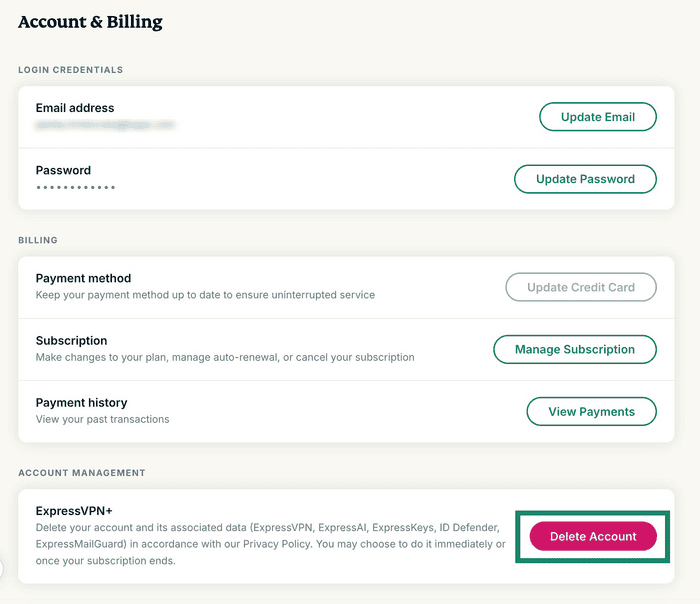
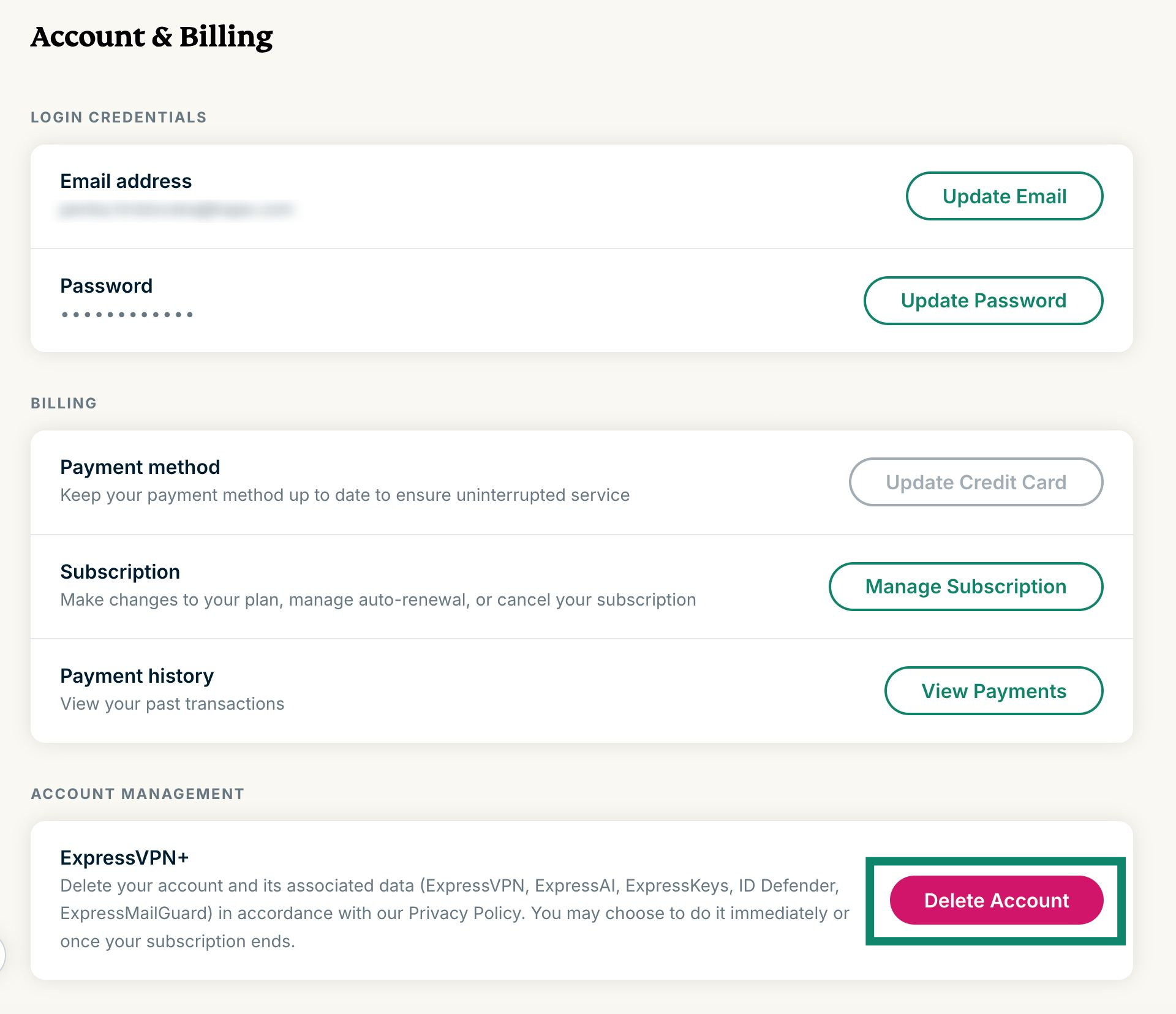
  2. Account management (アカウント管理)までスクロールし、Delete account(アカウントを削除)を選択します。The "Delete Account" button highlighted in the Account & Billing page in the ExpressVPN+ portal.
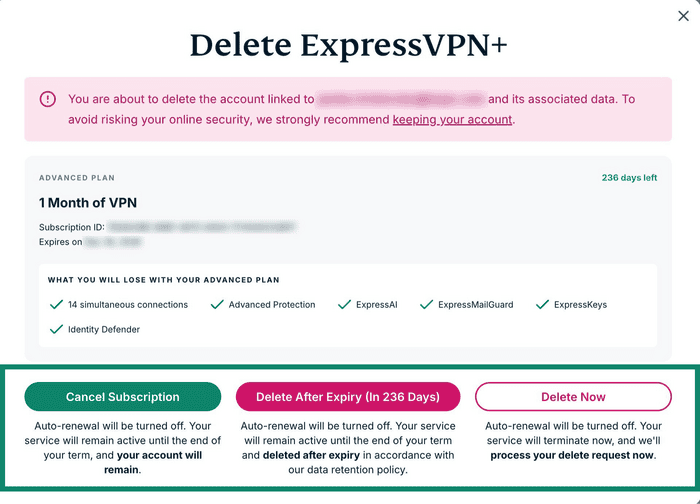
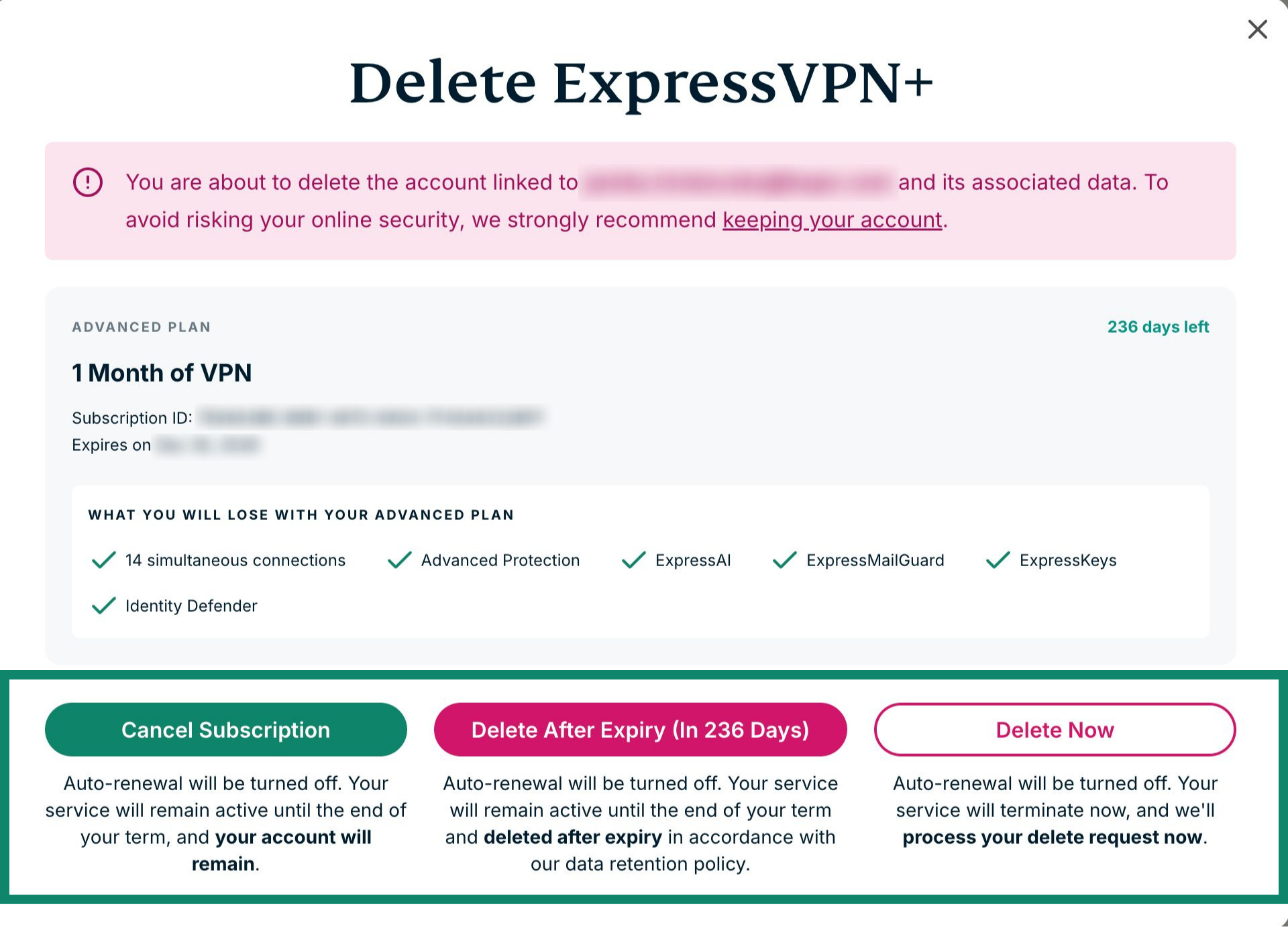
  3. 以下の3つのオプションから選択できます。The "Delete ExpressVPN+" pop-up in the ExpressVPN+ portal, showing three options: cancel Subscription, Delete After Expiry, and Delete Now.
    1. Cancel Subscription(サブスクリプションをキャンセル): 自動更新のみを停止します。アカウントは削除されません。
    2. Delete After Expiry (In xxx Days)(有効期限後に削除[あとxxx日]):自動更新を停止し、現在のサブスクリプションの有効期限が切れた後にアカウントを削除します。
    3. Delete Now(今すぐ削除): 自動更新を停止し、削除リクエストを直ちに処理します。このオプションを選択すると、残りのサブスクリプション期間は利用できなくなります。
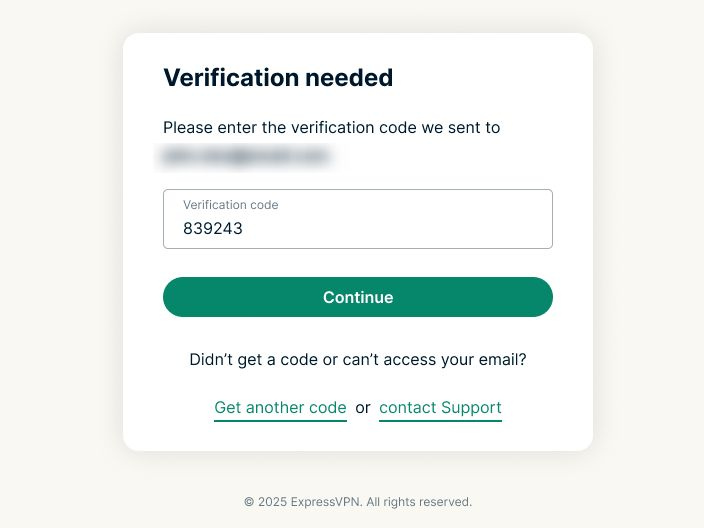
  4. 続いて、ExpressVPNアカウントの削除リクエストを確認します。登録したメールアドレスにVerification Code (認証コード)が届くので、認証コード欄に入力し、Continue(続行)を選択します。ExpressVPN's Verification needed page on desktop.
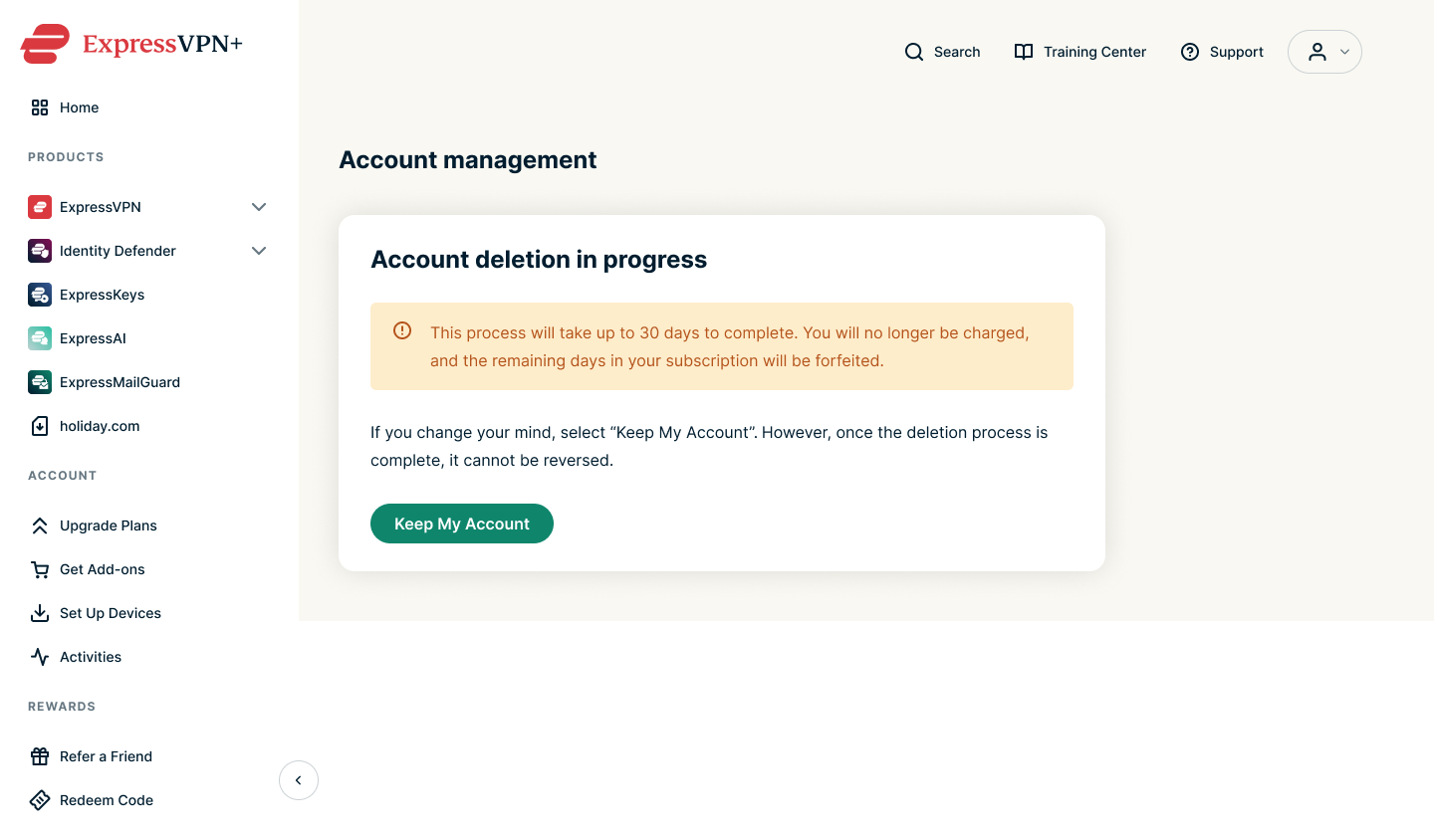
  5. 確認メッセージが表示され、アカウント削除リクエストの受付を確認するメールも届きます。The "Account deleting in progress" notification in the ExpressVPN+ portal.
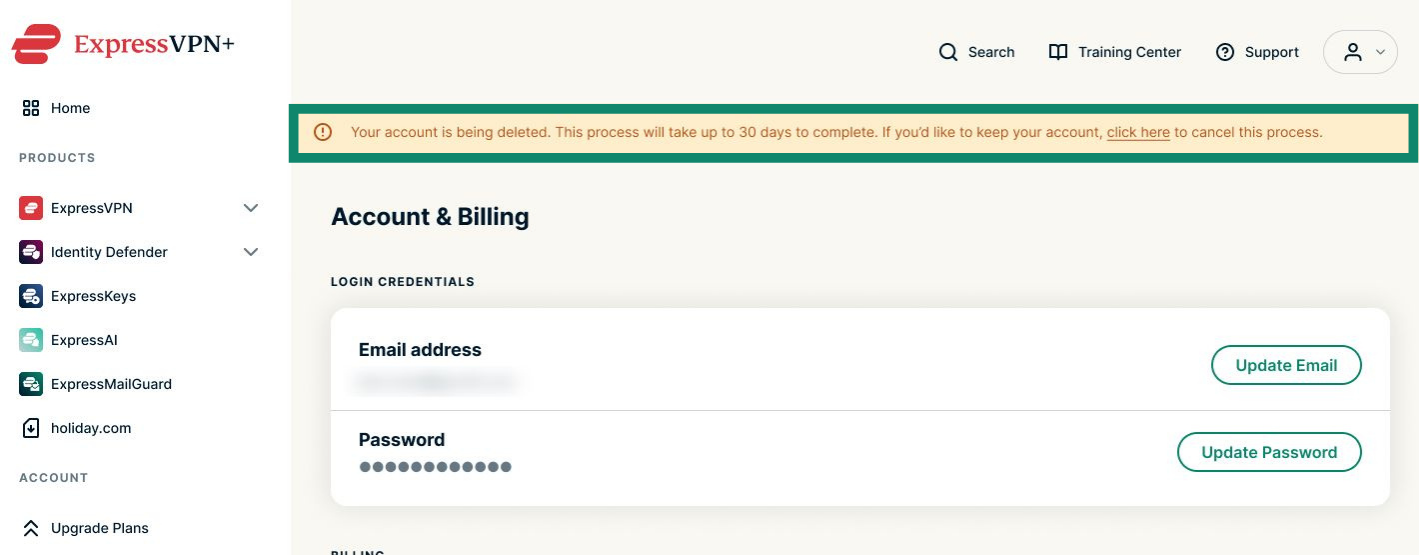
注: 誤ってアカウント削除をリクエストした場合や、削除を取りやめたい場合は、Keep My Account(アカウントを保持)を選択してください。誤ってこのページを閉じた場合でも、アカウントダッシュボードの上部にアカウントが削除処理中である旨のメッセージが表示されます。click here(こちらをクリック)を選択すると、削除処理をキャンセルできます。

The "Your account is being deleted" notification in the ExpressVPN+ portal.

サポートが必要ですか? すぐにサポートを受けるには、ExpressVPNサポートチームまでお問い合わせください。

トップへ戻る

モバイルでの手順(AndroidまたはiOSデバイス)

iPhone、iPad、Androidスマートフォンなどのモバイル端末をお使いの場合は、以下の手順に従ってください。

ExpressVPNのウェブサイトからアカウントの削除をリクエストできます。

  1. ExpressVPN+ポータルのAccount & Billing(アカウントと請求)ページを開きます。
    • 画面に表示された場合は、メールアドレスを入力し、Send Code(コードを送信)を選択します。
    • メールで届いた認証コードを入力し、Continue(続行)を選択します。
  2. Account management (アカウント管理)までスクロールし、Delete account(アカウントを削除)をタップします。
  3. 以下の3つのオプションから選択できます。
    1. Cancel Subscription(サブスクリプションをキャンセル): 自動更新のみを停止します。アカウントは削除されません。
    2. Delete After Expiry (In xxx Days)(有効期限後に削除[あとxxx日]):自動更新を停止し、現在のサブスクリプションの有効期限が切れた後にアカウントを削除します。
    3. Delete Now(今すぐ削除): 自動更新を停止し、アカウントを直ちに削除します。
  4. 続いて、ExpressVPNアカウントの削除リクエストを確認します。登録したメールアドレスにVerification Code (認証コード)が届くので、認証コード欄に入力し、Continue(続行)をタップします。
  5. 確認メッセージが表示され、アカウント削除リクエストの受付を確認するメールも届きます。
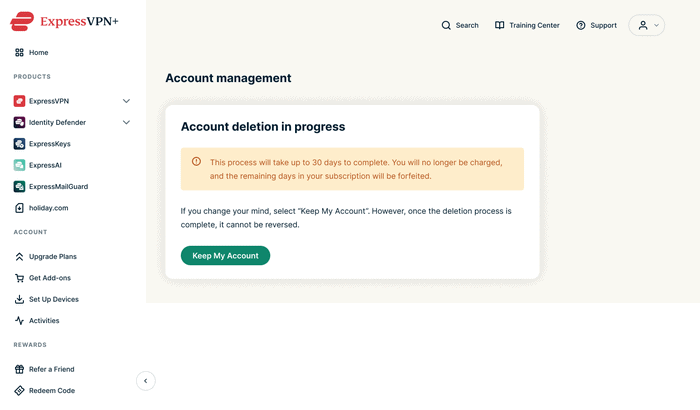
注: 誤ってアカウント削除をリクエストした場合は、Keep My Account(アカウントを保持)をタップしてください。

サポートが必要ですか? すぐにサポートを受けるには、ExpressVPNサポートチームまでお問い合わせください。

トップへ戻る


オプション2:ExpressVPN iOSアプリから削除する

iOS版ExpressVPN(iPhoneまたはiPad)をお使いの場合は、アプリ内から直接アカウントを削除できます。

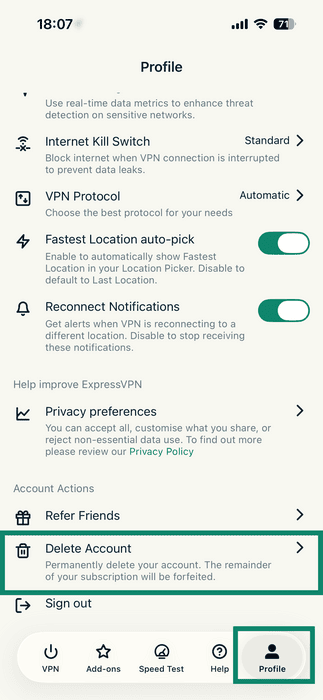
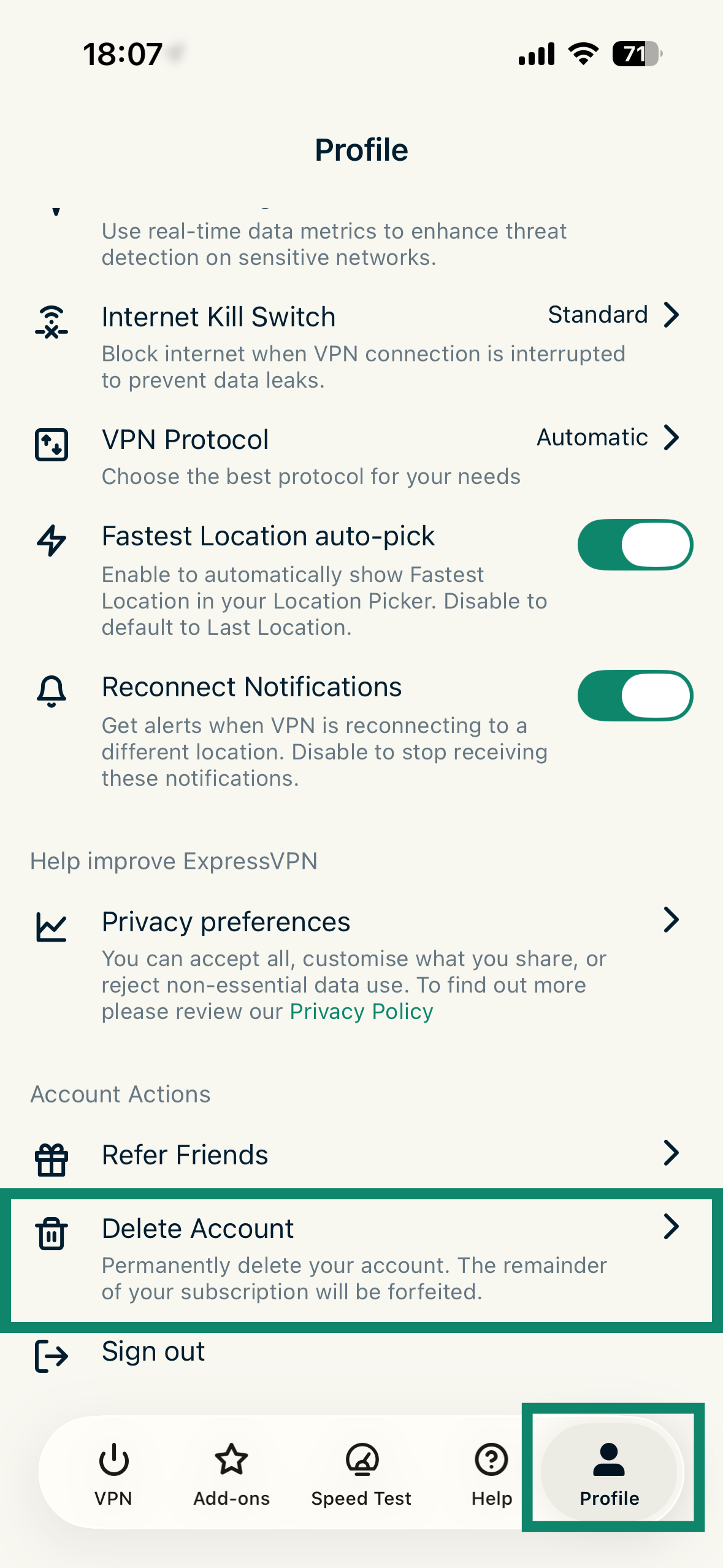
  1. ExpressVPN iOSアプリで、Profile(プロフィール)をタップし、続いてDelete Account(アカウントを削除)をタップします。The Profile tab in the ExpressVPN for iOS, with a highlighted "Delete Account" option.
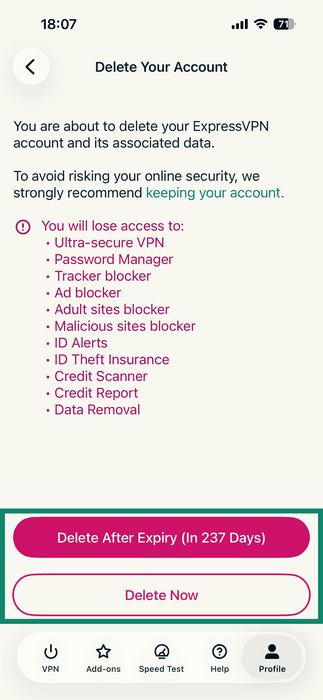
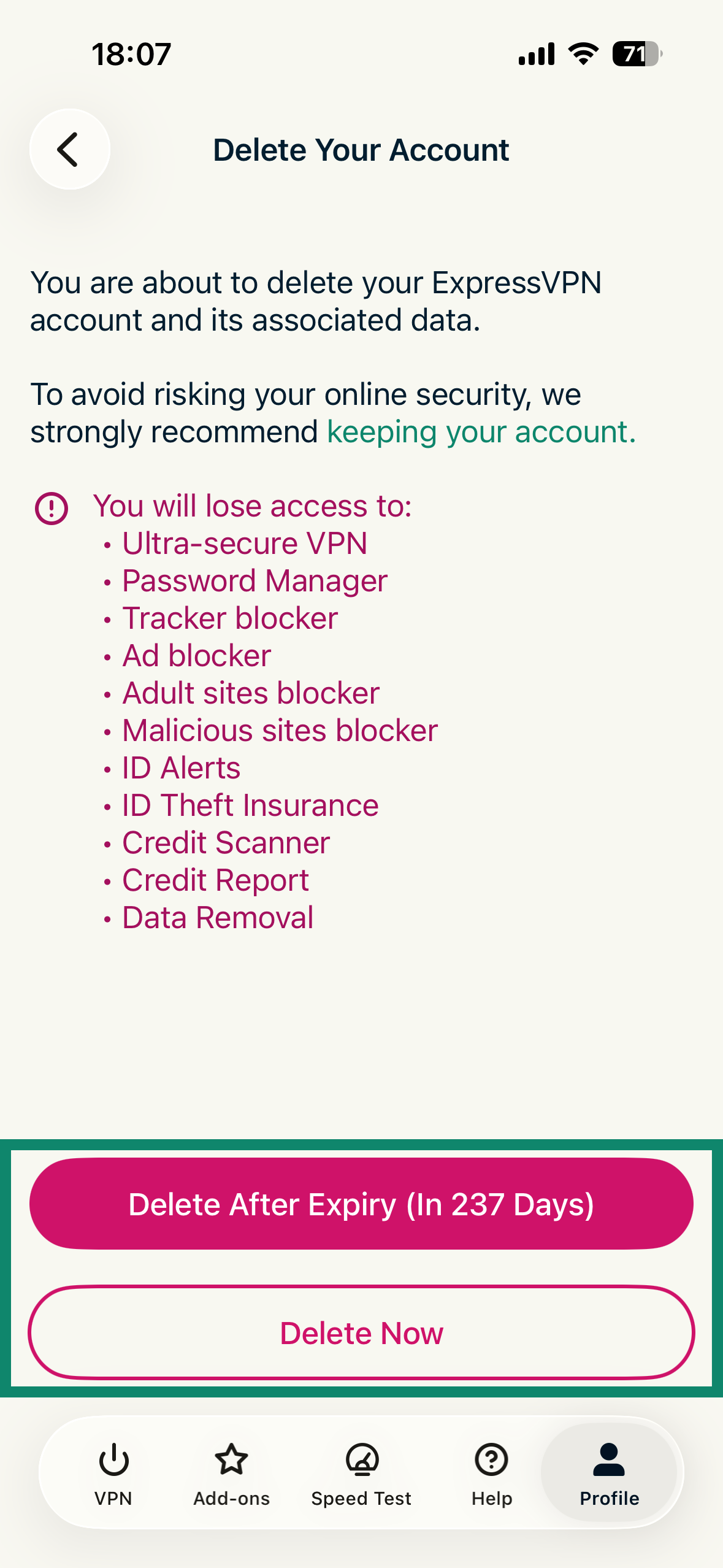
  2. 以下の2つのオプションから、希望するものをタップします。The "Delete Your Account" page in the ExpressVPN app for iOS, showing two options: Delete After Expiry and Delete Now.
    • Delete After Expiry (In xxx Days)(有効期限後に削除[あとxxx日]):自動更新を停止し、現在のサブスクリプションの有効期限が切れた後にアカウントを削除します。
    • Delete Now(今すぐ削除): 自動更新を停止し、アカウントを直ちに削除します。
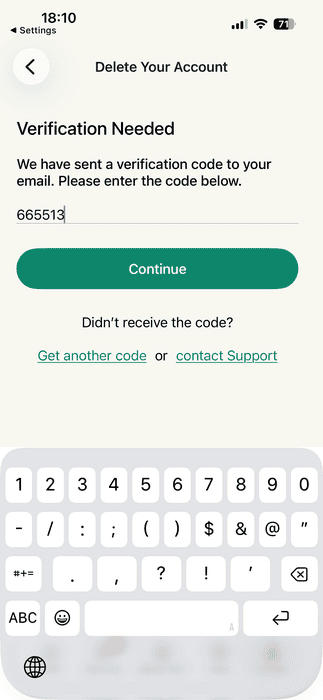
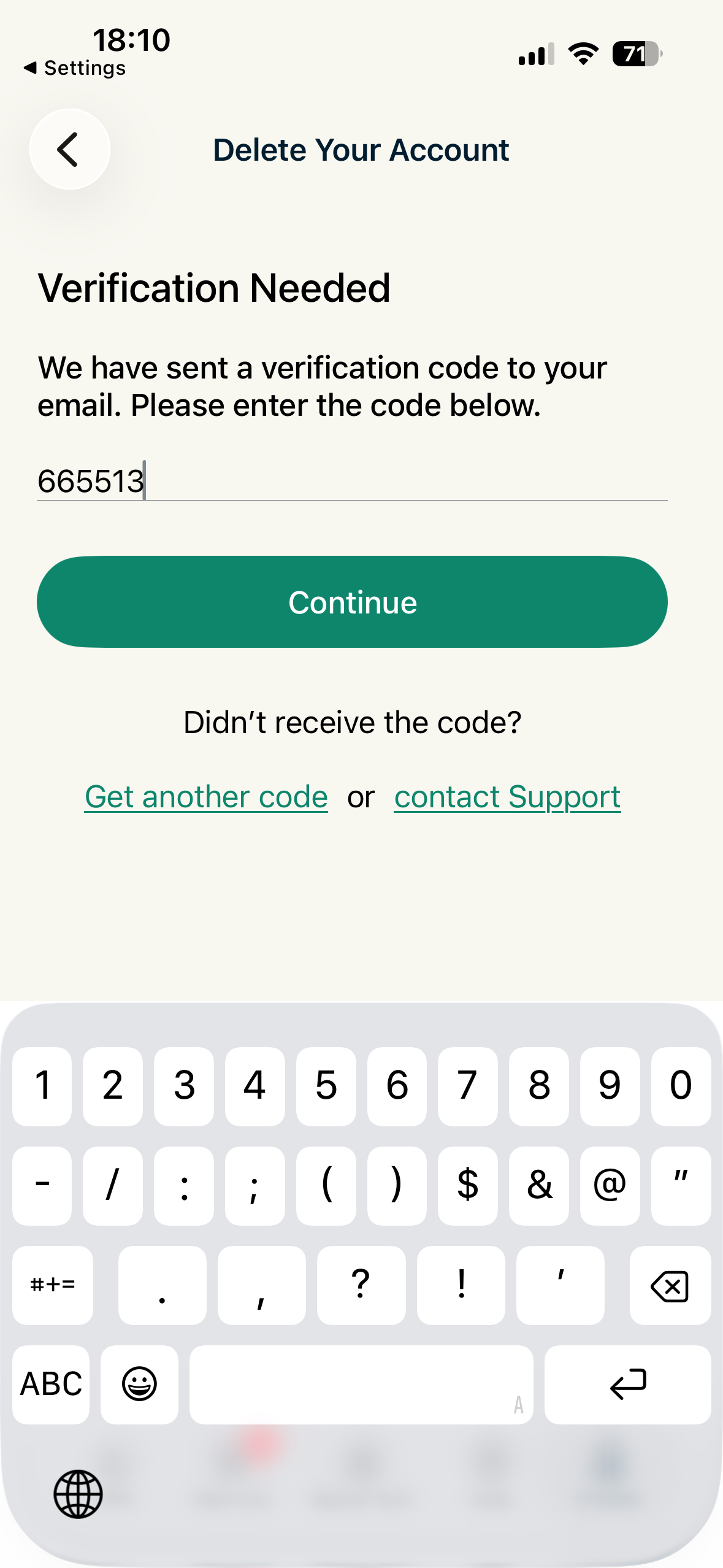
  3. 続いて、ExpressVPNアカウントの削除リクエストを確認します。登録したメールアドレスにVerification Code (認証コード)が届くので、「認証コード」欄に入力し、Continue(続行)をタップします。The Verification Needed screen in the ExpressVPN app for iOS.
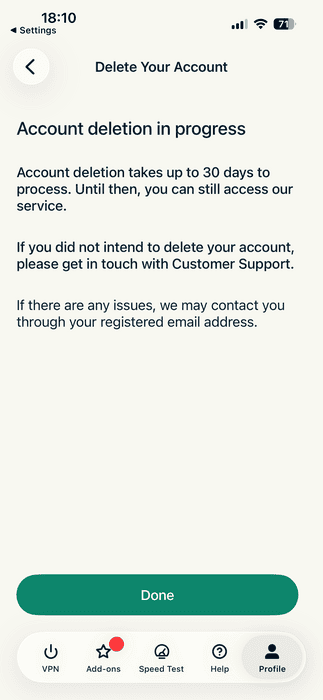
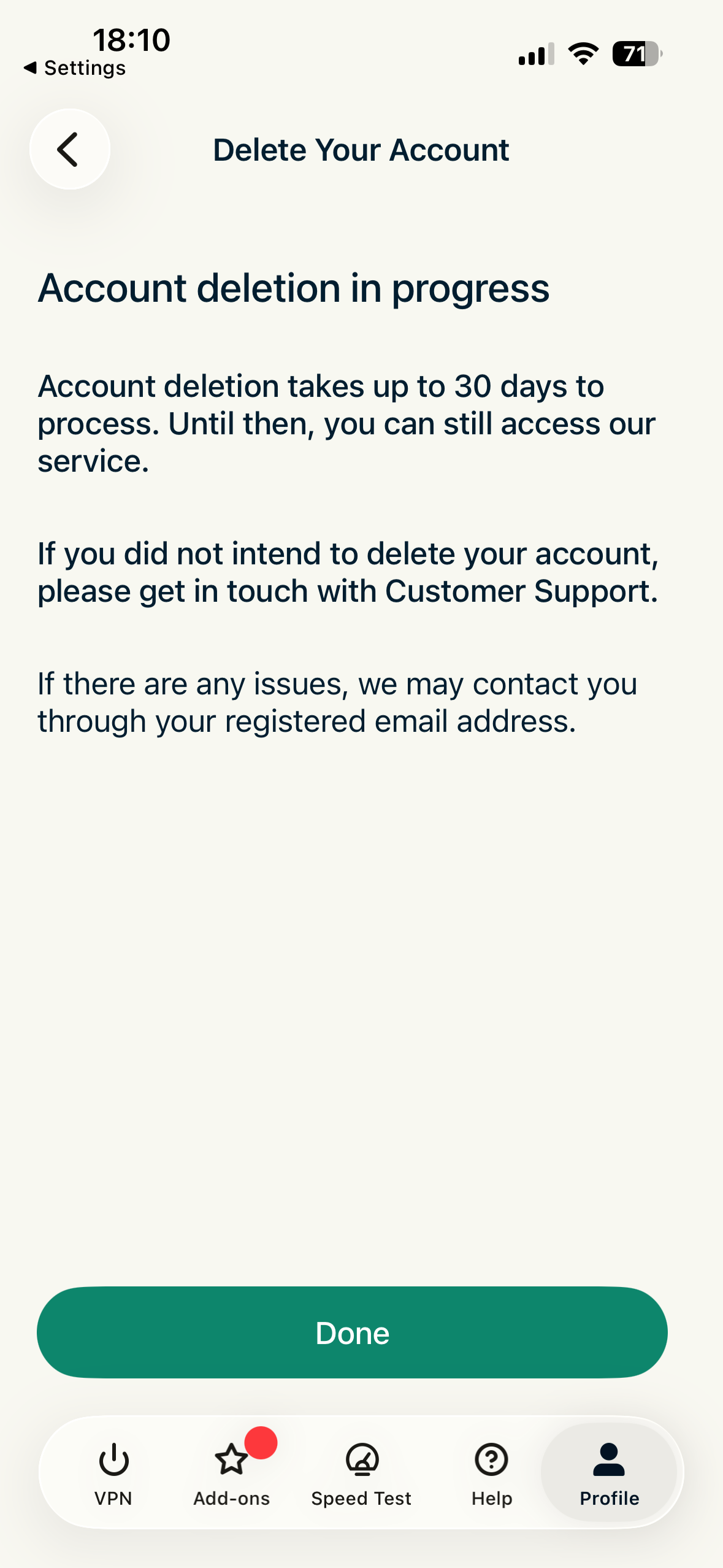
  4. 次の画面で、Done(完了)をタップします。The "Account deletion in progress" screen in the ExpressVPN app for iOS.
注: 誤ってアカウント削除をリクエストした場合や、削除を取りやめたい場合は、Keep My Account(アカウントを保持)を選択してください。誤ってこのページを閉じた場合でも、アカウントダッシュボードの上部にアカウントが削除処理中である旨のメッセージが表示されます。click here(こちらをクリック)を選択すると、削除処理をキャンセルできます。

サポートが必要ですか? すぐにサポートを受けるには、ExpressVPNサポートチームまでお問い合わせください。

トップへ戻る

Share in FacebookShare in TwitterShare in WhatsappShare in TelegramShare by email
この記事は役立ちましたか?

ご不便をおかけして申し訳ございません。よろしければ、今後の改善策をお聞かせください。

Please enter a valid email address.

サポートチームのメンバーがこの問題についてフォローアップいたします。

Share in FacebookShare in TwitterShare in WhatsappShare in TelegramShare by email
  • マルウェアとは?
  • ネットワークセキュリティキーとは?
  • VPNは合法ですか?
  • iPhoneで国を変更する方法
  • デジタルフットプリントとは?
  • VPNとTorを併用してネット上で匿名性を守る方法
  • 複数のデバイスに最適なVPNを入手
各デバイス対応のVPN
  • ExpressVPNのダウンロード
  • MacOS
  • Windows PC
  • iOS (iPhone & iPad)
  • Android
  • Linux
  • ルーター
  • Apple TV
  • Fire Stick
  • Android TV
  • Chrome拡張機能
VPNサーバーロケーション
  • 113ヶ国のサーバー
  • アメリカ対応VPN
  • イギリス対応VPN
  • カナダ対応VPN
  • オーストラリア対応VPN
特徴
  • 全ての機能を見る
  • VPNトライアル
  • プランと価格
プロダクト
  • ExpressKeys
  • ExpressMailGuard
  • ExpressAI
ExpressVPNについて
  • 弊社について
  • 信頼できるVPNへの取り組み
  • デジタルの権利
  • セキュリティ監査
  • ExpressVPNのレビュー
  • 弊社のエキスパートたち
  • プレス
  • 採用
プログラム
  • トッテナム・ホットスパー
  • Brooklyn Nets
  • パートナー
  • アフィリエイト
  • インフルエンサー
サポート
  • VPN設定方法
  • よくある質問 (FAQ)
  • VPNを購入する
詳しく知る
  • VPNとは?
  • 自分のIPを確認する
  • 私のIPを隠す
  • VPN用途トップ5
  • ブログ

© 2026 ExpressVPN. All rights reserved.(無断転載および引用禁止)

  • プライバシーポリシー
  • 利用規約
  • Cookieの設定

言語を選択してください

  • English
  • Dansk
  • Deutsch
  • Español
  • Français
  • Italiano
  • Nederlands
  • Norsk
  • Polski
  • Português
  • Suomi
  • Svenska
  • Türkçe
  • Русский
  • ภาษาไทย
  • 한국어

Live chat

Need help? Chat with us!

Online