ExpressVPN
    • Politique No logs
    • Servers in 105 Countries
    • Use on Multiple Devices
    • High-Speed VPN
    • Access Online Services Securely
    • VPN pour le gaming
    • 30-Day Money-Back Guarantee
    • Découvrir les fonctionnalités
    • À propos d'ExpressVPN
    Sign Up For Expressvpn

    One subscription gives you access to a fast-growing suite of privacy and security tools that work seamlessly together to improve your digital life.

    View all products
    • Protocole VPN Lightway
    • Internet Kill Switch
    • Split Tunneling
    • Private, Encrypted DNS
    • Avoid ISP Throttling
    • Threat Manager
    • Bloqueur de publicités
    • Contrôle parental
    • IP dédiée
  • Télécharger le VPN
    • Windows new
    • MacOS new
    • Linux new
    • iPhone / iPad
    • Android
    • Apple TV
    • Fire Stick
    • Android TV
    • VPN pour routeurs
    • Routeur Aircove
    • Chrome
    • Firefox
    • Edge
  • Pricing
    • Qu'est-ce qu'un VPN
    • VPN for Beginners
    • How To Use a VPN
    • VPN Encryption Explained
    • Blog
    • Glossary
    • IP Address Checker
    • Test de fuite DNS
    • Test de fuite WebRTC
    • Générateur de mots de passe
    • Support Client
    • FAQ
    • Messagerie instantanée
    • Tutoriels de configuration VPN
    • Redemption Code
  • Icon10VPN for Teams
  • Produits
    Icon11

    ExpressVPN for Teams Get fast, secure VPN protection for growing teams. Easy to deploy, simple to manage, built to scale.

    Img2
    • ExpressVPN

      ExpressVPN Industry-leading, ultra-fast VPN with secure servers in 105 countries.

    • ExpressMailGuard

      ExpressMailGuard Private email relay service to protect your inbox and identity.

    • ExpressKeys

      ExpressKeys Secure password management, multi-factor authentication, and more.

    • ExpressAI

      ExpressAI The first consumer AI powered by confidential computing for privacy-led intelligence.

    • Identity Defender

      Identity Defender Powerful suite of ID protection, monitoring, and data removal tools

    Other products from the family behind ExpressVPN

    • holiday.com eSIM

      holiday.com eSIM Unlimited data with a single eSIM across 150+ destinations.

    • Intego

      Intego Award-winning macOS antivirus, firewall, system tools, and more.

  • Mon compte
Démarrer
ExpressVPN
    • Politique No logs
    • Servers in 105 Countries
    • Use on Multiple Devices
    • High-Speed VPN
    • Access Online Services Securely
    • VPN pour le gaming
    • 30-Day Money-Back Guarantee
    • Découvrir les fonctionnalités
    • À propos d'ExpressVPN
    Sign Up For Expressvpn

    One subscription gives you access to a fast-growing suite of privacy and security tools that work seamlessly together to improve your digital life.

    View all products
    • Protocole VPN Lightway
    • Internet Kill Switch
    • Split Tunneling
    • Private, Encrypted DNS
    • Avoid ISP Throttling
    • Threat Manager
    • Bloqueur de publicités
    • Contrôle parental
    • IP dédiée
  • Télécharger le VPN
    • Windows new
    • MacOS new
    • Linux new
    • iPhone / iPad
    • Android
    • Apple TV
    • Fire Stick
    • Android TV
    • VPN pour routeurs
    • Routeur Aircove
    • Chrome
    • Firefox
    • Edge
  • Pricing
    • Qu'est-ce qu'un VPN
    • VPN for Beginners
    • How To Use a VPN
    • VPN Encryption Explained
    • Blog
    • Glossary
    • IP Address Checker
    • Test de fuite DNS
    • Test de fuite WebRTC
    • Générateur de mots de passe
    • Support Client
    • FAQ
    • Messagerie instantanée
    • Tutoriels de configuration VPN
    • Redemption Code
  • VPN for Teams
  • Produits
    • ExpressVPN

      ExpressVPN Industry-leading, ultra-fast VPN with secure servers in 105 countries.

    • ExpressMailGuard

      ExpressMailGuard Private email relay service to protect your inbox and identity.

    • ExpressKeys

      ExpressKeys Secure password management, multi-factor authentication, and more.

    • ExpressAI

      ExpressAI The first consumer AI powered by confidential computing for privacy-led intelligence.

    • Identity Defender

      Identity Defender Powerful suite of ID protection, monitoring, and data removal tools

    Other products from the family behind ExpressVPN

    • holiday.com eSIM

      holiday.com eSIM Unlimited data with a single eSIM across 150+ destinations.

    • Intego

      Intego Award-winning macOS antivirus, firewall, system tools, and more.

    Icon11

    ExpressVPN for Teams Get fast, secure VPN protection for growing teams. Easy to deploy, simple to manage, built to scale.

    Img2
  • Mon compte
Démarrer
Home Home » How to recover a lost or forgotten password

Gérer votre compte

How to recover a lost or forgotten password

Dernière mise à jour : 11 mai 2026

Share in FacebookShare in TwitterShare in WhatsappShare in TelegramShare by email

Pour utiliser nos applis et configurations, veuillez d'abord créer un compte ExpressVPN.

To reset a lost or forgotten password, you can visit our reset password page. The instructions below outline how to change your password from there.

If you remember your ExpressVPN account password and want to change it, visit our guide on how to change your password.

Jump to section

Change your password via email
Change your password via the ExpressVPN app


Change your password via email

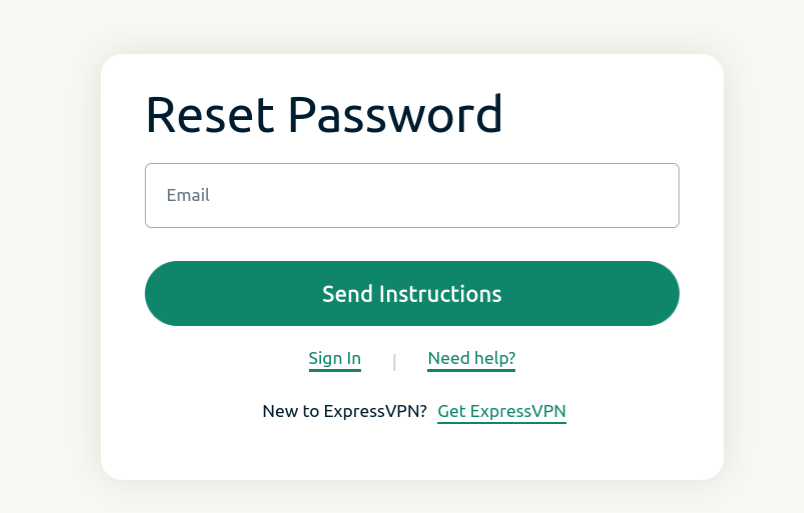
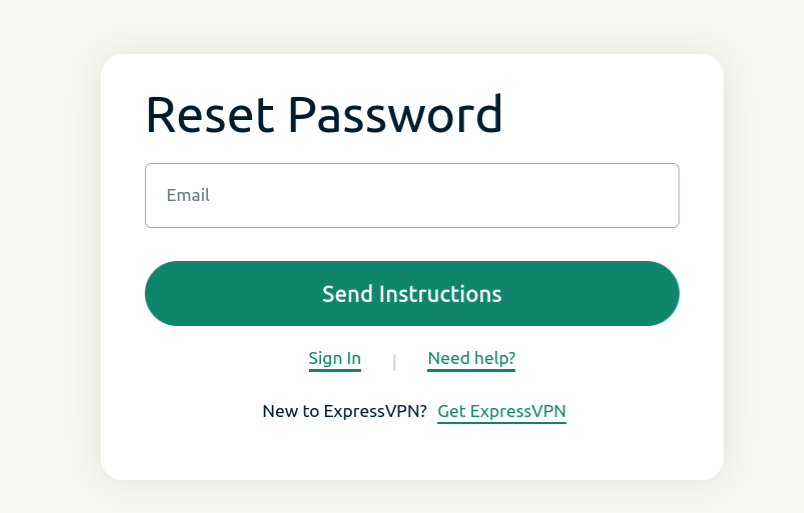
  1. Visit the password reset page and enter the email address associated with your account. Click Send Instructions.Reset password screen for ExpressVPN.
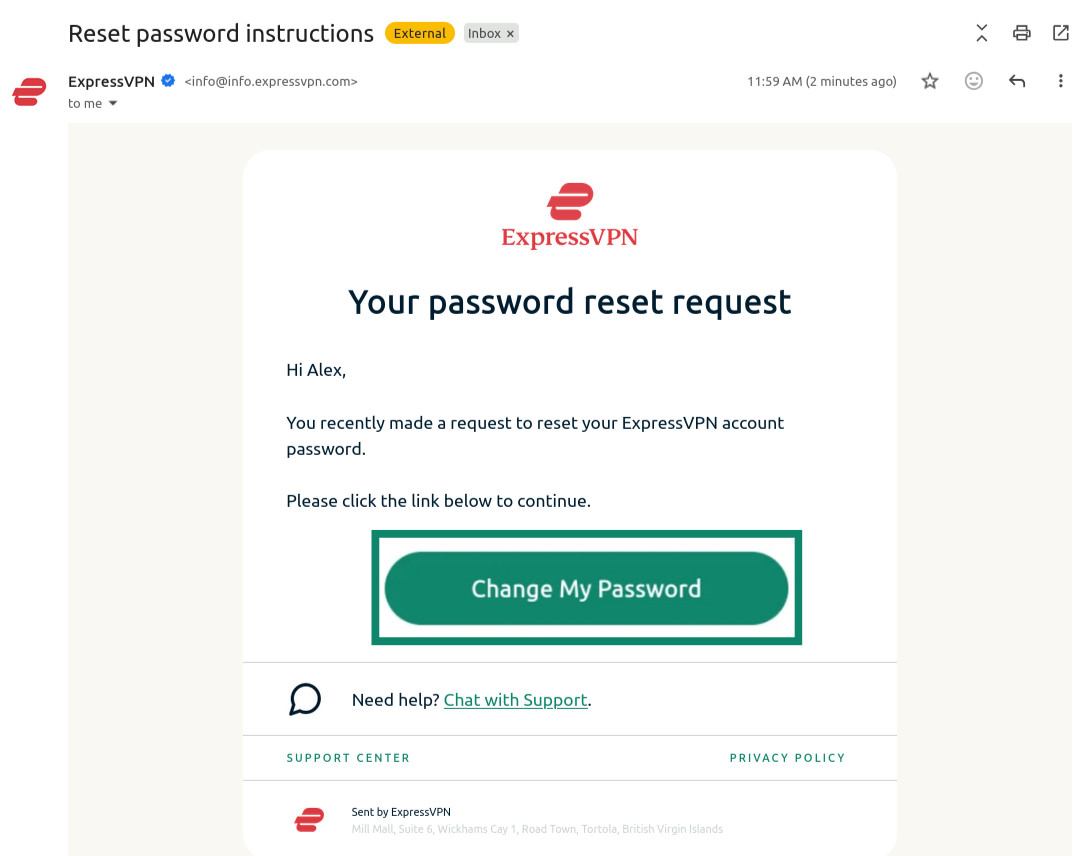
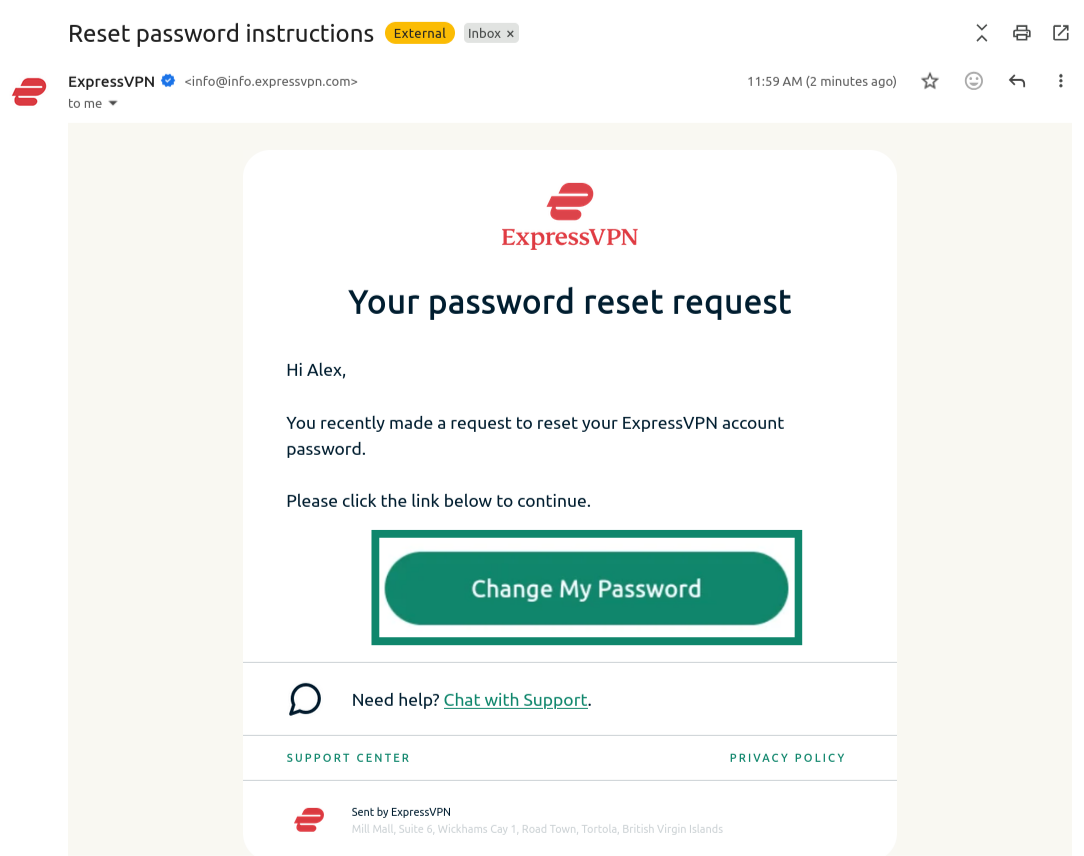
  2. Open the new email you received and click the Change My Password button.Email from ExpressVPN showing the "Change My Password" button highlighted.
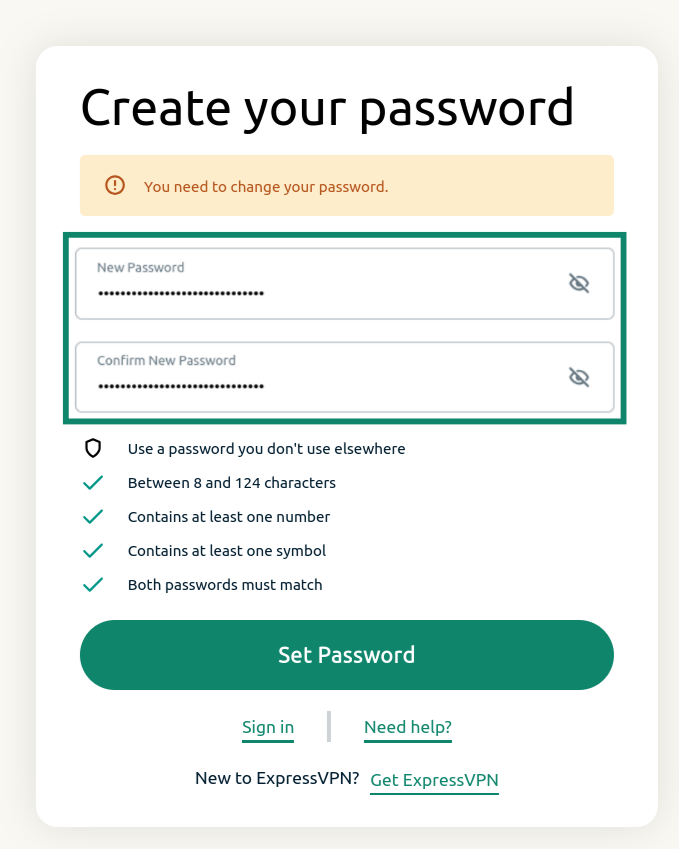
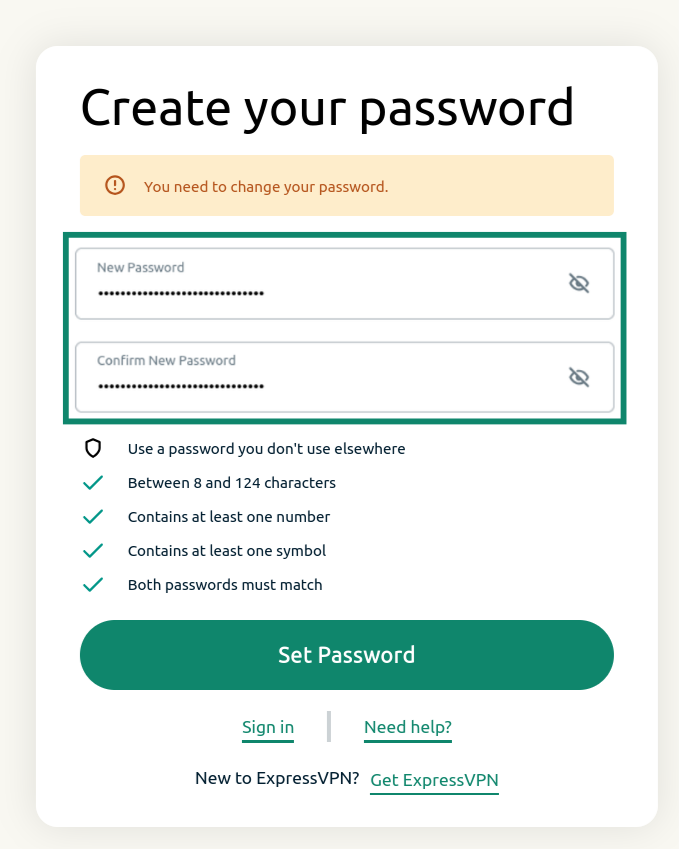
  3. Enter a new password, confirm it, and click Set Password.ExpressVPN password reset screen showing the password reset fields and the "Set Password" button.

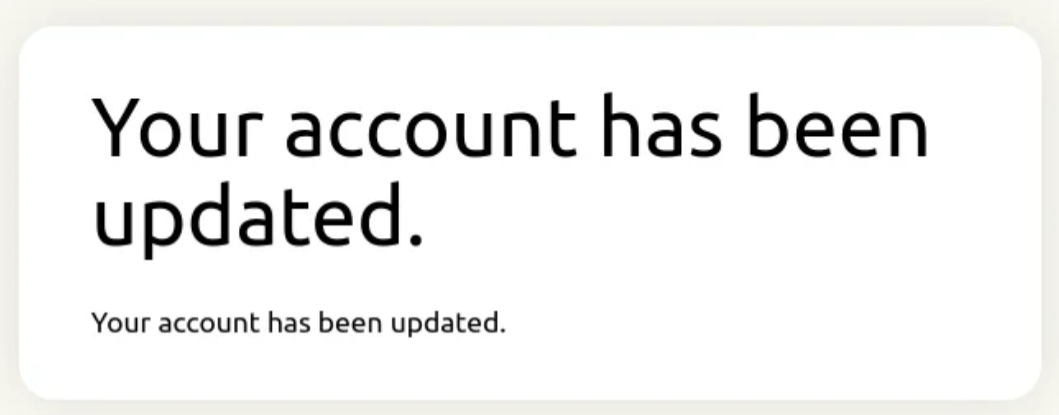
You will receive a notification saying that your account has been updated. Your password should now be reset.Notification showing that the ExpressVPN password has been updated.
Need help? Contact the ExpressVPN Support Team for immediate assistance.

Back to top


Change your password via the ExpressVPN app

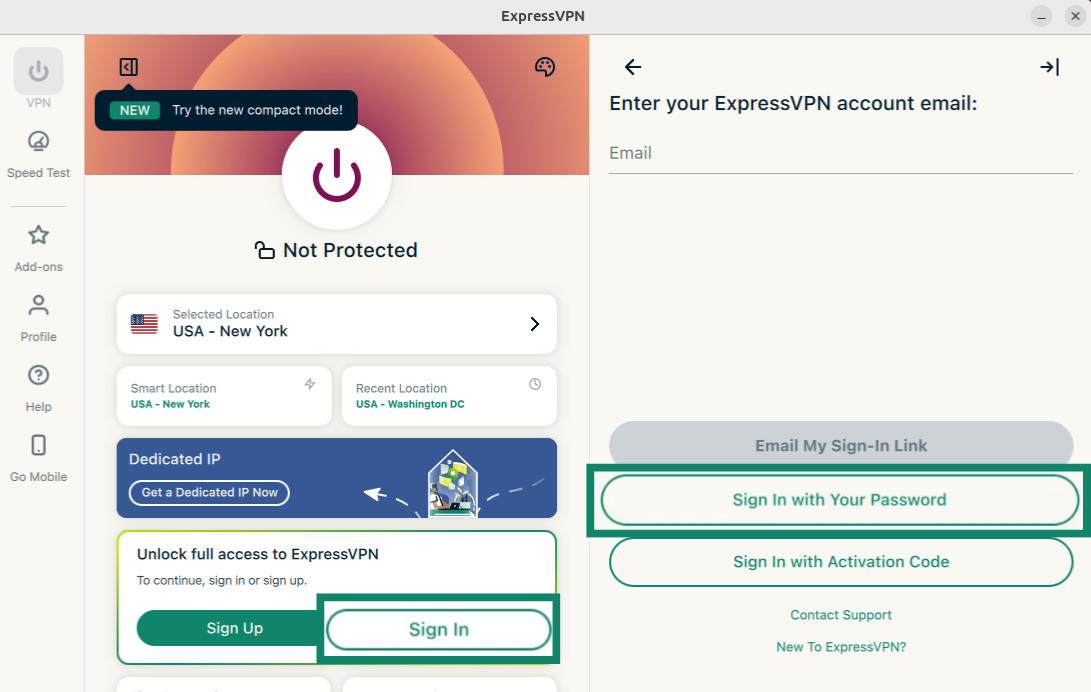
  1. Open the ExpressVPN app and select Sign In.
  2. Select Sign in with Your Password.ExpressVPN app showing the "Sign In" and "Sign In with Your Password" buttons highlighted.
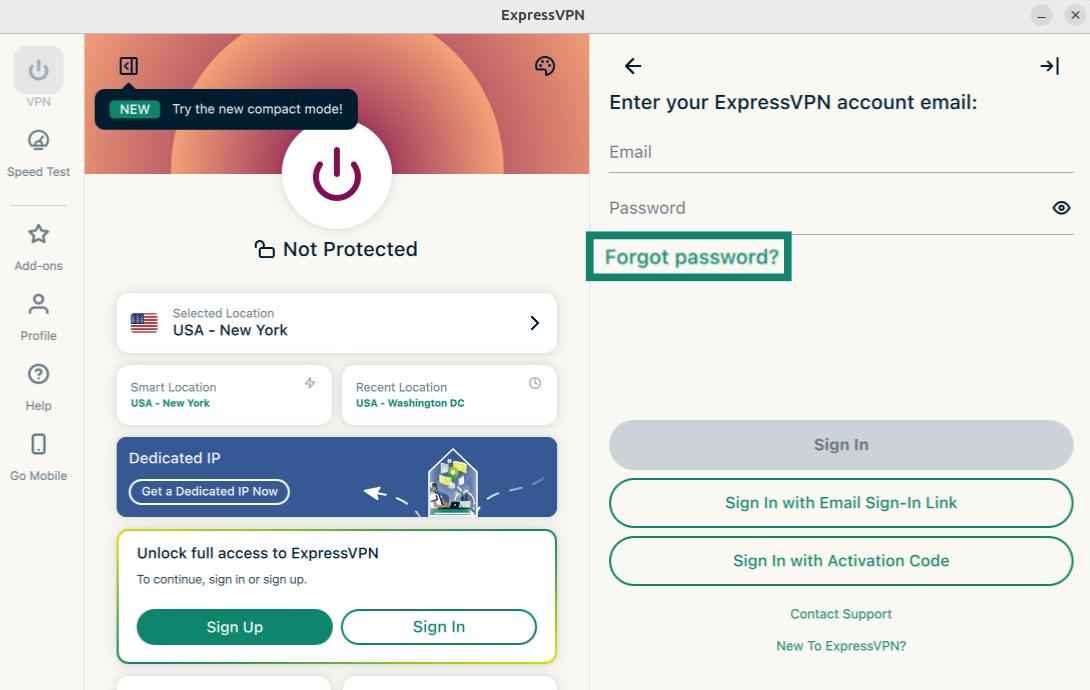
  3. Click Forgot password?ExpressVPN app showing the "Forgot password?" button highlighted.
  4. The password reset page will open. Enter the email address associated with your ExpressVPN account and click Send Instructions.ExpressVPN app showing the "Forgot password?" button highlighted.
  5. Open the new email you received and click the Change My Password button.Email from ExpressVPN showing the "Change My Password" button highlighted.
  6. Enter a new password, confirm it, and click Set Password.ExpressVPN password reset screen showing the password reset fields and the "Set Password" button.

Your password should now be reset.

Need help? Contact the ExpressVPN Support Team via Live Chat for immediate assistance.

Back to top

Share in FacebookShare in TwitterShare in WhatsappShare in TelegramShare by email
Cet article vous a-t-il été utile ?

Nous sommes navrés de l'apprendre. Dites-nous comment nous pouvons nous améliorer.

Please enter a valid email address.

Un membre de notre équipe de support assurera le suivi de votre problème.

Share in FacebookShare in TwitterShare in WhatsappShare in TelegramShare by email
  • Qu’est-ce qu’un programme malveillant ?
  • Qu’est-ce qu’une clé de sécurité réseau ?
  • Les VPN sont-ils légaux ?
  • Comment modifier la localisation de votre iPhone ?
  • Qu’est-ce qu’une trace numérique ?
  • Comment combiner un VPN et Tor pour garantir votre anonymat en ligne ?
  • Téléchargez le meilleur VPN pour plusieurs appareils
VPN pour tout appareil
  • Télécharger ExpressVPN
  • MacOS
  • PC Windows
  • iOS (iPhone et iPad)
  • Android
  • Linux
  • Routeur Aircove
  • Apple TV
  • Fire Stick
  • Android TV
  • Extension Chrome
Emplacements serveurs
  • Serveurs dans 105 pays
  • VPN États-Unis
  • VPN Royaume-Uni
  • VPN Canada
  • VPN Australie
Fonctionnalités
  • Découvrir les fonctionnalités
  • Essai VPN sans risque
  • Abonnements et tarifs
Produits
  • ExpressKeys
  • ExpressMailGuard
  • ExpressAI
À propos d'ExpressVPN
  • À propos de nous
  • Centre de confiance
  • Centre des droits
  • Audits de sécurité
  • Avis sur ExpressVPN
  • Nos experts
  • Presse
  • Carrières
Programmes
  • Tottenham Hotspur
  • Brooklyn Nets
  • Devenez partenaire
  • Affiliés
  • Influenceurs
Support
  • Tutoriels de configuration VPN
  • FAQ
  • Obtenir le VPN
En savoir plus
  • Qu'est-ce qu'un VPN ?
  • Quelle est mon IP ?
  • Masquer mon IP
  • Le Top 5 des utilisations du VPN
  • Blog

© 2026 ExpressVPN. Tous droits réservés.

  • Politique de confidentialité
  • Conditions de service
  • Préférences de cookies

Choisissez une langue

  • English
  • Deutsch
  • Español
  • Italiano
  • Nederlands
  • Português

Live chat

Need help? Chat with us!

Online