ExpressVPN
    • No-Logs-Richtlinie
    • Servers in 105 Countries
    • Use on Multiple Devices
    • High-Speed VPN
    • Access Online Services Securely
    • Gaming-VPN
    • 30-Day Money-Back Guarantee
    • Alle Features entdecken
    • Über ExpressVPN
    Sign Up For Expressvpn

    One subscription gives you access to a fast-growing suite of privacy and security tools that work seamlessly together to improve your digital life.

    View all products
    • VPN-Protokoll Lightway
    • Internet Kill Switch
    • Split-Tunneling
    • Private, Encrypted DNS
    • Avoid ISP Throttling
    • Threat Manager
    • Werbeblocker
    • Kinderschutz
    • Dedizierte IP-Adresse
  • VPN-Download
    • Windows new
    • MacOS new
    • Linux new
    • iPhone / iPad
    • Android
    • Apple TV
    • Fire Stick
    • Android TV
    • VPN für Router
    • Aircove Router
    • Chrome
    • Firefox
    • Edge
  • Pricing
    • Was ist ein VPN?
    • VPN for Beginners
    • How To Use a VPN
    • VPN Encryption Explained
    • Blog
    • Glossary
    • IP Address Checker
    • DNS-Leak-Test
    • WebRTC-Leak-Test
    • Passwort-Generator
    • Hilfecenter
    • FAQ
    • Live-Chat
    • VPN-Setup Tutorials
    • Redemption Code
  • Icon10VPN for Teams
  • Produkte
    Icon11

    ExpressVPN for Teams Get fast, secure VPN protection for growing teams. Easy to deploy, simple to manage, built to scale.

    Img2
    • ExpressVPN

      ExpressVPN Industry-leading, ultra-fast VPN with secure servers in 105 countries.

    • ExpressMailGuard

      ExpressMailGuard Private email relay service to protect your inbox and identity.

    • ExpressKeys

      ExpressKeys Secure password management, multi-factor authentication, and more.

    • ExpressAI

      ExpressAI The first consumer AI powered by confidential computing for privacy-led intelligence.

    • Identity Defender

      Identity Defender Powerful suite of ID protection, monitoring, and data removal tools

    Other products from the family behind ExpressVPN

    • holiday.com eSIM

      holiday.com eSIM Unlimited data with a single eSIM across 150+ destinations.

    • Intego

      Intego Award-winning macOS antivirus, firewall, system tools, and more.

  • Mein Konto
Los geht's
ExpressVPN
    • No-Logs-Richtlinie
    • Servers in 105 Countries
    • Use on Multiple Devices
    • High-Speed VPN
    • Access Online Services Securely
    • Gaming-VPN
    • 30-Day Money-Back Guarantee
    • Alle Features entdecken
    • Über ExpressVPN
    Sign Up For Expressvpn

    One subscription gives you access to a fast-growing suite of privacy and security tools that work seamlessly together to improve your digital life.

    View all products
    • VPN-Protokoll Lightway
    • Internet Kill Switch
    • Split-Tunneling
    • Private, Encrypted DNS
    • Avoid ISP Throttling
    • Threat Manager
    • Werbeblocker
    • Kinderschutz
    • Dedizierte IP-Adresse
  • VPN-Download
    • Windows new
    • MacOS new
    • Linux new
    • iPhone / iPad
    • Android
    • Apple TV
    • Fire Stick
    • Android TV
    • VPN für Router
    • Aircove Router
    • Chrome
    • Firefox
    • Edge
  • Pricing
    • Was ist ein VPN?
    • VPN for Beginners
    • How To Use a VPN
    • VPN Encryption Explained
    • Blog
    • Glossary
    • IP Address Checker
    • DNS-Leak-Test
    • WebRTC-Leak-Test
    • Passwort-Generator
    • Hilfecenter
    • FAQ
    • Live-Chat
    • VPN-Setup Tutorials
    • Redemption Code
  • VPN for Teams
  • Produkte
    • ExpressVPN

      ExpressVPN Industry-leading, ultra-fast VPN with secure servers in 105 countries.

    • ExpressMailGuard

      ExpressMailGuard Private email relay service to protect your inbox and identity.

    • ExpressKeys

      ExpressKeys Secure password management, multi-factor authentication, and more.

    • ExpressAI

      ExpressAI The first consumer AI powered by confidential computing for privacy-led intelligence.

    • Identity Defender

      Identity Defender Powerful suite of ID protection, monitoring, and data removal tools

    Other products from the family behind ExpressVPN

    • holiday.com eSIM

      holiday.com eSIM Unlimited data with a single eSIM across 150+ destinations.

    • Intego

      Intego Award-winning macOS antivirus, firewall, system tools, and more.

    Icon11

    ExpressVPN for Teams Get fast, secure VPN protection for growing teams. Easy to deploy, simple to manage, built to scale.

    Img2
  • Mein Konto
Los geht's
Home Home » How to recover a lost or forgotten password

Kontoverwaltung

How to recover a lost or forgotten password

Zuletzt aktualisiert: 11. Mai 2026

Share in FacebookShare in TwitterShare in WhatsappShare in TelegramShare by email

Um unsere Apps und Konfigurationen nutzen zu können, registrieren Sie sich bitte zuerst für ein ExpressVPN-Konto.

To reset a lost or forgotten password, you can visit our reset password page. The instructions below outline how to change your password from there.

If you remember your ExpressVPN account password and want to change it, visit our guide on how to change your password.

Jump to section

Change your password via email
Change your password via the ExpressVPN app


Change your password via email

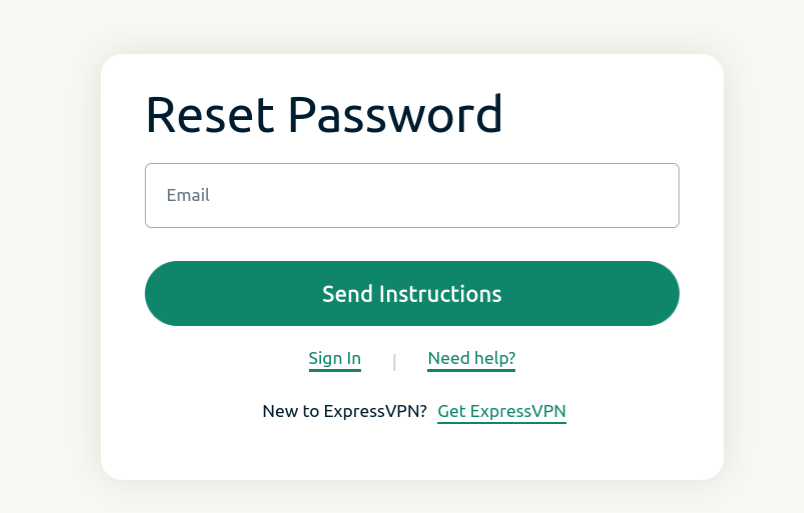
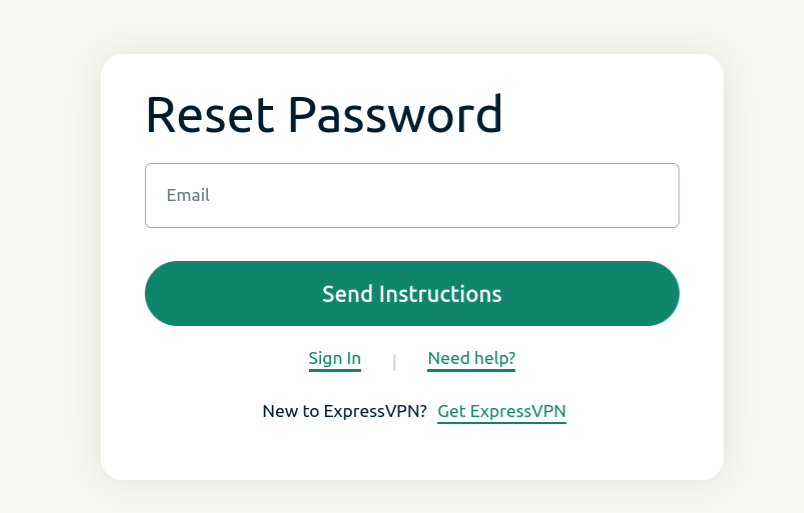
  1. Visit the password reset page and enter the email address associated with your account. Click Send Instructions.Reset password screen for ExpressVPN.
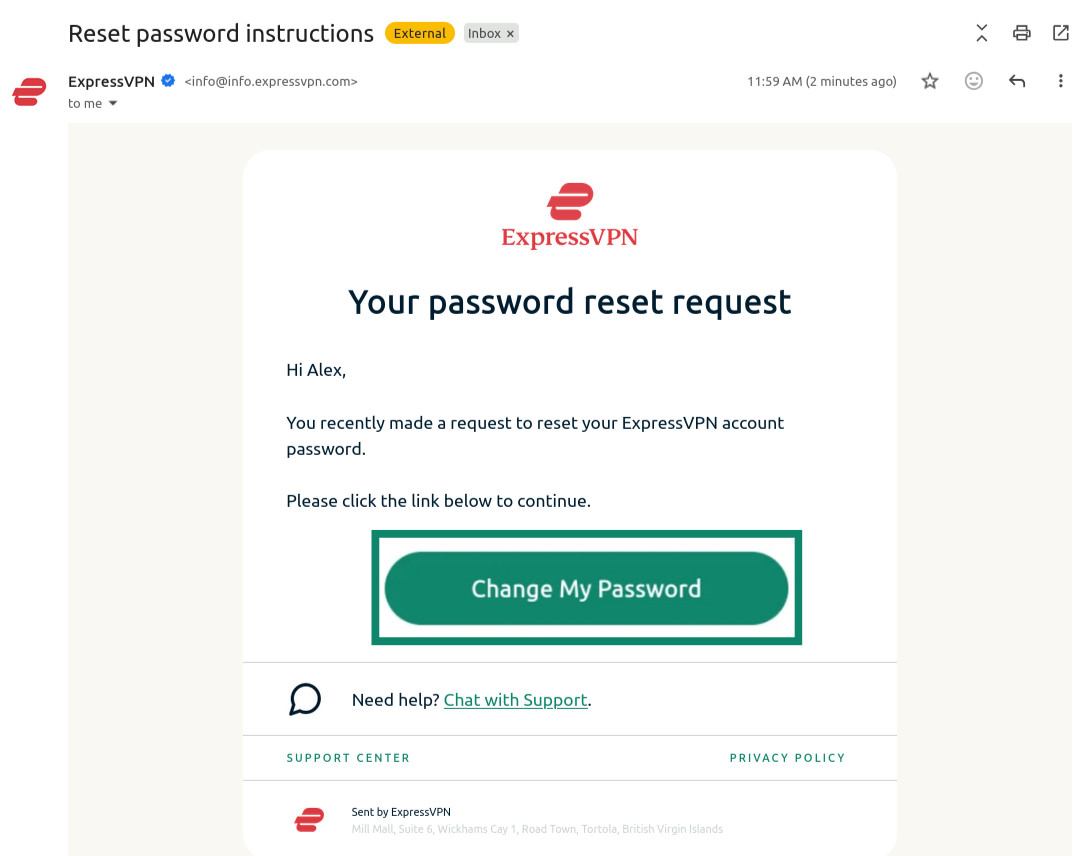
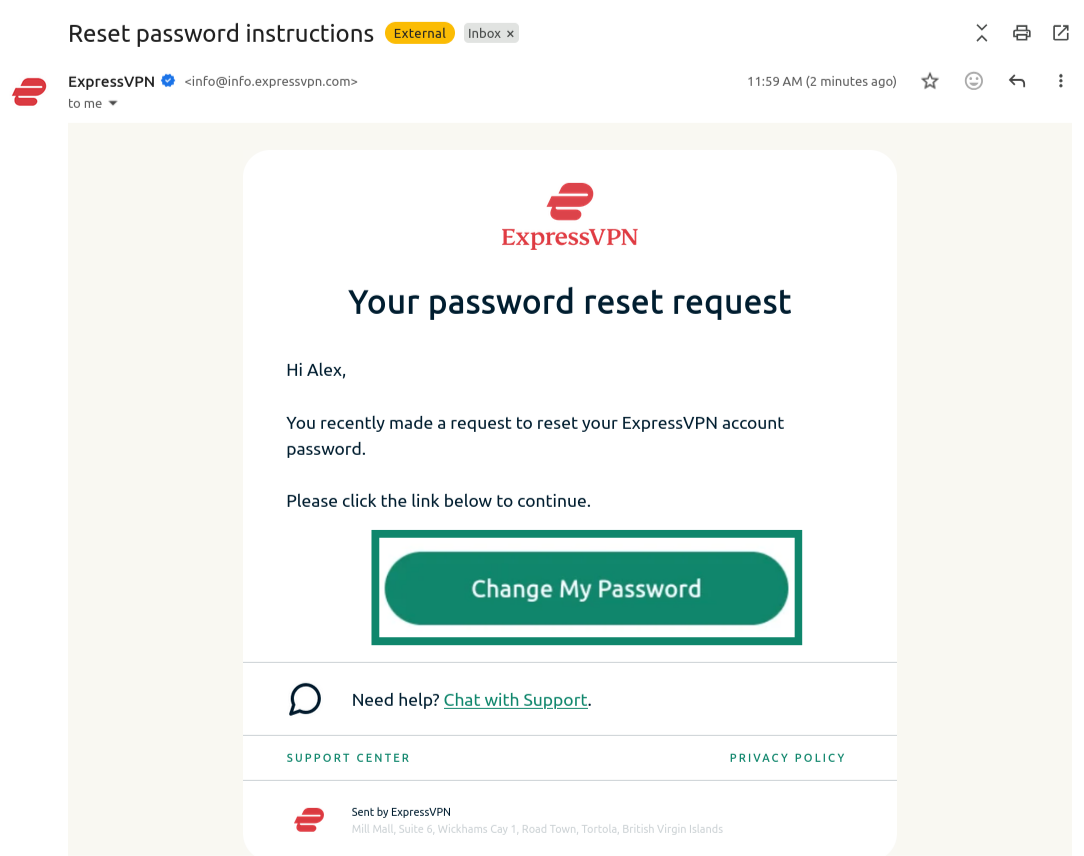
  2. Open the new email you received and click the Change My Password button.Email from ExpressVPN showing the "Change My Password" button highlighted.
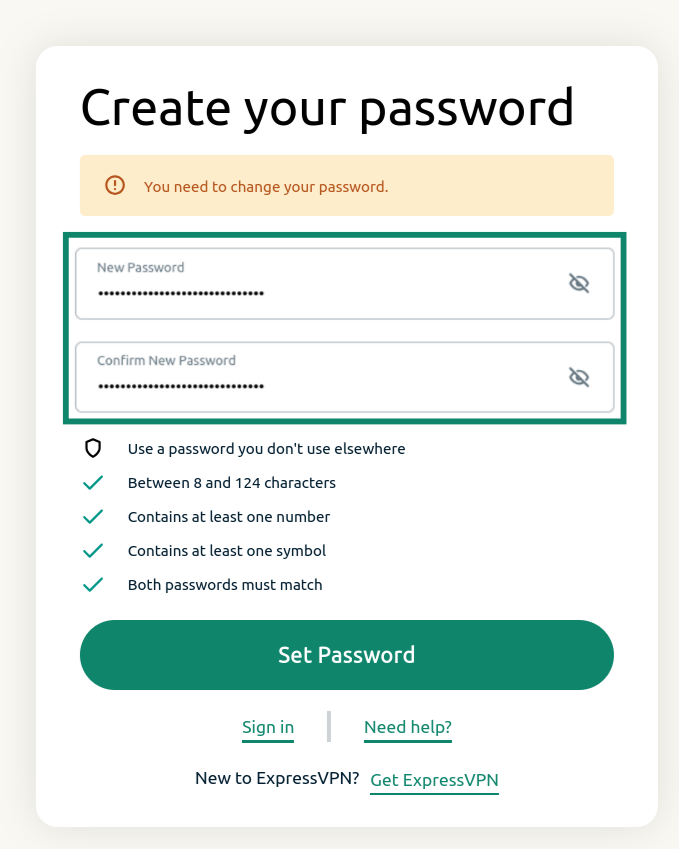
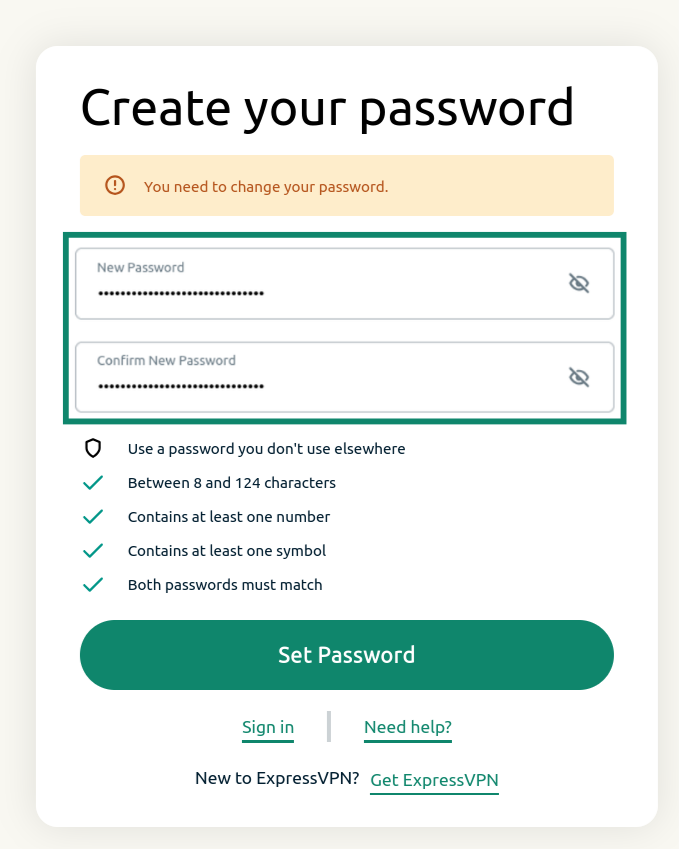
  3. Enter a new password, confirm it, and click Set Password.ExpressVPN password reset screen showing the password reset fields and the "Set Password" button.

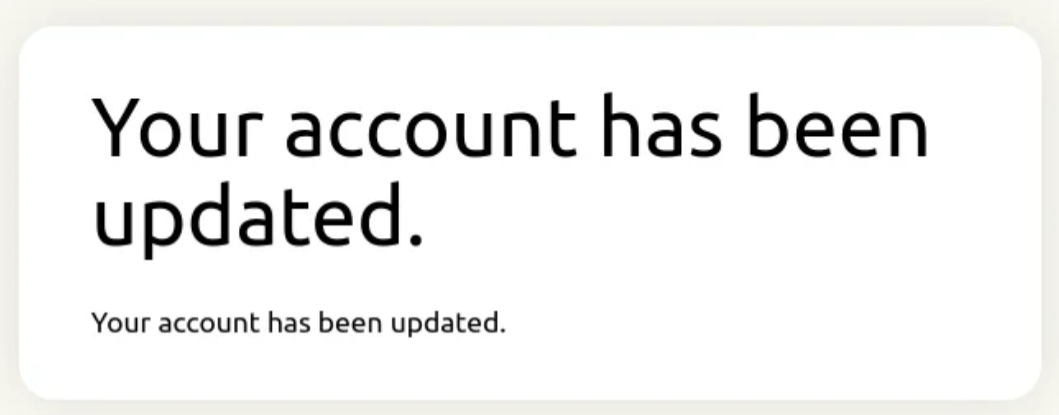
You will receive a notification saying that your account has been updated. Your password should now be reset.Notification showing that the ExpressVPN password has been updated.
Need help? Contact the ExpressVPN Support Team for immediate assistance.

Back to top


Change your password via the ExpressVPN app

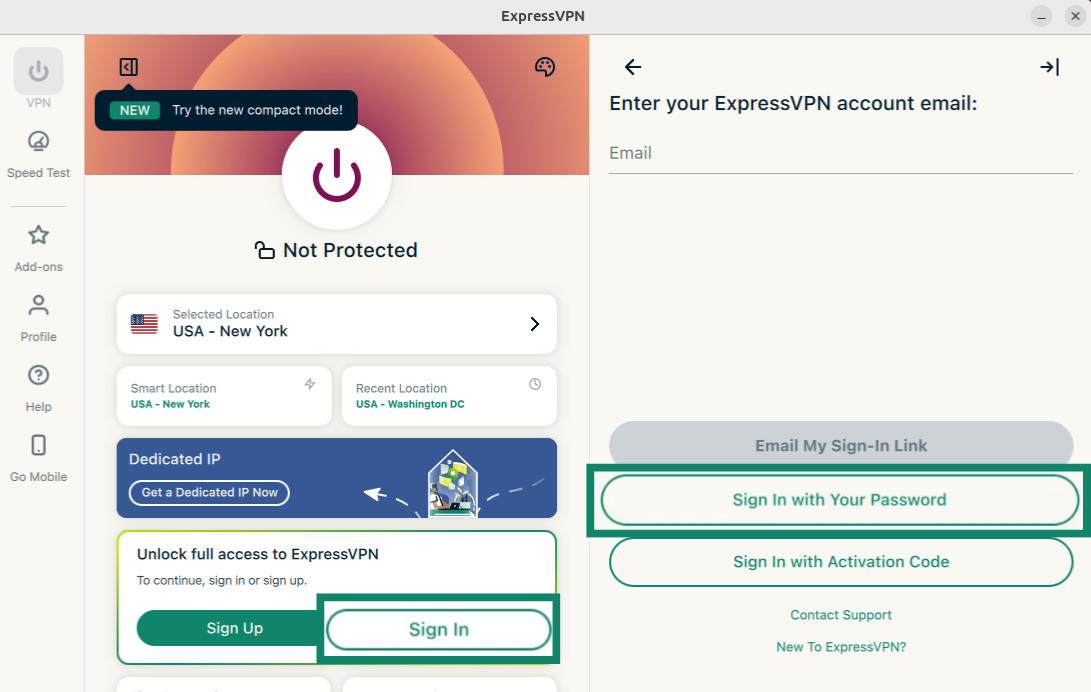
  1. Open the ExpressVPN app and select Sign In.
  2. Select Sign in with Your Password.ExpressVPN app showing the "Sign In" and "Sign In with Your Password" buttons highlighted.
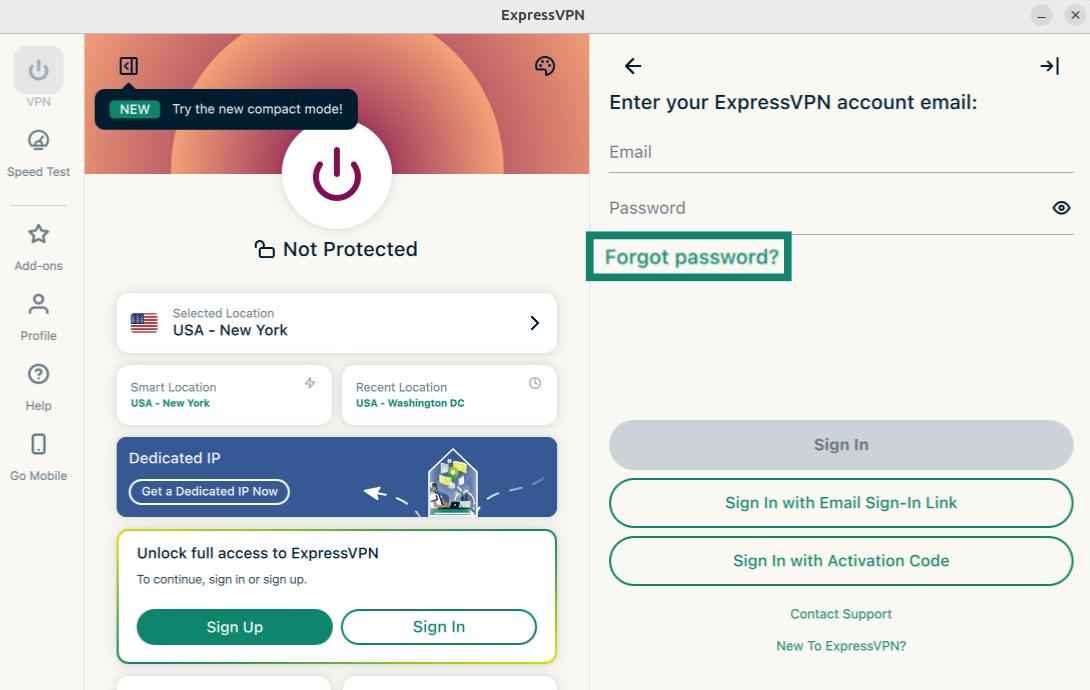
  3. Click Forgot password?ExpressVPN app showing the "Forgot password?" button highlighted.
  4. The password reset page will open. Enter the email address associated with your ExpressVPN account and click Send Instructions.ExpressVPN app showing the "Forgot password?" button highlighted.
  5. Open the new email you received and click the Change My Password button.Email from ExpressVPN showing the "Change My Password" button highlighted.
  6. Enter a new password, confirm it, and click Set Password.ExpressVPN password reset screen showing the password reset fields and the "Set Password" button.

Your password should now be reset.

Need help? Contact the ExpressVPN Support Team via Live Chat for immediate assistance.

Back to top

Share in FacebookShare in TwitterShare in WhatsappShare in TelegramShare by email
War dieser Beitrag hilfreich?

Das tut uns leid. Lassen Sie uns wissen, wie wir uns verbessern können.

Please enter a valid email address.

Ein Mitarbeiter unseres Supportteams wird sich mit Ihrem Problem befassen.

Share in FacebookShare in TwitterShare in WhatsappShare in TelegramShare by email
  • Was ist Malware?
  • Was ist ein Netzwerk-Sicherheits-Schlüssel?
  • Sind VPNs legal?
  • Wie Du den Standort auf Deinem iPhone änderst
  • Was ist ein digitaler Fußabdruck?
  • Wie man ein VPN und Tor für Online-Anonymität kombiniert
  • Erhalte das beste VPN für mehrere Geräte
VPN für alle Geräte
  • ExpressVPN herunterladen
  • MacOS
  • Windows-PC
  • iOS (iPhone & iPad)
  • Android
  • Linux
  • Router
  • Apple TV
  • Fire Stick
  • Android TV
  • Chrome-Erweiterung
VPN Serverstandorte
  • Server in 105 Ländern
  • USA-VPN
  • UK-VPN
  • Kanada-VPN
  • Australien-VPN
Features
  • Alle Features entdecken
  • VPN-Testversion ohne Risiko
  • Abos und Preise
Produkte
  • ExpressKeys
  • ExpressMailGuard
  • ExpressAI
Über ExpressVPN
  • Über uns
  • Trust Center
  • Rights Center
  • Sicherheitsaudits
  • ExpressVPN-Erfahrungen
  • Unsere Experten
  • Presse
  • Karriere
Programme
  • Tottenham Hotspur
  • Brooklyn Nets
  • Partner werden
  • Affiliates
  • Influencer
Support
  • VPN-Setup Tutorials
  • FAQ
  • VPN kaufen
Mehr erfahren
  • Was ist ein VPN?
  • Was ist meine IP-Adresse?
  • Verberge meine IP
  • Top 5 VPN-Verwendungen
  • Blog

© 2026 ExpressVPN. Alle Rechte vorbehalten.

  • Datenschutzrichtlinie
  • Servicebedingungen
  • Cookie-Einstellungen

Wählen Sie eine Sprache

  • English
  • Español
  • Français
  • Italiano
  • Nederlands
  • Português

Live chat

Need help? Chat with us!

Online