

ExpressVPN
    • ノーログポリシー
    • Servers in 105 Countries
    • Use on Multiple Devices
    • High-Speed VPN
    • Access Online Services Securely
    • ゲームに最適なVPN
    • 30-Day Money-Back Guarantee
    • 全ての機能を見る
    • ExpressVPNについて
    Sign Up For Expressvpn

    One subscription gives you access to a fast-growing suite of privacy and security tools that work seamlessly together to improve your digital life.

    View all products
    • Lightway VPNプロトコル
    • Internet Kill Switch
    • スプリットトンネル
    • Private, Encrypted DNS
    • Avoid ISP Throttling
    • Threat Manager
    • 広告ブロッカー
    • ペアレンタルコントロール
    • 固定IP
  • VPNのダウンロード
    • Windows new
    • MacOS new
    • Linux new
    • iPhone / iPad
    • Android
    • Apple TV
    • Fire Stick
    • Android TV
    • ルーター版VPN
    • Aircoveルーター
    • Chrome
    • Firefox
    • Edge
  • Pricing
    • VPNとは?
    • VPN for Beginners
    • How To Use a VPN
    • VPN Encryption Explained
    • ブログ
    • Glossary
    • IP Address Checker
    • DNS漏洩テスト
    • WebRTC漏洩テスト
    • パスワード生成
    • サポートセンター
    • よくある質問 (FAQ)
    • ライブチャット
    • VPN設定方法
    • Redemption Code
  • Icon10VPN for Teams
  • プロダクト
    Icon11

    ExpressVPN for Teams Get fast, secure VPN protection for growing teams. Easy to deploy, simple to manage, built to scale.

    Img2
    • ExpressVPN

      ExpressVPN Industry-leading, ultra-fast VPN with secure servers in 105 countries.

    • ExpressMailGuard

      ExpressMailGuard Private email relay service to protect your inbox and identity.

    • ExpressKeys

      ExpressKeys Secure password management, multi-factor authentication, and more.

    • ExpressAI

      ExpressAI The first consumer AI powered by confidential computing for privacy-led intelligence.

    • Identity Defender

      Identity Defender Powerful suite of ID protection, monitoring, and data removal tools

    Other products from the family behind ExpressVPN

    • holiday.com eSIM

      holiday.com eSIM Unlimited data with a single eSIM across 150+ destinations.

    • Intego

      Intego Award-winning macOS antivirus, firewall, system tools, and more.

  • マイアカウント
プランを見る
ExpressVPN
    • ノーログポリシー
    • Servers in 105 Countries
    • Use on Multiple Devices
    • High-Speed VPN
    • Access Online Services Securely
    • ゲームに最適なVPN
    • 30-Day Money-Back Guarantee
    • 全ての機能を見る
    • ExpressVPNについて
    Sign Up For Expressvpn

    One subscription gives you access to a fast-growing suite of privacy and security tools that work seamlessly together to improve your digital life.

    View all products
    • Lightway VPNプロトコル
    • Internet Kill Switch
    • スプリットトンネル
    • Private, Encrypted DNS
    • Avoid ISP Throttling
    • Threat Manager
    • 広告ブロッカー
    • ペアレンタルコントロール
    • 固定IP
  • VPNのダウンロード
    • Windows new
    • MacOS new
    • Linux new
    • iPhone / iPad
    • Android
    • Apple TV
    • Fire Stick
    • Android TV
    • ルーター版VPN
    • Aircoveルーター
    • Chrome
    • Firefox
    • Edge
  • Pricing
    • VPNとは?
    • VPN for Beginners
    • How To Use a VPN
    • VPN Encryption Explained
    • ブログ
    • Glossary
    • IP Address Checker
    • DNS漏洩テスト
    • WebRTC漏洩テスト
    • パスワード生成
    • サポートセンター
    • よくある質問 (FAQ)
    • ライブチャット
    • VPN設定方法
    • Redemption Code
  • VPN for Teams
  • プロダクト
    • ExpressVPN

      ExpressVPN Industry-leading, ultra-fast VPN with secure servers in 105 countries.

    • ExpressMailGuard

      ExpressMailGuard Private email relay service to protect your inbox and identity.

    • ExpressKeys

      ExpressKeys Secure password management, multi-factor authentication, and more.

    • ExpressAI

      ExpressAI The first consumer AI powered by confidential computing for privacy-led intelligence.

    • Identity Defender

      Identity Defender Powerful suite of ID protection, monitoring, and data removal tools

    Other products from the family behind ExpressVPN

    • holiday.com eSIM

      holiday.com eSIM Unlimited data with a single eSIM across 150+ destinations.

    • Intego

      Intego Award-winning macOS antivirus, firewall, system tools, and more.

    Icon11

    ExpressVPN for Teams Get fast, secure VPN protection for growing teams. Easy to deploy, simple to manage, built to scale.

    Img2
  • マイアカウント
プランを見る
Home Home » WindowsデバイスからVPN接続を共有する方法

設定チュートリアル

WindowsデバイスからVPN接続を共有する方法

最終更新: 2024/11/19

Share in FacebookShare in TwitterShare in WhatsappShare in TelegramShare by email
Get ExpressVPN on Windows.
WindowsにVPNが必要ですか?
今すぐExpressVPNを購入する

Refer a friend to use ExpressVPN.
ExpressVPNを気に入りましたか?1ヶ月の無料サービスを獲得しよう
今すぐ友達に紹介

このチュートリアルでは、Windows 10デバイスからVPN接続を共有する方法をご紹介します。これにより、Windowsデバイスから共有されたVPN接続を、他のデバイスでも利用できるようになります。

始める前に、ExpressVPNアプリをWindowsデバイスで確実に設定してください。仮想ルーターやモバイルホットスポットを設定する際には、アプリに接続しないでください。

目次

Windows 10:モバイルホットスポットの設定
ExpressVPNアプリに接続
VPN接続にデバイスを接続
VPN接続を切断する


Windows 10:モバイルホットスポットの設定

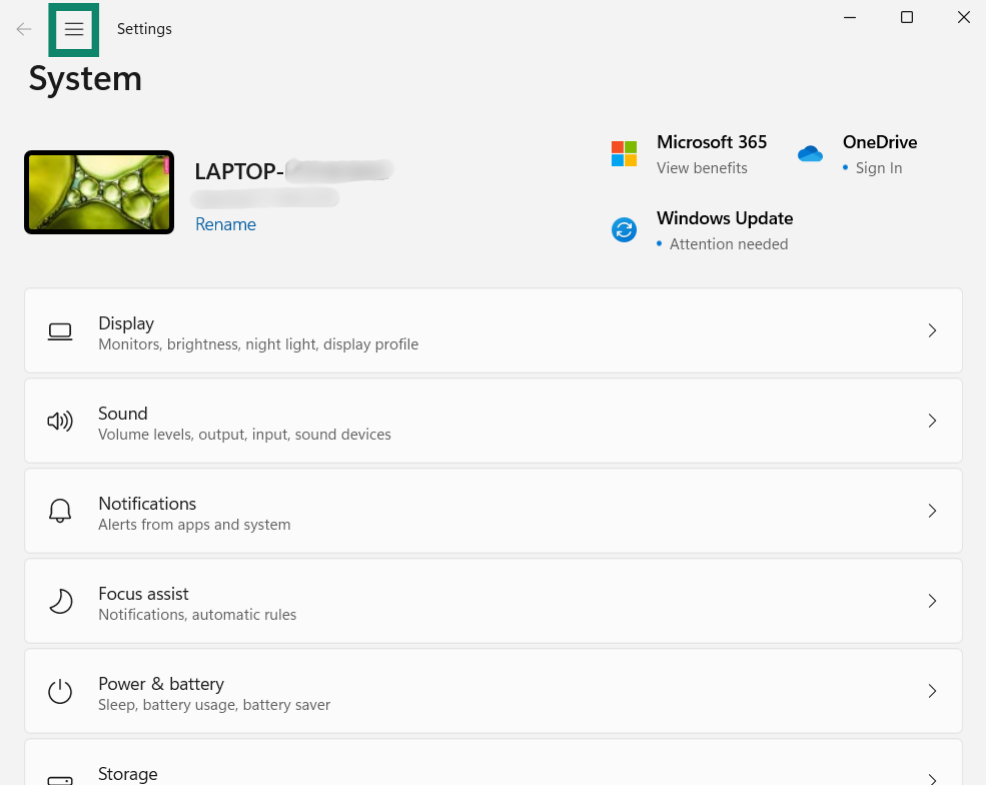
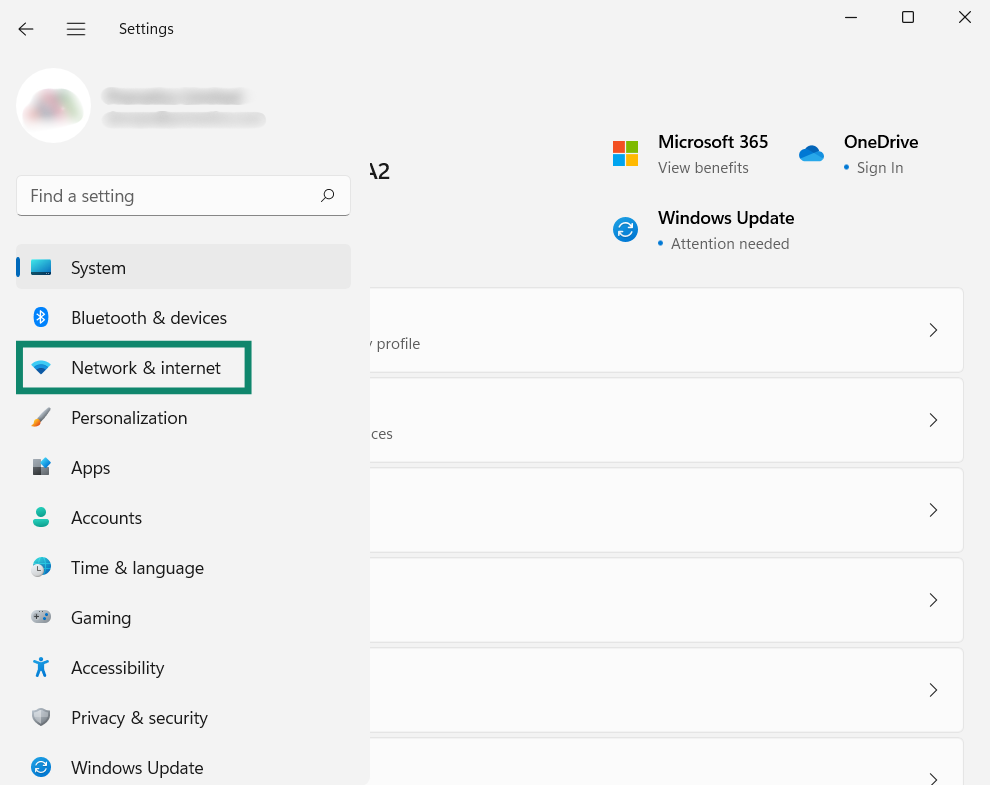
お使いのWindowsデバイスで、Window's Start button.をクリックし、設定 > ネットワークとインターネットを開きます。

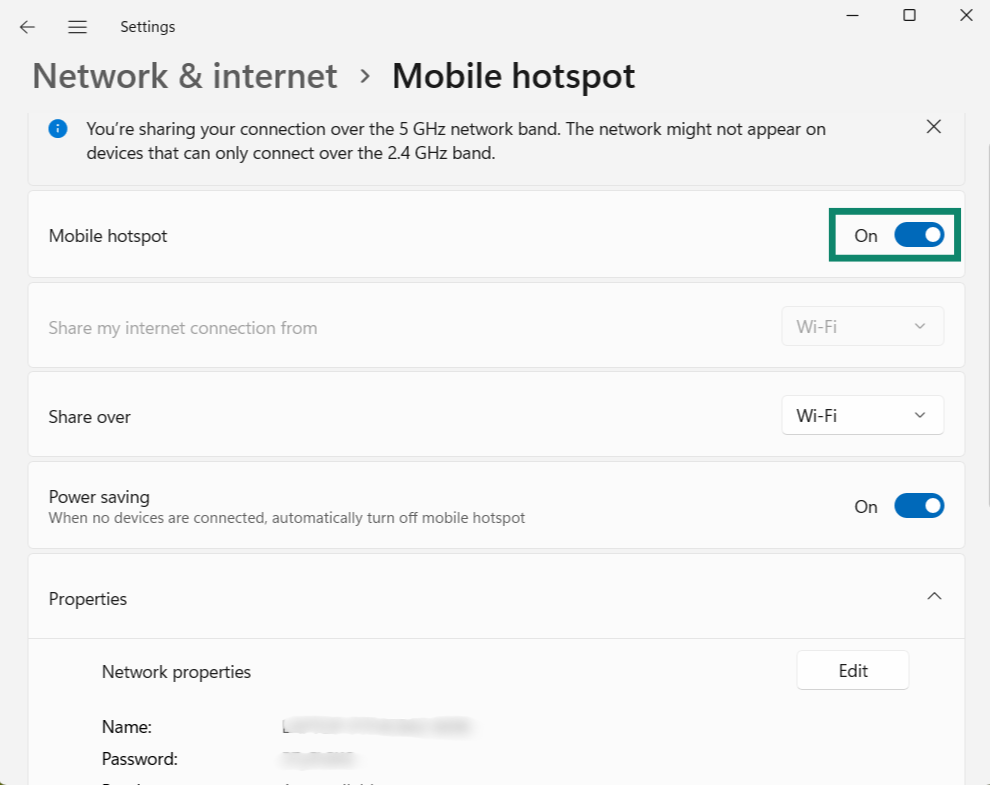
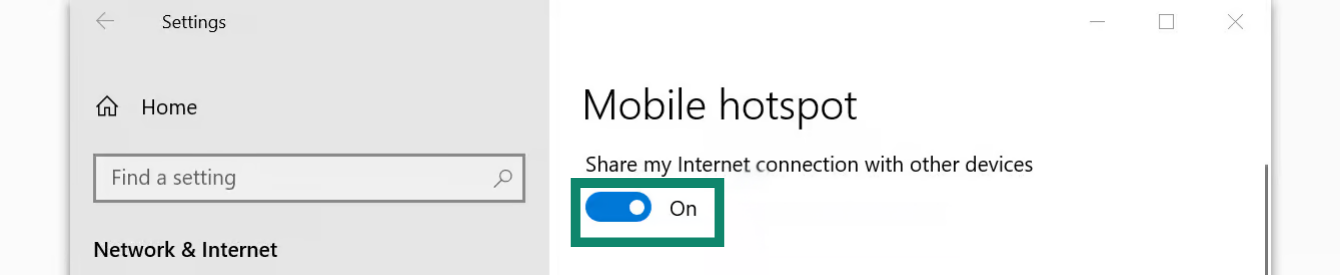
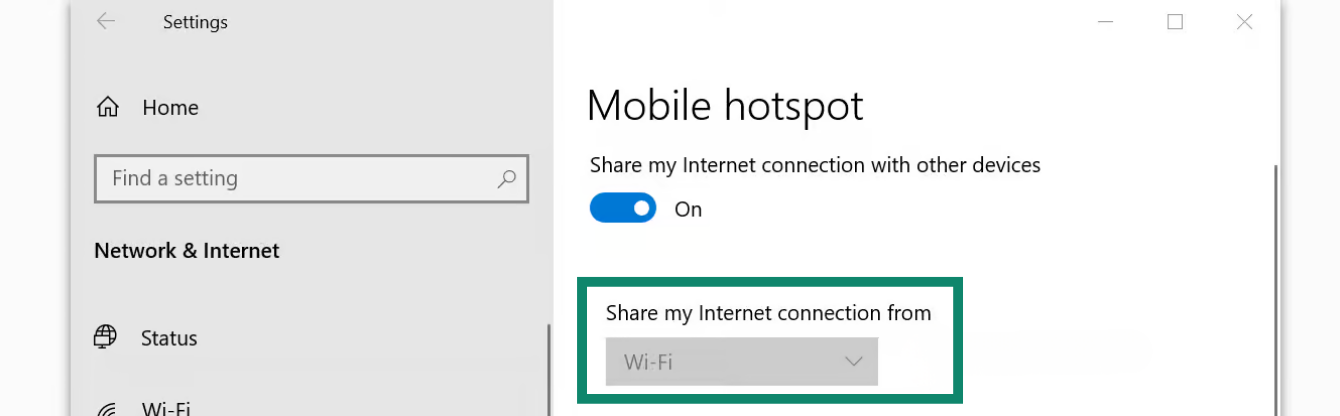
モバイルホットスポットをクリックし、モバイルホットスポットのトグルをオンにします。

モバイルホットスポットのトグルをオンにします。

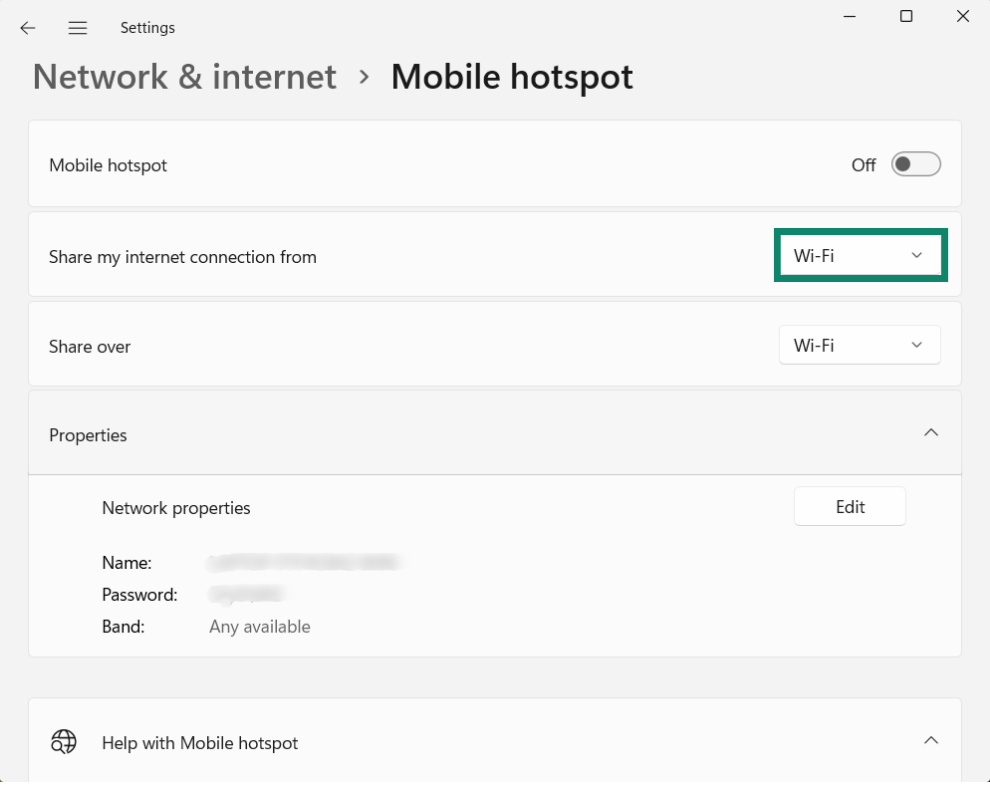
「インターネット接続を共有する」の下にあるWi-Fiを選択します。

Wi-Fiを選択します。

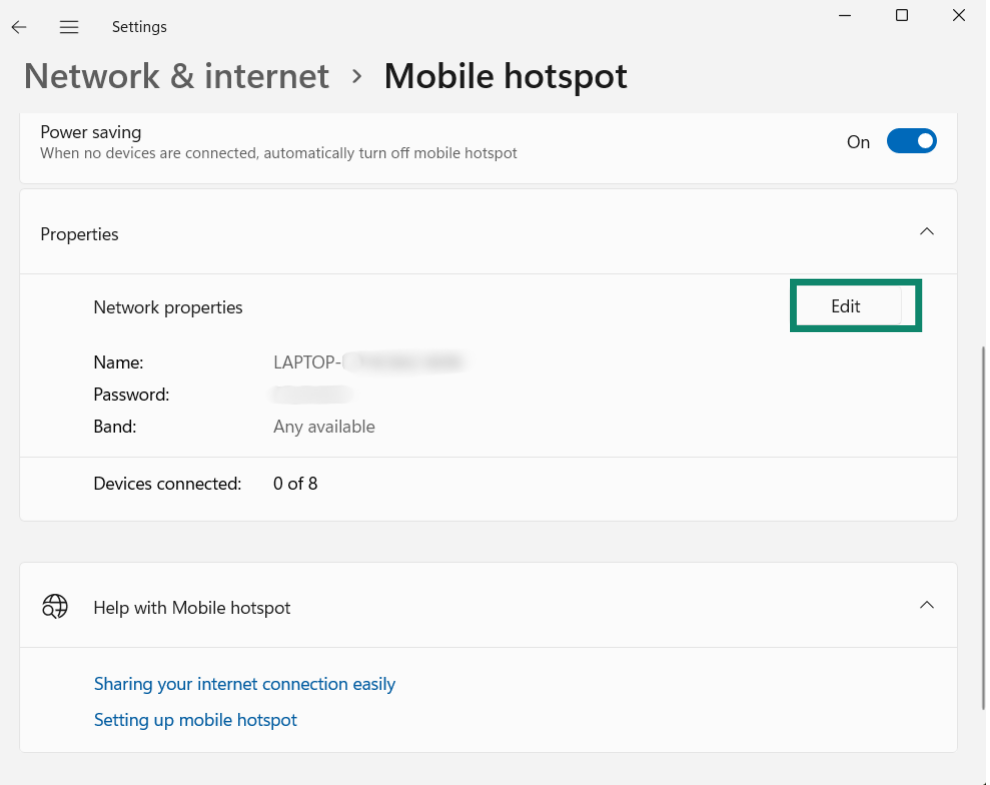
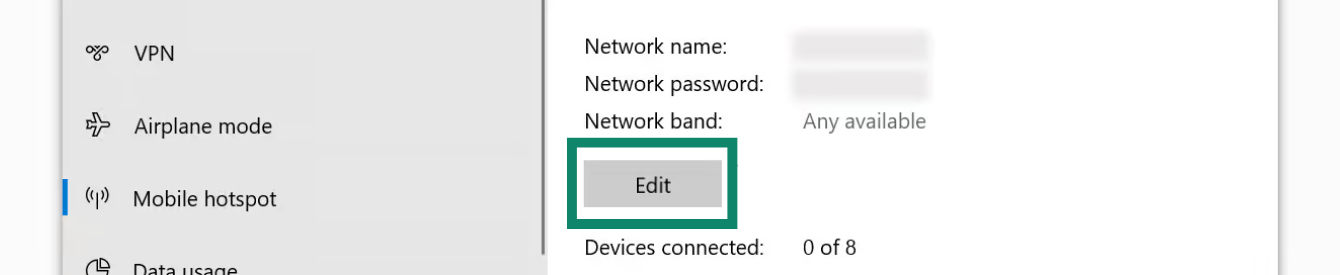
モバイルホットスポットに別のネットワーク名とパスワードを設定します。

編集をクリックします。
Click "Edit."

以下の詳細を入力します。

  • ネットワーク名:共有するモバイルホットスポットの名前を入力します。
  • ネットワークパスワード:共有するモバイルホットスポットのパスワードを入力します。

保存をクリックします。
保存をクリックします。

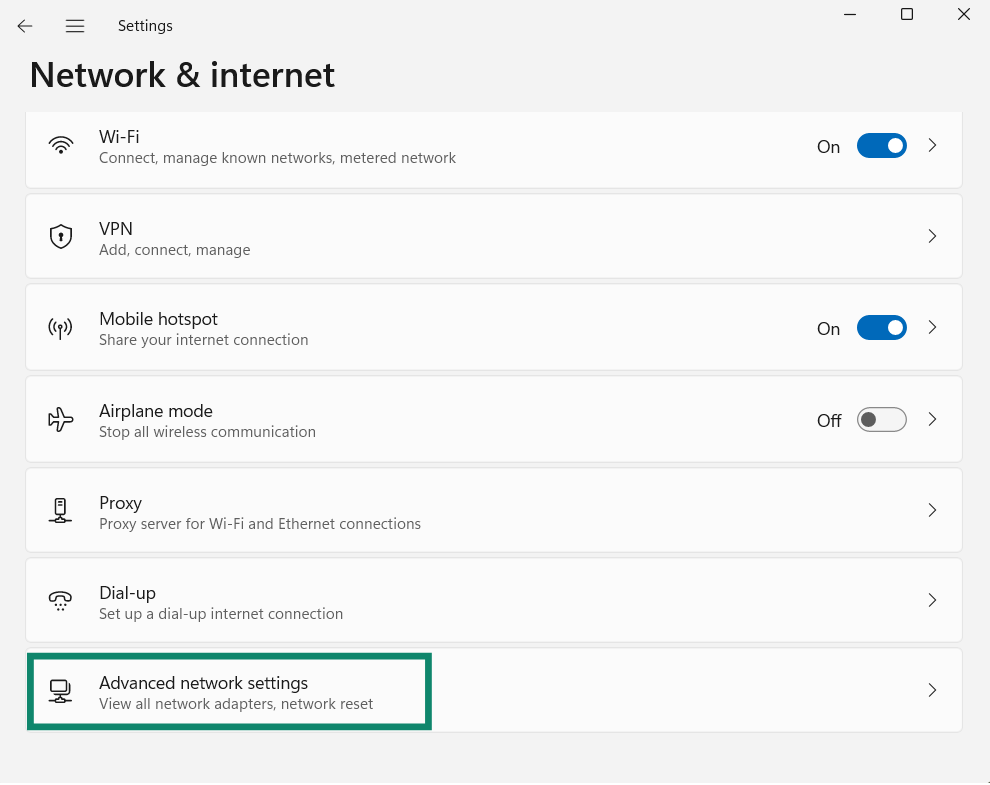
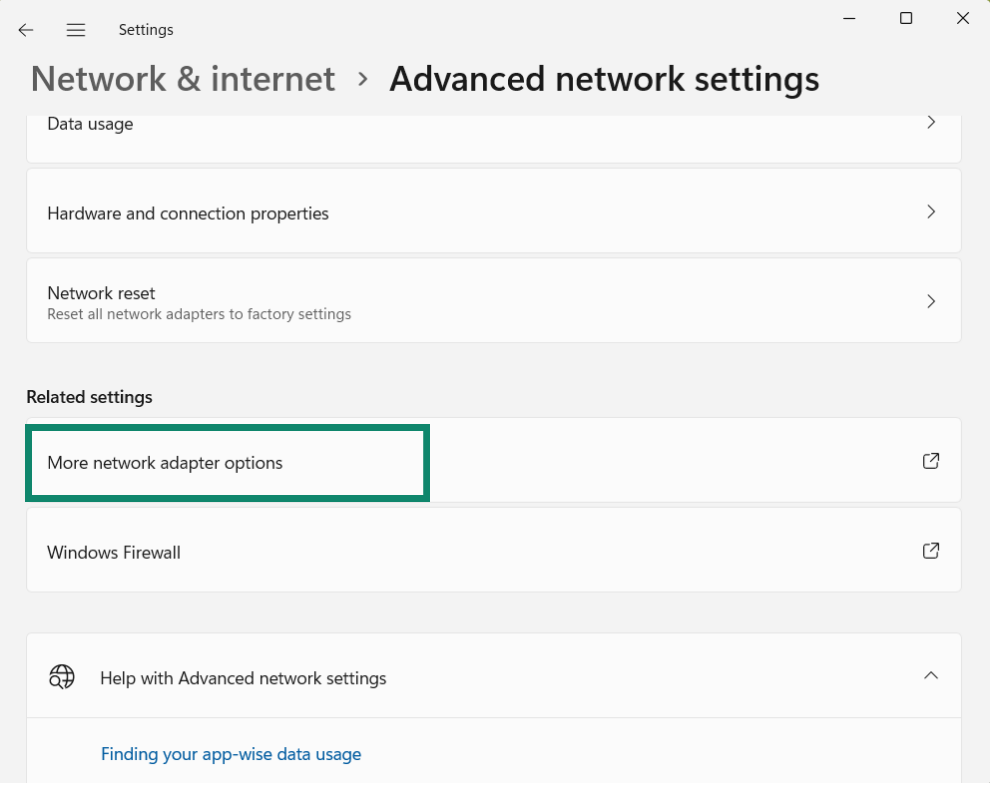
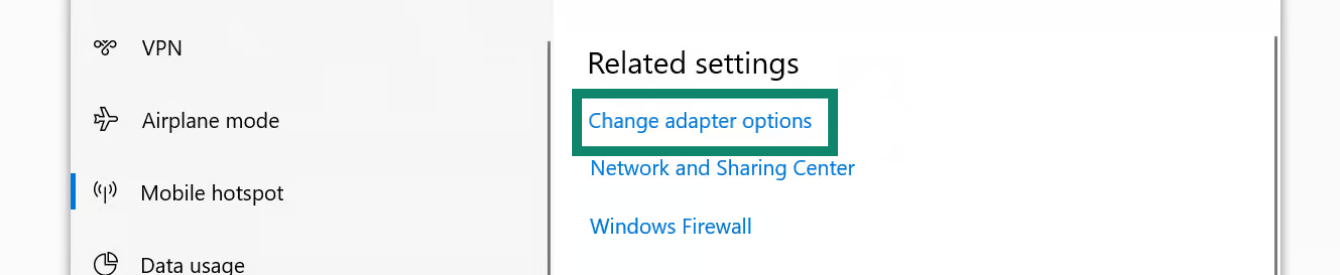
関連設定で、「アダプターのオプションを変更する」をクリックします。

アダプターのオプションを変更するをクリックします。

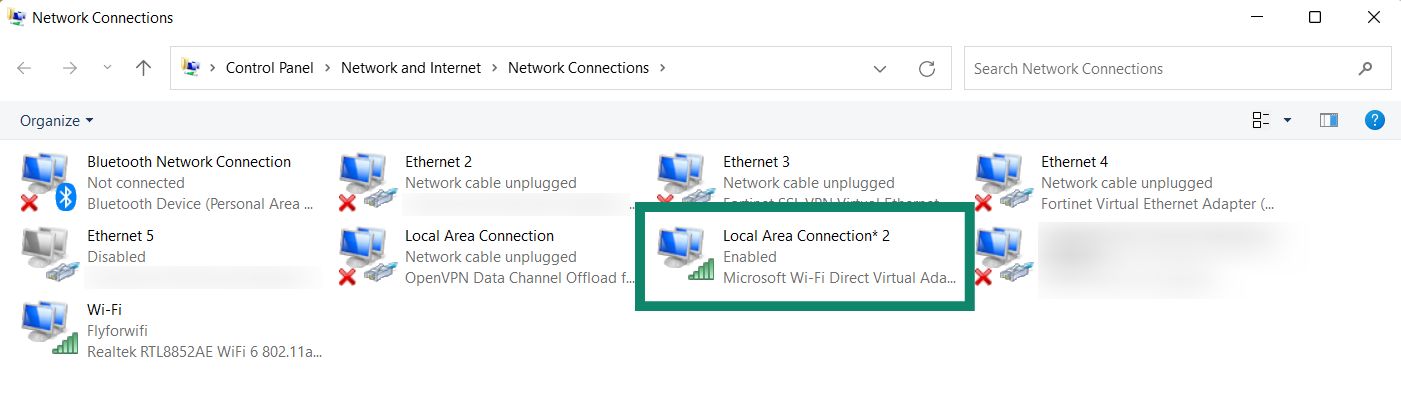
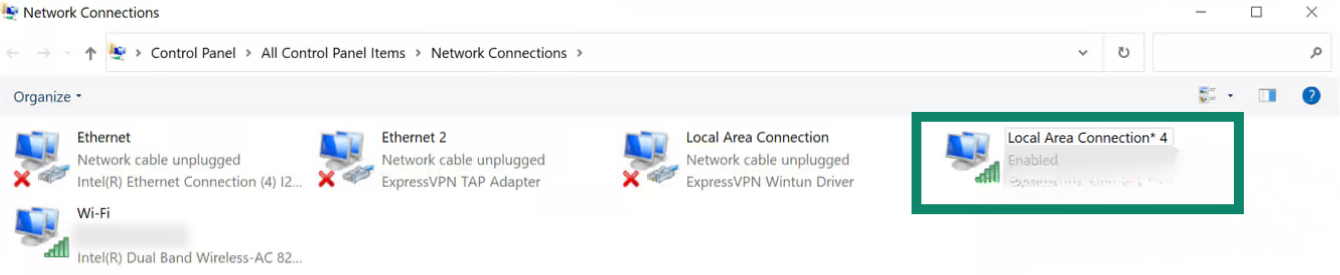
ネットワーク接続画面で、ローカルエリア接続*と呼ばれるネットワークが表示されます。これが今作成した新しいモバイルホットスポットです。

「ローカルエリア接続」と呼ばれるネットワークが表示されます。”

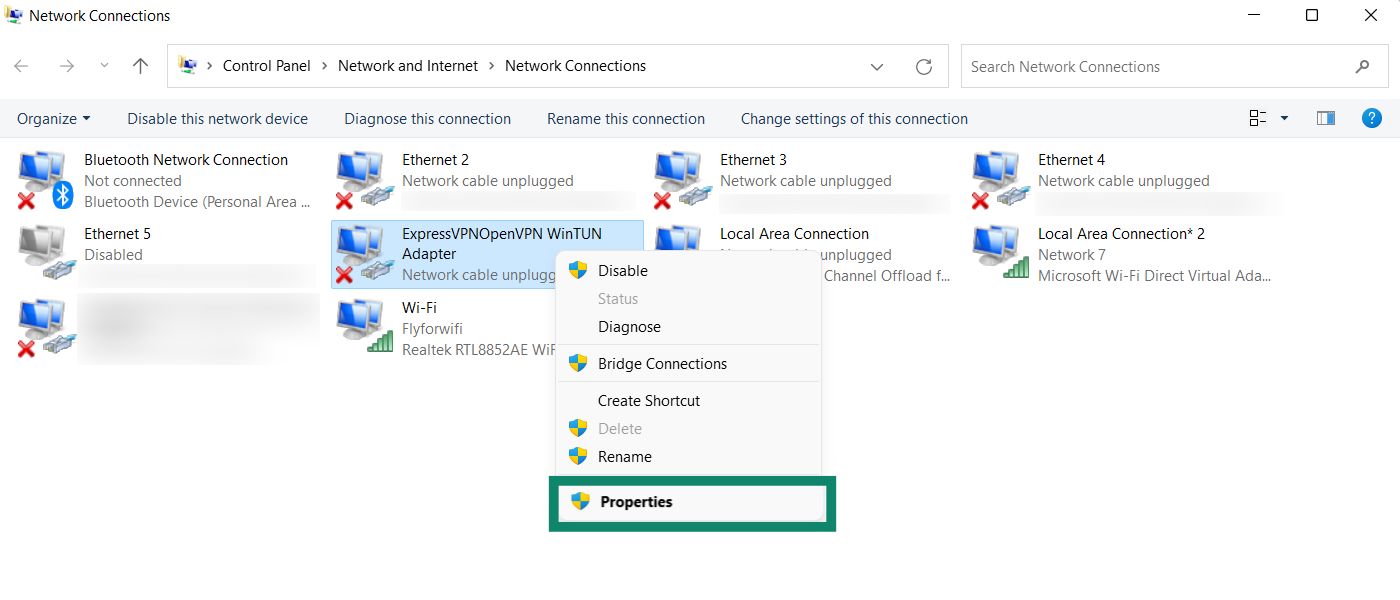
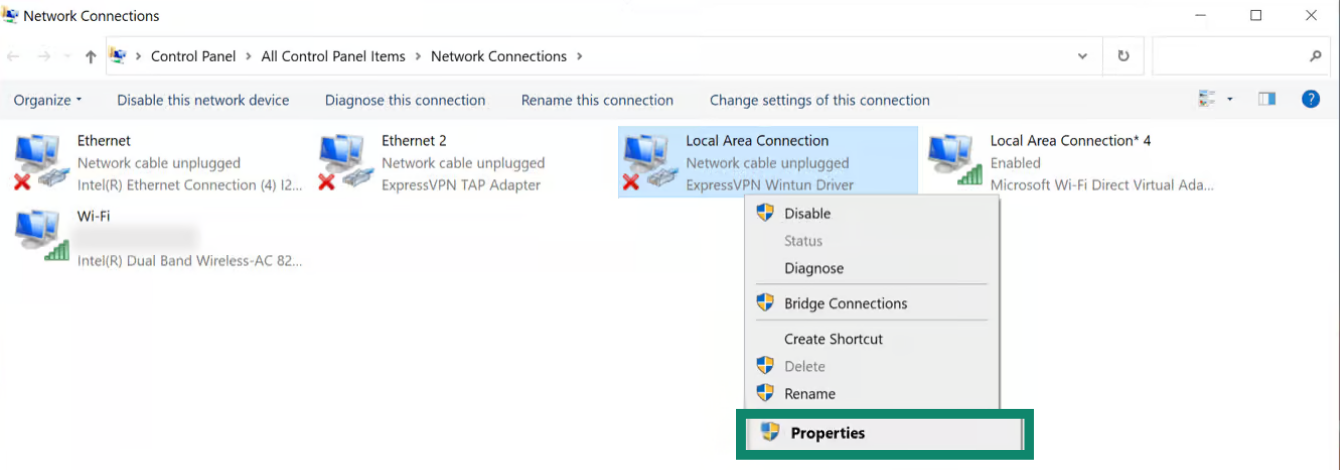
「ExpressVPN Wintun Driver」という記述のあるネットワークを探します。右クリックで「プロパティ」を選択します。

「プロパティ」をクリックします。”

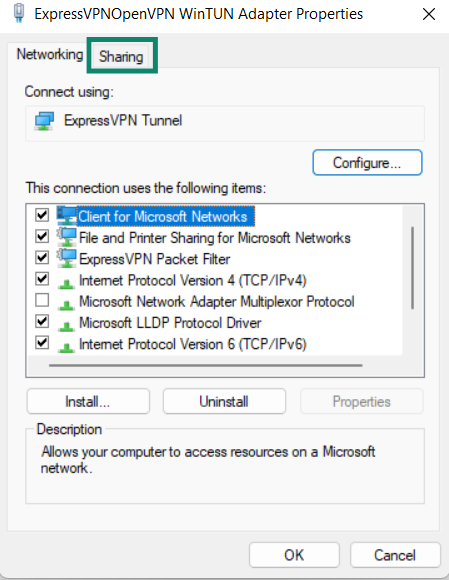
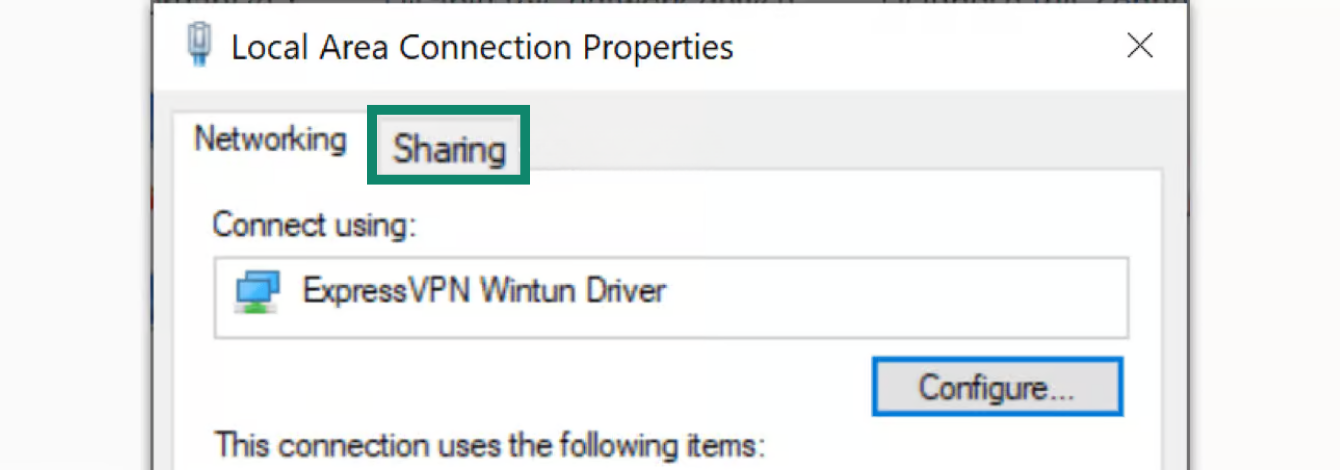
上部で共有タブをクリックします。

共有タブをクリックします。

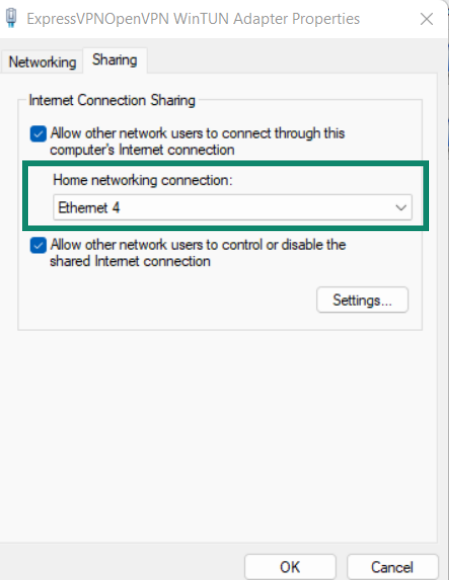
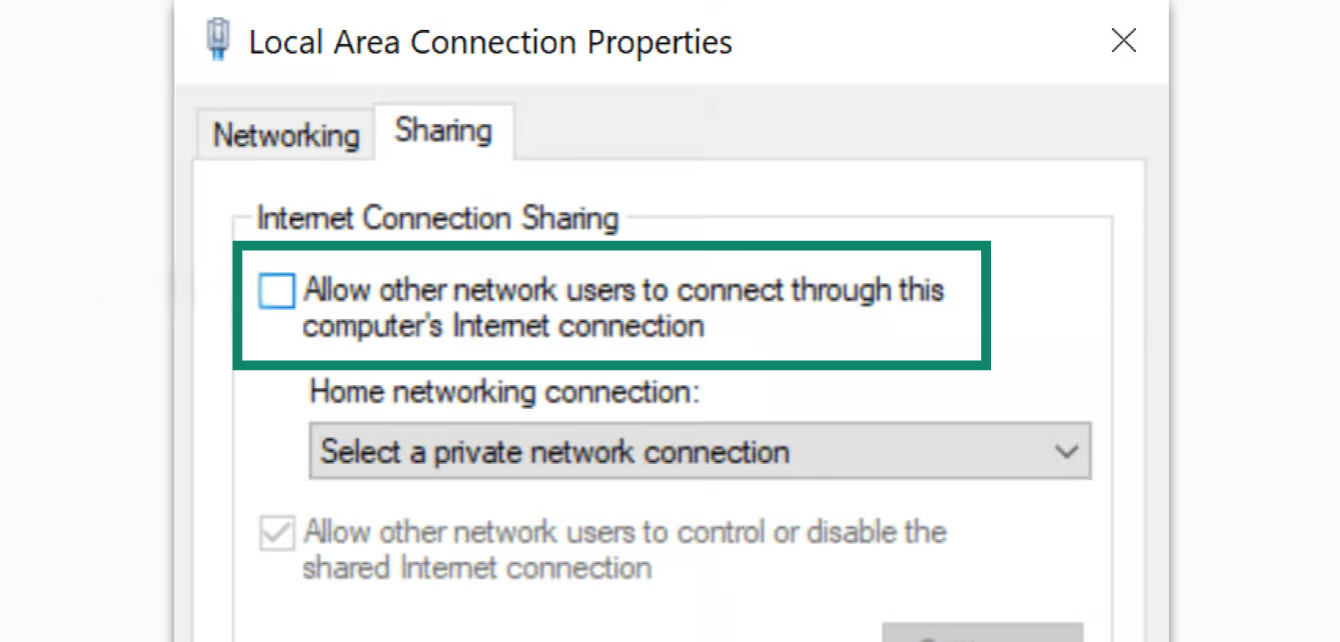
「ネットワークのほかのユーザーに、このコンピューターのインターネット接続を介した接続を許可する」にチェックを入れます。

「ネットワークのほかのユーザーに、このコンピューターのインターネット接続をとおしての接続を許可する」にチェックを入れます。

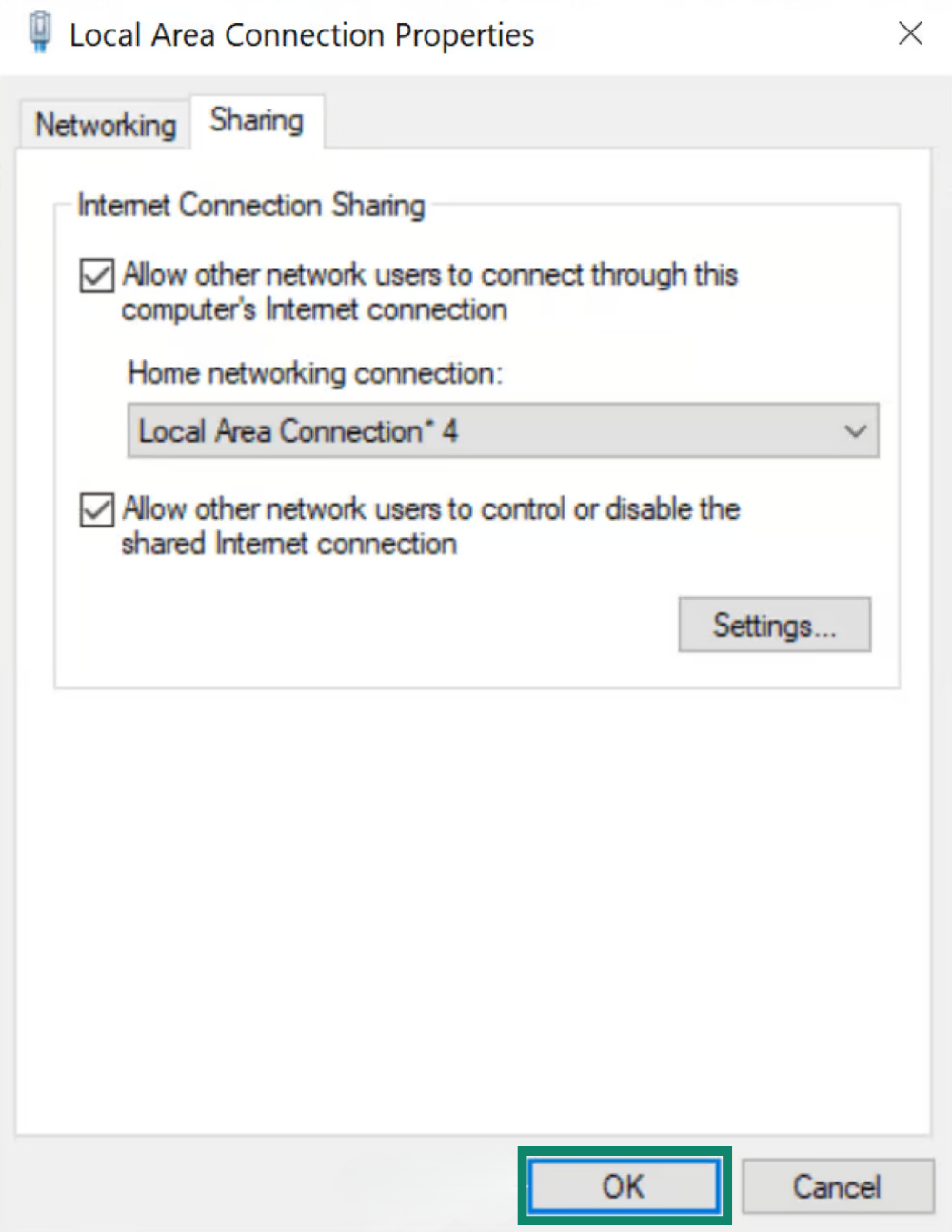
「ホームネットワーク接続」で、先に作成した仮想ルーター(ローカルエリア接続*)の名前を選択します。「OK」をクリックします。

「OK」をクリックします。

お持ちのデバイスをVPN接続に進めます。

ヘルプが必要ですか?ExpressVPNサポートチームに問い合わせを行い、迅速なサポートを受けてください。

トップに戻る


ExpressVPNアプリに接続

  1. お使いのWindowsデバイスで、ExpressVPNアプリを開きます。
  2. お好みのVPNサーバーロケーションに接続します。

お持ちのデバイスをVPN接続に進めます。

ヘルプが必要ですか?ExpressVPNサポートチームに問い合わせを行い、迅速なサポートを受けてください。

トップに戻る


VPN接続にデバイスを接続

  1. 各デバイスでWi-Fi設定を開きます。
  2. 先ほど作成したネットワーク名を探します。

接続されていることを確認するために、ExpressVPNのIPアドレスチェッカーを使って、IPアドレスとロケーションを確認することができます。ExpressVPNアプリに表示されているIPアドレスや位置情報と一致している必要があります。

ヘルプが必要ですか?ExpressVPNサポートチームに問い合わせを行い、迅速なサポートを受けてください。

トップに戻る


VPN接続を切断する

Windows 10

  1. お持ちのWindowsデバイスで、Window's Start button.をクリックします。
  2. 設定 > ネットワークとインターネット > モバイルホットスポットを開きます。
  3. モバイルホットスポットのトグルをオフにします。

ヘルプが必要ですか?ExpressVPNサポートチームに問い合わせを行い、迅速なサポートを受けてください。

トップに戻る

Windows 8

コマンドプロンプトを開き、次のコマンドを入力します。

netsh wlan stop hostednetwork

コマンドプロンプトのStop hosted network

「The hosted network stopped(ホストされたネットワークが停止しました)」のメッセージが表示されます。

The hosted network stopped.

ヘルプが必要ですか?ExpressVPNサポートチームに問い合わせを行い、迅速なサポートを受けてください。

トップに戻る

Share in FacebookShare in TwitterShare in WhatsappShare in TelegramShare by email
この記事は役立ちましたか?

ご不便をおかけして申し訳ございません。よろしければ、今後の改善策をお聞かせください。

Please enter a valid email address.

サポートチームのメンバーがこの問題についてフォローアップいたします。

Share in FacebookShare in TwitterShare in WhatsappShare in TelegramShare by email
  • マルウェアとは?
  • ネットワークセキュリティキーとは?
  • VPNは合法ですか?
  • iPhoneで国を変更する方法
  • デジタルフットプリントとは?
  • VPNとTorを併用してネット上で匿名性を守る方法
  • 複数のデバイスに最適なVPNを入手
各デバイス対応のVPN
  • ExpressVPNのダウンロード
  • MacOS
  • Windows PC
  • iOS (iPhone & iPad)
  • Android
  • Linux
  • ルーター
  • Apple TV
  • Fire Stick
  • Android TV
  • Chrome拡張機能
VPNサーバーロケーション
  • 105ヶ国のサーバー
  • アメリカ対応VPN
  • イギリス対応VPN
  • カナダ対応VPN
  • オーストラリア対応VPN
特徴
  • 全ての機能を見る
  • VPNトライアル
  • プランと価格
プロダクト
  • ExpressKeys
  • ExpressMailGuard
  • ExpressAI
ExpressVPNについて
  • 弊社について
  • 信頼できるVPNへの取り組み
  • デジタルの権利
  • セキュリティ監査
  • ExpressVPNのレビュー
  • 弊社のエキスパートたち
  • プレス
  • 採用
プログラム
  • トッテナム・ホットスパー
  • Brooklyn Nets
  • パートナー
  • アフィリエイト
  • インフルエンサー
サポート
  • VPN設定方法
  • よくある質問 (FAQ)
  • VPNを購入する
詳しく知る
  • VPNとは?
  • 自分のIPを確認する
  • 私のIPを隠す
  • VPN用途トップ5
  • ブログ

© 2026 ExpressVPN. All rights reserved.(無断転載および引用禁止)

  • プライバシーポリシー
  • 利用規約
  • Cookieの設定

言語を選択してください

  • English
  • Dansk
  • Deutsch
  • Español
  • Français
  • Italiano
  • Nederlands
  • Norsk
  • Polski
  • Português
  • Suomi
  • Svenska
  • Türkçe
  • Русский
  • ภาษาไทย
  • 한국어

Live chat

Need help? Chat with us!

Online