




Need a VPN for your router?
Get ExpressVPN Now
Love ExpressVPN? Want a free month?
Refer a Friend NowThis tutorial will show you how to configure your Asus router with MediaStreamer by changing your DNS settings.
MediaStreamer is a DNS service designed to offer faster streaming speeds. To use MediaStreamer smoothly, you must register your IP address on the ExpressVPN website so ExpressVPN will recognize your IP address and grant MediaStreamer access to your device.
Note: MediaStreamer is not a VPN and does not offer the privacy and security benefits of a VPN. You cannot change locations with MediaStreamer.
The following steps were tested on an Asus RT-AC68U (up to v3).
Jump to…
1. Register your IP address on the ExpressVPN website
2. Get your MediaStreamer server IP addresses
3. Change the DNS settings on your Asus router
1. Register your IP address on the ExpressVPN website
- Log into the ExpressVPN+ portal.
- Select ExpressVPN > DNS Settings in the left sidebar.


- Under IP address registration, click Register my IP address. If it already reads “registered” next to your IP address, there is no need to select this option again.


- Toggle Automatically register my IP address on. This is recommended as it automatically tracks changes to your IP address.


If you have enabled Automatically register your IP address, you can keep your IP address updated by using the ExpressVPN app on your device or signing in to your ExpressVPN account occasionally.
Need help? Click here to contact the ExpressVPN Support Team via Live Chat
2. Get your MediaStreamer server IP address
- Go to the ExpressVPN Setup page.
- Under Applications (or Show other devices), select Network & smart home to open the dropdown menu. From there, click MediaStreamer.


- You will find your DNS server IP addresses on the right side, under MediaStreamer IP#1 and MediaStreamer IP #2.


Keep this browser window open. You will need this information for the setup later.
Need help? Click here to contact the ExpressVPN Support Team via Live Chat
3. Change the DNS settings on your Asus router
Note: The steps below also work for the Asuswrt-Merlin firmware.
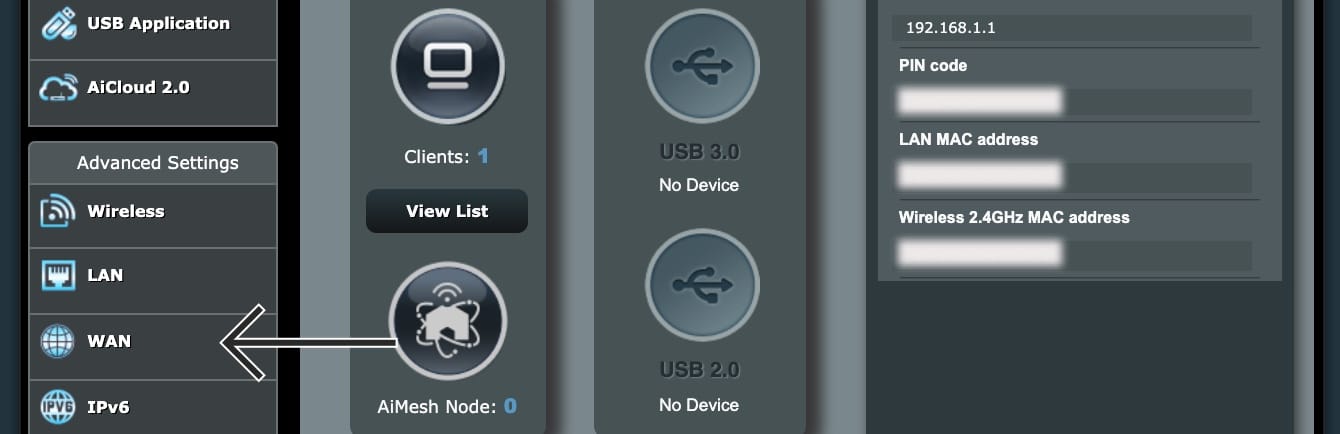
- To access your router admin panel, go to 192.168.1.1 in your web browser. Sign in with your username and password (by default, both are admin).
- If your router’s IP address was changed in the past and you cannot remember it, you can find it in your device’s settings.
- In the left sidebar, click WAN.


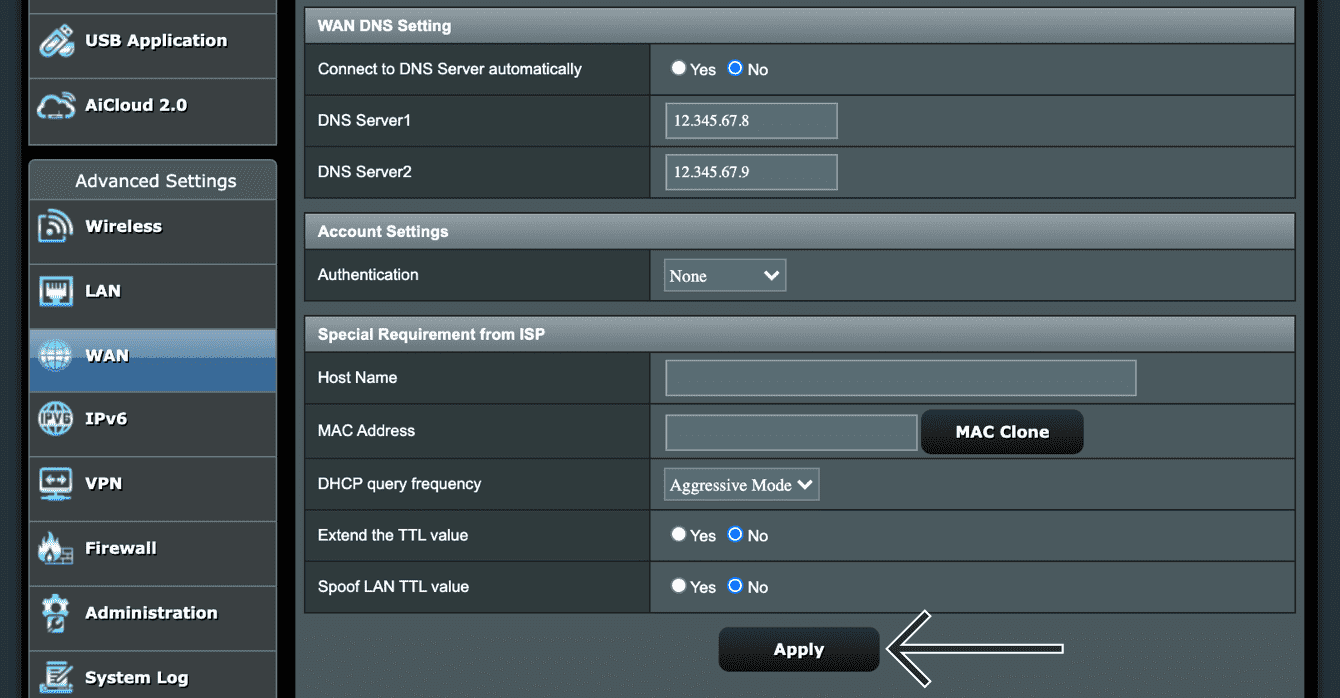
- Under WAN DNS Setting, select No for Connect to DNS Server automatically. Enter the MediaStreamer IP addresses found earlier.
- Click Apply.


Need help? Click here to contact the ExpressVPN Support Team via Live Chat